- Getting Started -
Using this manual
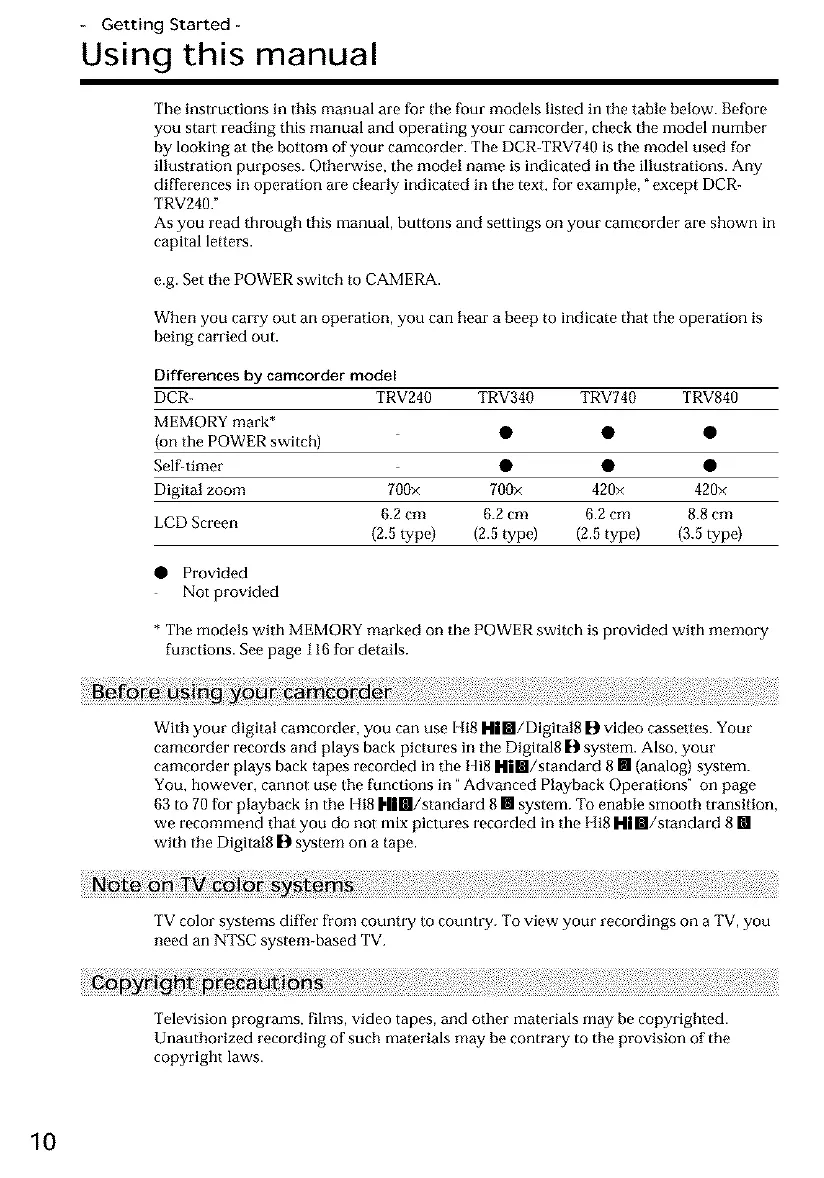
The instructions in this manual are for the four models listed in the table below. Before
you start reading this manual and operating your camcorder, check the model number
by looking at tile bottom of your camcorder. The DCR-TRV740 is the model used for
illustration purposes. Otherwise, the model name is indicated in tile illustrations. Any
differences in operation are clearly indicated in the text, for example, _except DCR-
TRV240."
As you read through this manual, buttons and settings on your camcorder are shown in
capital letters.
e.g. Set the POWER switch to CAMERA.
When you carry out an operation, you can hear a beep to indicate that the operation is
being carried out.
Differences by camcorder model
DCR- TRV240 TRV340 TRV740 TRV840
MEMORY mark*
(on the POWER switch) • • •
Self-timer • • •
Digital zoom 700× 700× 420× 420×
LCD Screen 6.2 cm 6.2 cm 6.2 cm 8.8 cm
(2.5 type) (2.5 type) (2.5 type) (3.5 type)
• Provided
Not provided
* The models with MEMORY marked on the POWER switch is provided with memory
functions. See page 116 for details.
With your digital camcorder, you can use Hi8 H| Ill/Digital8 []1video cassettes. Your
camcorder records and plays back pictures in the Digital8 |_ system. Also, your
camcorder plays back tapes recorded in the Hi8 Him/standard 8 [] (analog) system.
You, however, cannot use the functions in "Advanced Playback Operations" on page
63 to 70for playback in tile Hi8 H|m/standard 8 [] system. To enable smooth transition,
we recommend that you do not mix pictures recorded in the Hi8 H| m/standard 8 []
with tile Digital8 |]1system on a tape.
TV color systems differ from country to country. To view your recordings on a TV, you
need an NTSC system-based TV.
Television programs, films, video tapes, and other materials may be copyrighted.
Unauthorized recording of such materials may be contrary to tile provision of the
copyright laws.
10













 To Next Page