Changing the menu settings
POWER
Icon/item Mode Meaning switch
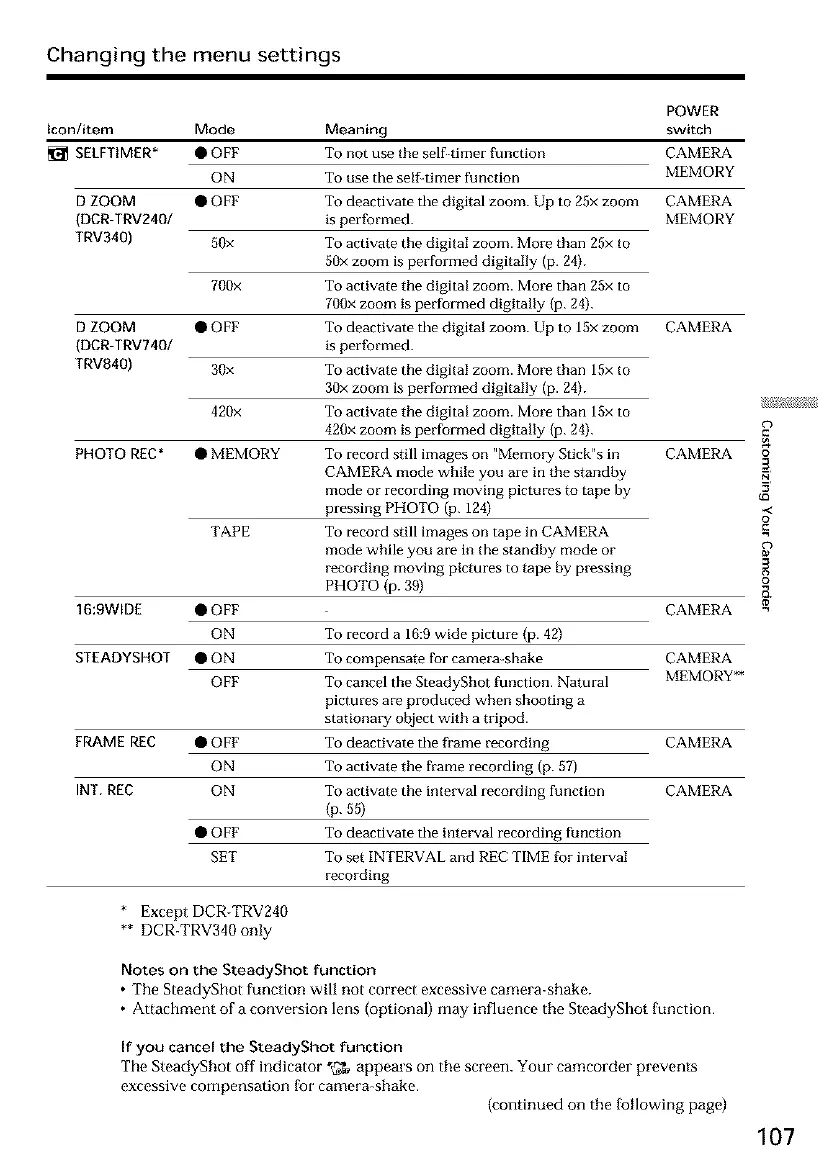
_1_ SELFTIMER* • OFF To not use the self timer function CAMERA
ON To use the selgtimer function MEMORY
D ZOOM • OFF To deactivate the digital zoom. Up to 25x zoom CAMERA
(DCR-TRV2401 is performed. MEMORY
TRV340) 50x To activate the digital zoom. More than 25x to
50x zoom is performed digitally (p. 24).
700x To activate the digital zoom. More than 25x to
700x zoom is performed digitally (p. 24).
D ZOOM • OFF To deactivate the digital zoom. Up to 15x zoom CAMERA
(DCR-TRV740/ is performed.
TRVg40) 30x To activate the digital zoom. More than 15x to
30x zoom is performed digitally (p. 24).
420x To activate the digital zoom. More than 15x to
420x zoom is performed digitally (p. 24).
PHOTO REC* • MEMORY To record still images on "Memol3_ Stick"s in CAMERA o
CAMERA mode while you are in the standby 3
mode or recording moving pictures to tape by
pressing PHOTO (p. 124) -<
To record still images on tape in CAMERA _=o
mode while you are in the standby mode or
recording moving pictures to tape by pressing
PHOTO (p. 39)
TAPE
16:9WIDE • OFF CAMERA
ON To record a 16:9 wide picture (p. 42)
STEADYSHOT • ON To compensate for camera-shake CAMERA
OFF To cancel the SteadyShot function. Natural MEMORY**
FRAME REC • OFF CAMERA
ON
INT, REC ON CAMERA
pictures are produced when shooting a
stationary object with a tripod.
To deactivate the frame recording
To activate the frame recording (p. 57)
To activate the interval recto-cling function
(p. 55)
To deactivate the interval recording function
To set INTERVAL and REC TIME for intmwal
recording
• OFF
SET
* Except DCR-TRV240
** DCR-TRV340 only
Notes on the SteadyShot function
• The SteadyShot function will not correct excessive camera-shake.
• Attachment of a conversion lens (optional) may influence the SteadyShot function.
If you cancel the SteadyShot function
The SteadyShot off indicator "tT_ appears on the screen. Your camcorder prevents
excessive compensation [ior camera-shake.
(continued on the [bllowing pago)
107













 To Next Page