Using special effects - Picture effect
You can digitally process pictures to obtain special effects like those in films or on the
TV.
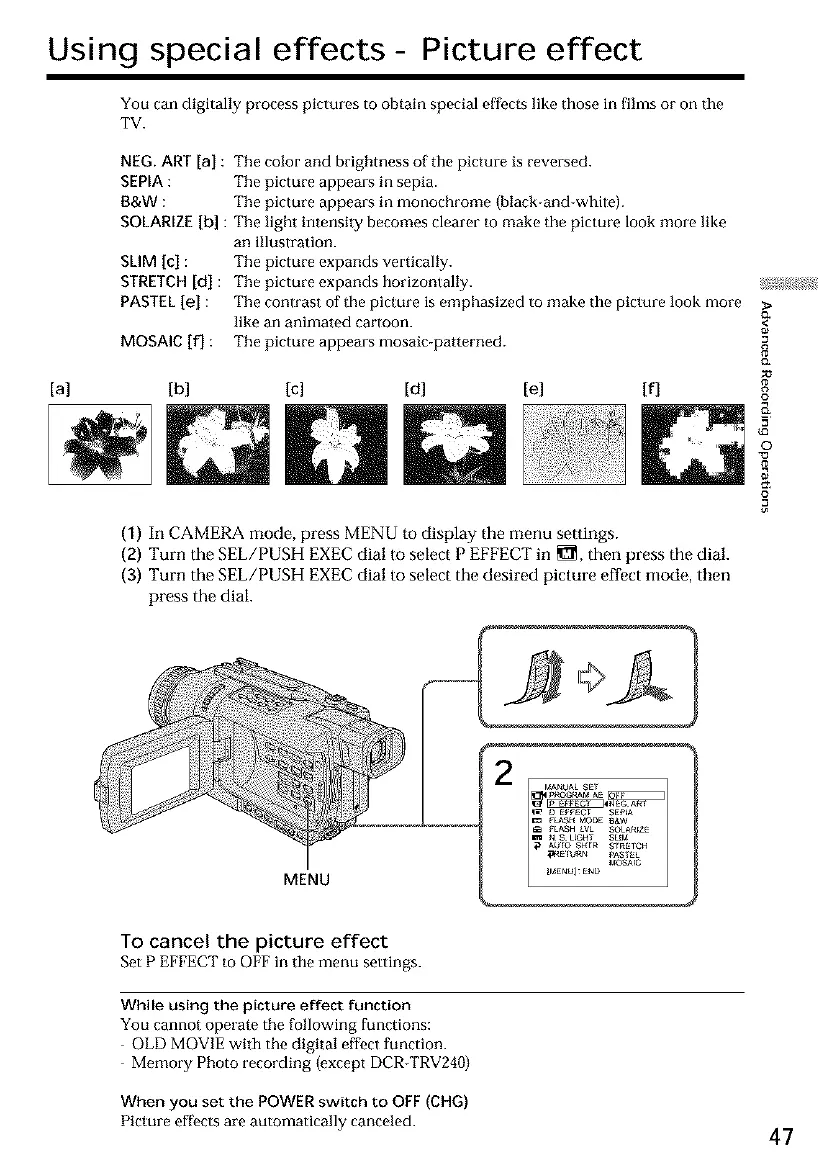
NEG. ART [a] : The color and brightness of the picture is reversed.
SEPIA: Tile picture appears in sepia.
B&W : Tile picture appears in monochrome (black-and-white).
SOLARIZE[b] : Tile light intensity becomes clearer to make the picture look more like
an illustration.
SLIM [c] : Tile picture expands vertically.
STRETCH[d] : Tile picture expands horizontally.
PASTEL[el : Tile contrast of the picture is emphasized to make the picture look more
like an animated cartoon.
MOSAIC if] : Tile picture appears mosaic-patterned.
[a] [b] [c] [d] tel [f]
(1) In CAMERA mode, press MENU to display the menu seltings.
(2) Turn the SEL/PUSH EXEC dial to select P EFFECT in _, then press the dial.
(3) Turn the SEL/PUSH EXEC dial to select the desired picture effect mode, then
press the dial.
{3*
I
8
g
e_
o
©
13
=o
MENU
To cancel the picture effect
Set P EFFECT to OFF in the menu settings.
While using the picture effect function
You cannot operate the following functions:
OLD MOVIE with the digital effect function.
Memory Photo recording (except DCR-TRV240)
When you set the POWER switch to OFF (CHG)
Picture eff>ets are automatically canceled. 47













 To Next Page