Identifying parts and controls
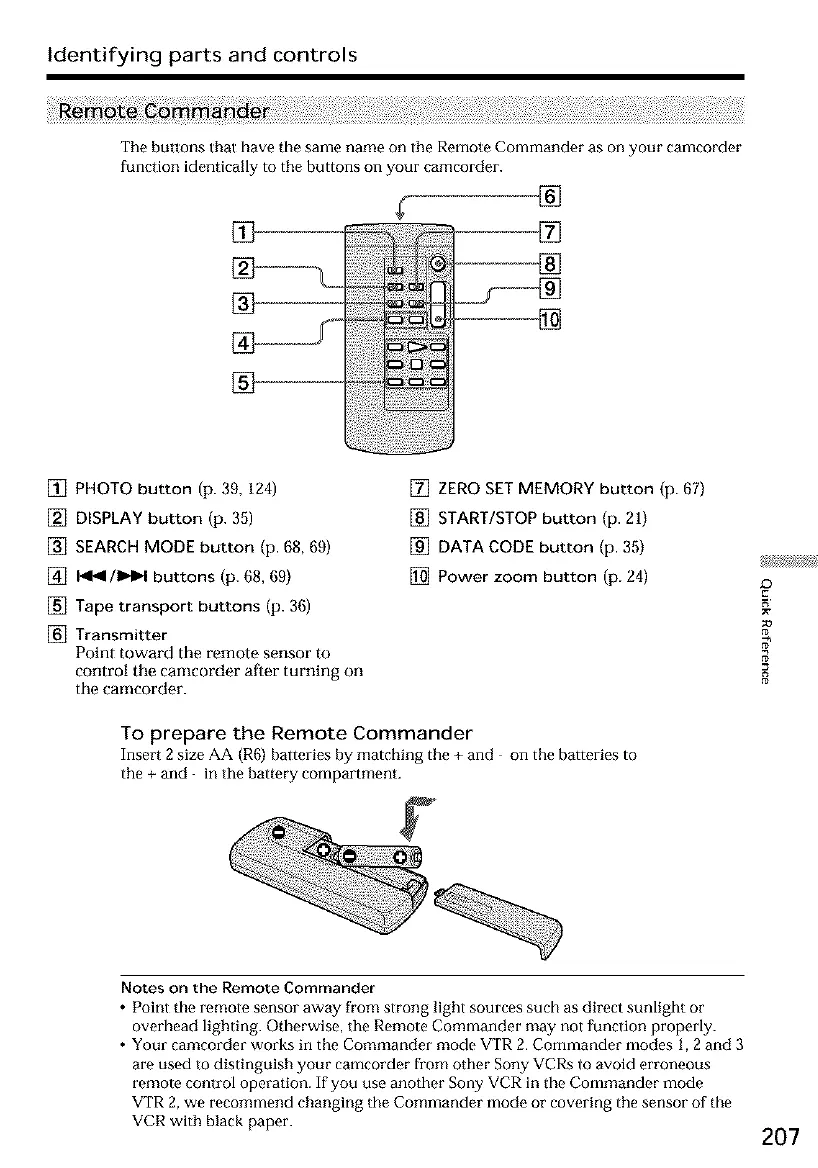
The buttons Ihal have the same name on the Remote Commander as on your camcorder
function identically to the buttons on your camcorder.
®
[] PHOTO button (p. 39, 124)
[] DISPLAY button (p. 35)
[] SEARCH MODE button (p. 68, 69)
[] 141_1/1_1 buttons (p. 68, 69)
[] Tape transport buttons (p. 36)
[] Transmitter
Point toward the remote sensor to
control tile camcorder atter turning on
the camcorder.
[] ZERO SET MEMORY button (p. 67)
[] START/STOP button (p. 21)
[] DATA CODE button (p. 35)
[] Power zoom button (p. 24)
To prepare the Remote Commander
Insert 2 size AA (R6) batteries by matching the + and on the batteries to
the + and in the battery compartment.
8
Notes on the Remote Commander
• Point the remote sensor away from strong light sources such as direct sunlight or
overhead lighting. Otherwise, the Remote Commander may not function properly.
• Your camcorder works in the Commander mode VTR 2. Commander modes 1, 2 and 3
are used to distinguish your camcorder from other Sony VCRs to avoid erroneous
remote control operation. If you use another Sony VCR in the Commander mode
VTR 2, we recommend changing the Commander mode or covering the sensor of the
VCR with black paper.
207













 To Next Page