Changing the menu settings
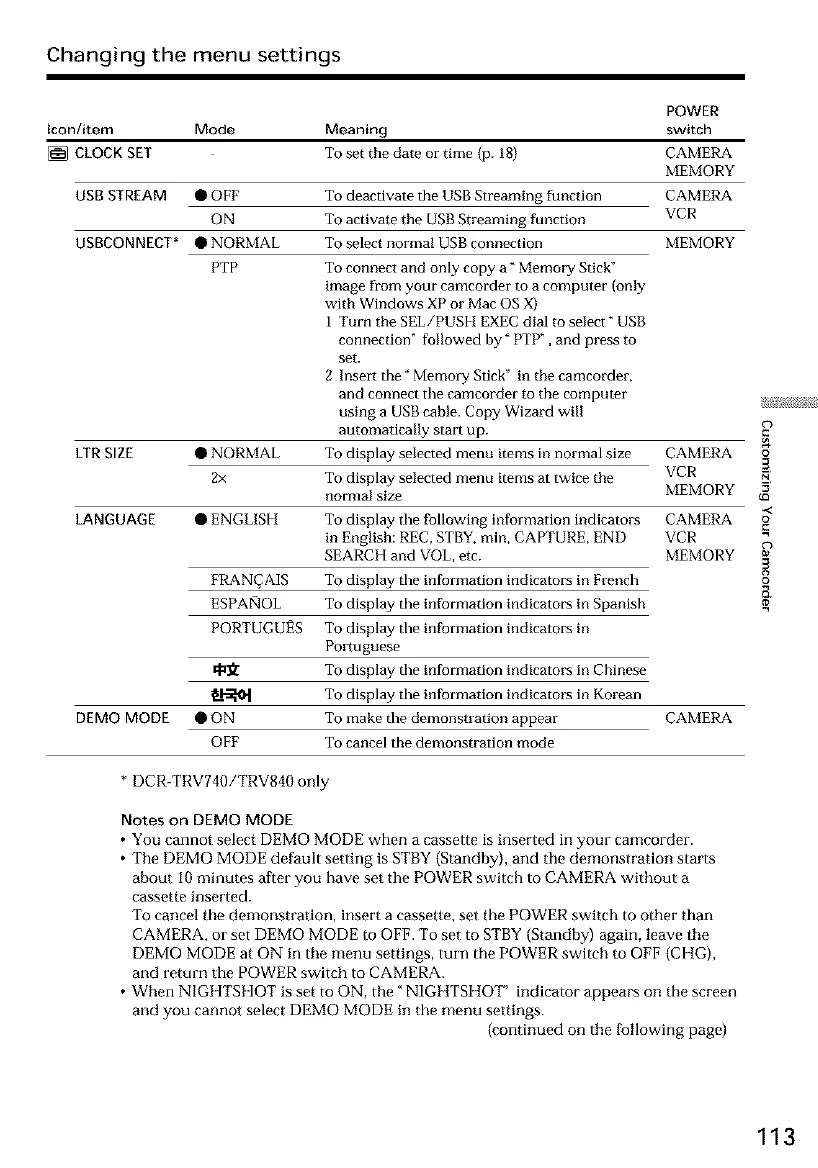
Icon/item Mode Meaning
[] CLOCK SET To set the date or time (p. 18)
USB STREAM • OFF
ON
USBCONNECT* • NORMAL
LTR SIZE
PTP
• NORMAL
2x
LANGUAGE • ENGLISH
DEMO MODE
FRAN_AIS
ESPAiqOL
PORTUGUES
•ON
OFF
POWER
switch
CAMERA
MEMORY
CAMERA
VCR
To deactivate the USB Streaming function
To activate the USB Streaming function
To select normal USB connection MEMORY
To connect and only copy a" Memo_T Stick"
image from your camcorder to a computer (only
with Windows XP or Mac OS X)
I Turn the SEL/PUSH EXEC dial to select" USB
connection" followed by" PTP", and press to
set.
2 Insm3: the" Memory Stick" in the camcorder,
and connect the camcorder to the computer
using a USB cable. Copy Wizard will
automatically start up.
To display selected menu items in normal size CAMERA
To display selected menu items at twice the VCR
normal size MEMORY
To display the following information indicator's CAMERA
in English: REC, STBY, min, CAPTURE, END VCR
SEARCH and VOL, etc. MEMORY
To display the information indicators in French
To display the information indicators in Spanish
To display the information indicators in
Portuguese
To display the information indicator's in Chinese
To display the information indicators in Korean
To make the demonstration appear CAMERA
To cancel the demonstration mode
* DCR-TRV740/TRV840 only
Notes on DEMO MODE
• You cannot select DEMO MODE when a cassette is inserted in your camcorder.
• The DEMO MODE default setting is STBY {Standby), and the demonstration starts
about 10 minutes after you have set the POWER switch to CAMERA without a
cassette inserted.
To cancel the demonstration, insert a cassette, set the POWER switch to other than
CAMERA, or set DEMO MODE to OFF. To set to STBY {Standby) again, leave the
DEMO MODE at ON in the menu settings, turn the POWER switch to OFF (CHG),
and return the POWER switch to CAMERA.
• When NIGHTSHOT is set to ON, the" NIGHTSHOT' indicator appears on the screen
and you cannot select DEMO MODE in the menu settings.
{continued on the fBllowing page)
o
*<
o
113













 To Next Page