Superimposing a title
You canselectone of eight preseltitles and two custom titles (p. 60).You canalso select
the language, color, size and position of titles.
q
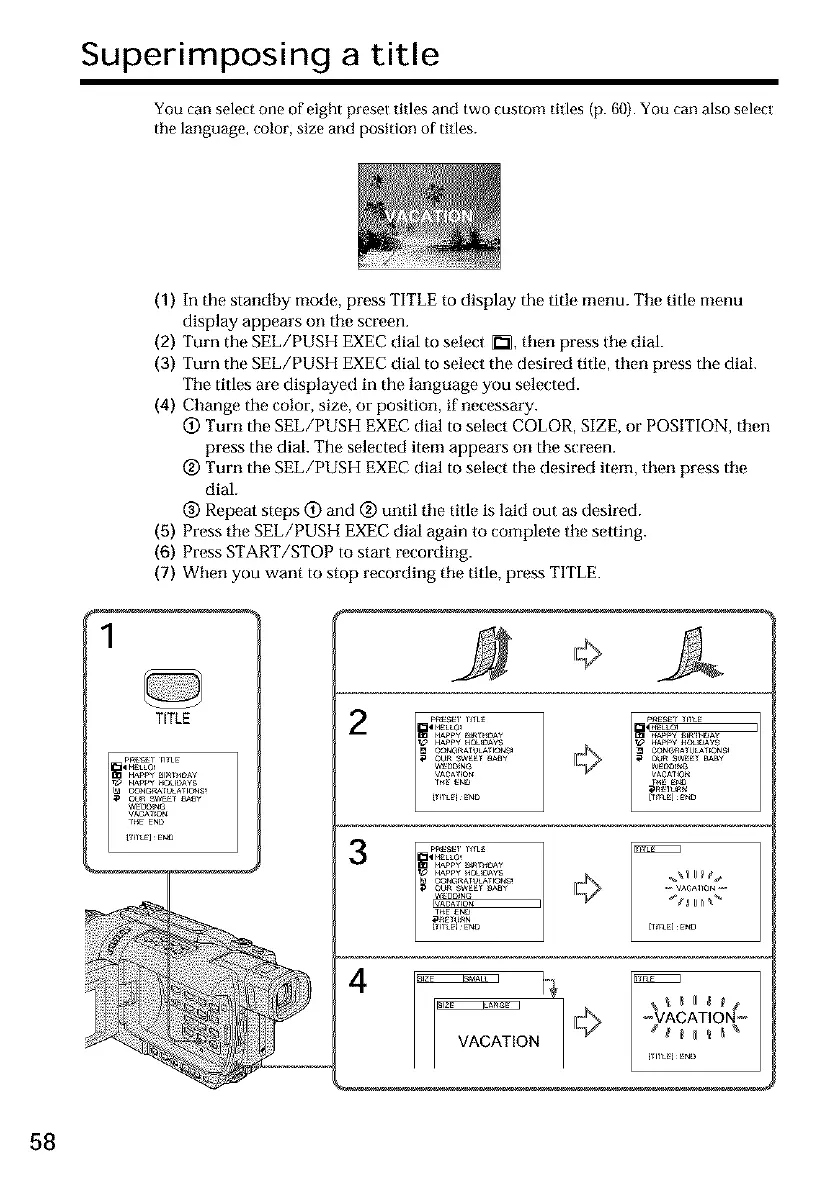
(1) In the standby mode, press TITLE to display the title menu. Tile title menu
display appears on the screen.
(2) Turn the SEL/PUSH EXEC dial to select i2:1,then press tile dial.
(3) Turn the SEL/PUSH EXEC dial to select the desired tide, then press the dial.
Tile titles are displayed in the language you selected.
(4) Change the color, size, or position, if necessary.
(_) Turn the SEL/PUSH EXEC dial to select COLOR, SIZE, or POSITION, then
press the dial. The selected item appears on tile screen.
@ Turn the gEL/PUSH EXEC dial to select the desired item, then press tile
dial.
(_) Repeat steps (_) and (_) until tile title is laid out as desired.
(5) Press tile SEL/PUSH EXEC dial again to complete tile setting.
(6) Press START/STOP to start recording.
(7) When you want to stop recording tile title, press TITLE.
TITLE
A
2
3
4
© AOATIO
VACATION [ _ f _ _ _ __
[tilL I gf_
58













 To Next Page