Enlarging still images recorded on
" Memory Stick" s - Memory PB ZOOM
- Except DCR-TRV240
You can enlarge still images recorded on a" Memory Stick." You can select and view a
desired part from the enlarged still image. Also, you can copy the desired part of the
enlarged still image to tapes or ¢Memory Stick" s.
Before operation
Insert a" Memory Stick" into your camcorder.
(1) Set the POWER switch to MEMORY or VCR. Make sure that tile LOCK switch
is set to tile left (unlock} position,
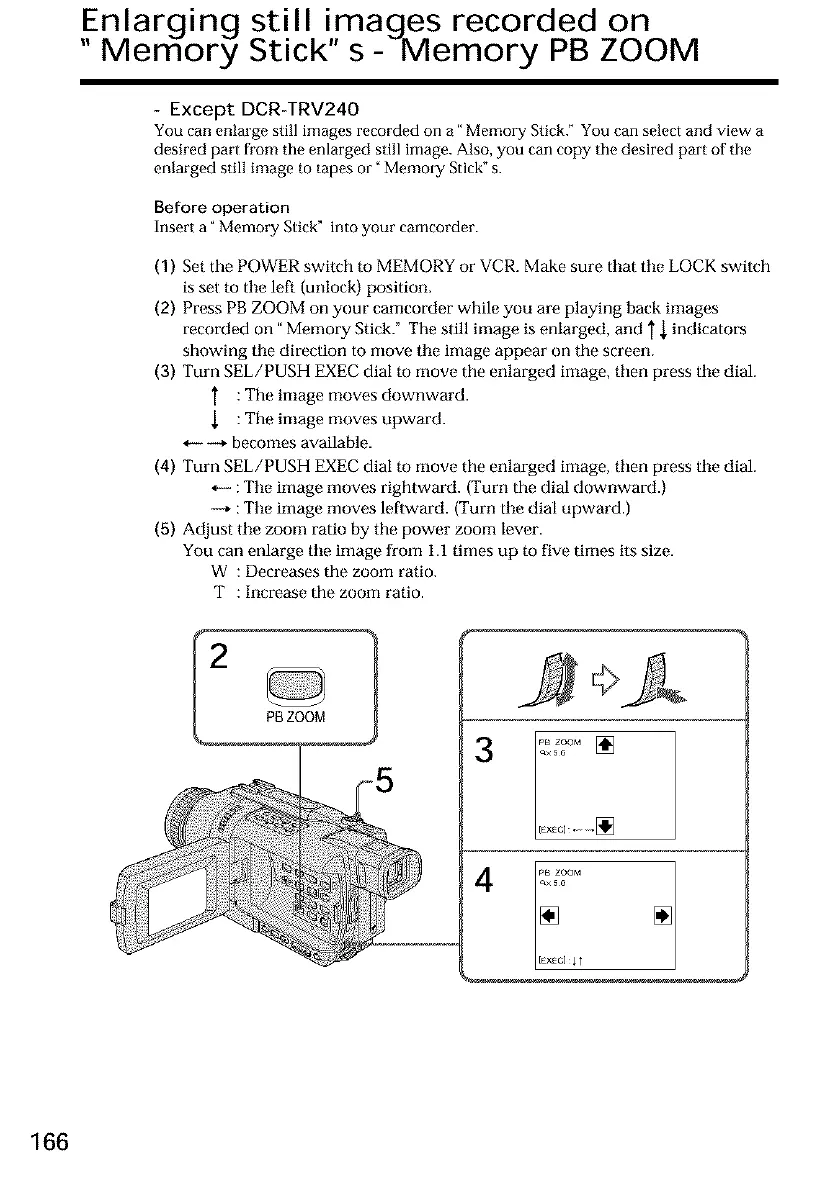
(2) Press PB ZOOM on your camcorder while you are playing back images
recorded on" Memory Stick." The still image is enlarged, and } { indicators
showing the direction to move tile image appear on the screen.
(3) Turn SEE/PUSH EXEC dial to move the enlarged image, then press the dial.
: The image moves downward.
: The image moves upward.
_+ becomes available.
(4) Turn SEE/PUSH EXEC dial to move the enlarged image, then press the dial.
*_ :Tile image moves rightward. (Turn the dial downward.)
-+ :Tile image moves leftward. (Turn the dial upward.)
(5) Adjust tile zoom ratio by the power zoom lever.
You can enlarge the image from 1.1 times up to five times its size.
W : Decreases the zoom ratio.
T : Increase the zoom ratio.
PBZOOM
[EX_C][]
E×_ClII
166













 To Next Page