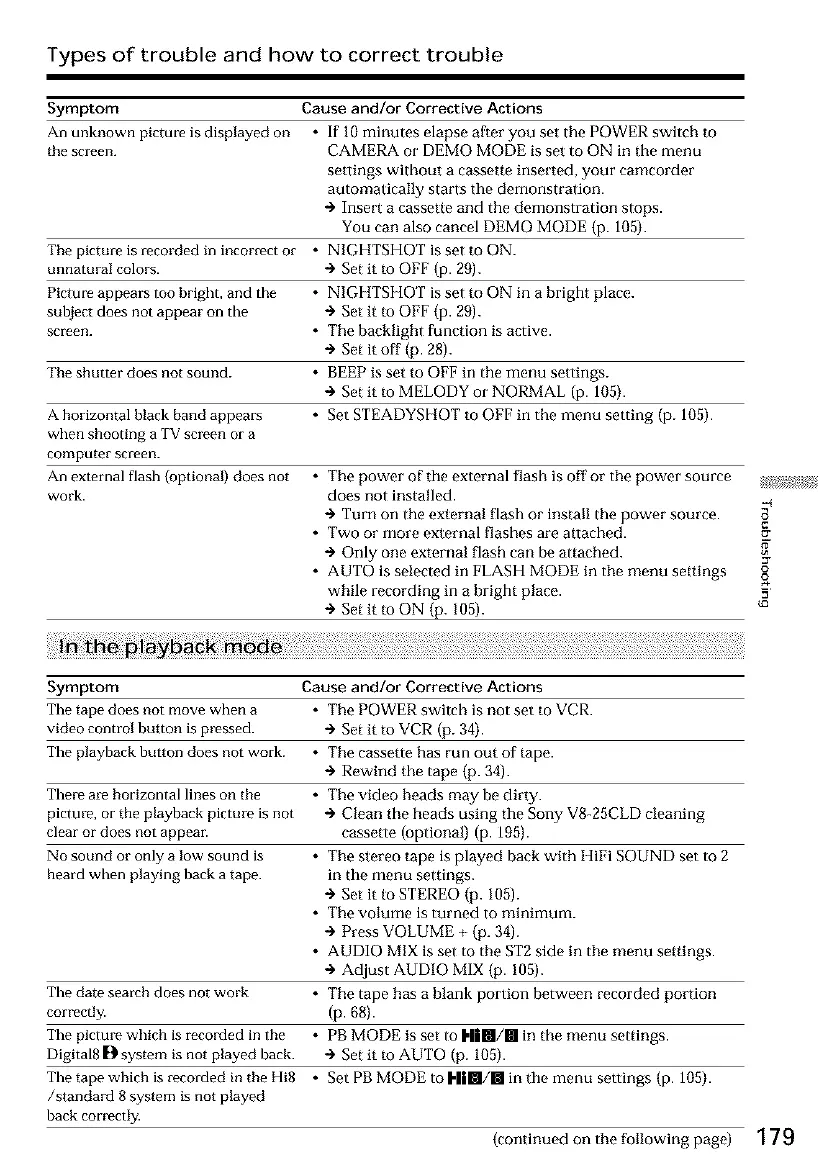
Types of trouble and how to correct trouble
Symptom Cause and/or Corrective Actions
An unknown picture is displayed on * If 10 minutes elapse after you set the POWER switch to
the screen. CAMERA or DEMO MODE is set to ON in the menu
setlings without a cassette inserted, your camcorder
automatically starts the demonstration.
@ Insert a cassette and the demonstration stops.
You can also cancel DEMO MODE (p. 105).
The picture is recorded in incorrect or • NIGHTSHOT is set to ON.
unnatural colors. + Set it m OFF (p. 29).
Picture appears too bright, and the • NIGHTSHOT is set to ON in a bright place.
subject does not appear on the + Set it m OFF (p. 29).
screen. • The bacMight function is active.
+ Set it off (p. 28).
The shutter does not sound. * BEEP is set to OFF in the menu settings.
+ Set it to MELODY or NORMAL (p. 105).
A borizontal black band appears • Set STEADYSEIOT to OFF in the menu setting (p. 105).
when shooting a TV screen or a
computer screen.
An external flash {optional) does not • Tile power of the external flash is off or tile power source
work. does not installed.
Turn on the external flash or install the power source.
• Two or more external []ashes are attached.
Only one external flash can be attached.
• AUTO is selected in FLASH MODE in tile menu settings
while recording in a bright place.
Set it to ON (p. 105).
Symptom Cause and/or Corrective Actions
The tape does not move when a • The POWER switch is not set to VCR.
video control button is pressed. + Set it to VCR (p. 34).
The playback button does not work. • Tile cassette has run out of tape.
+ Rewind the tape (p. 34).
There are horizontal lines on the * Tile video heads may be dirty.
picture, or the playback picture is not + Clean the heads using the Sony V8-25CLD cleaning
clear or does not appear, cassette (optional) (p. 195).
No sound or only a low sound is * Tile stereo tape is played back with HiFi SOUND set to 2
heard when playing back a tape. in the menu settings.
÷ Set it to STEREO (p. 105).
• Tile volume is turned to minimum.
÷ Press VOLUME + (p. 34).
• AUDIO MIX is set to tile ST2 side in tile menu settings.
÷ Adjust AUDIO MIX (p. 105).
The date search does not work * Tile tape has a blank portion between recorded portion
correctl3_ (p. 68).
The picture which is recorded in the * PB MODE is set to I,||RI/III in the menu settings.
Digital8 D system is not played back. + Set it m AUTO (p. 105).
The tape which is recorded in the Hi8 * Set PB MODE to I-||m/ll in the menu settings (p. 105).
/standard 8 system is not played
back correctly.
2r
g
{o
(continued on the following page) 179













 To Next Page