- Recording- Basics-
Recording a picture
Your camcorder automatically focuses for you.
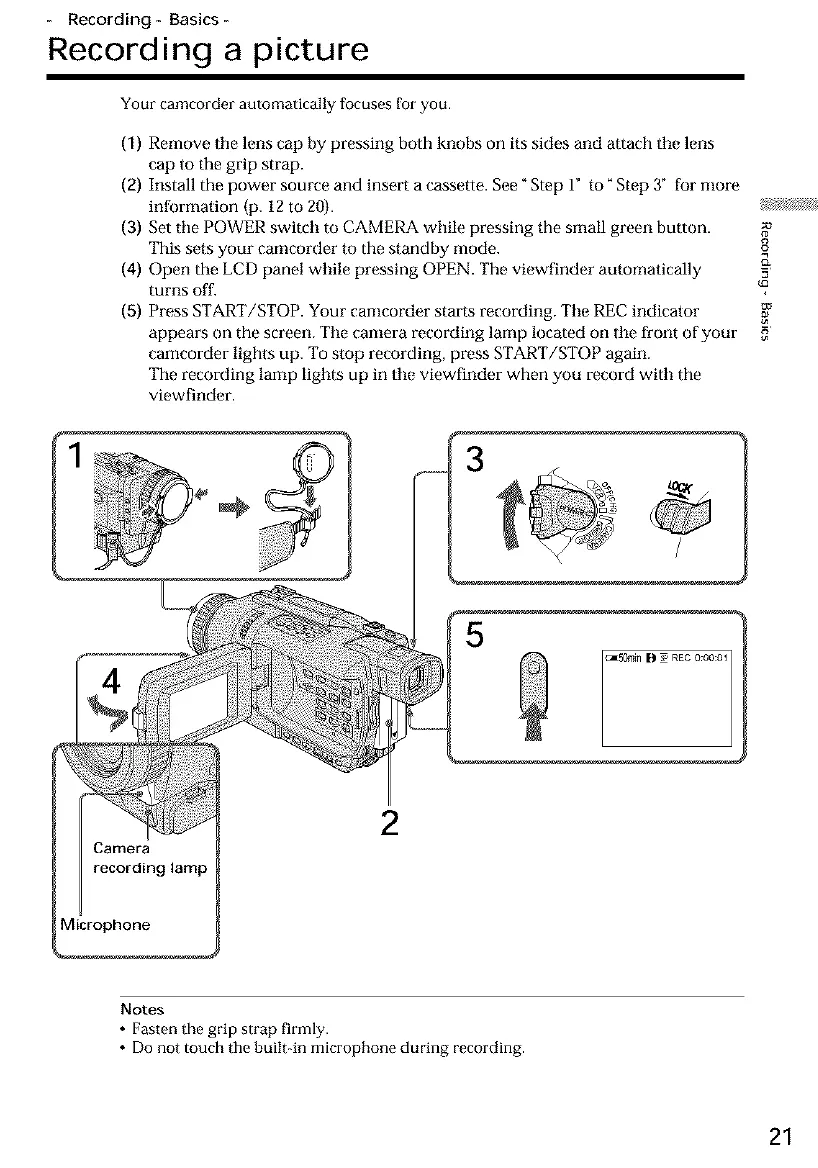
(1) Remove tile lens cap by pressing both knobs on its sides and attach tile lens
cap to the grip strap.
(2) Install the power source and insert a cassette. See "Step 1" to" Step 3" for more
information (p. 12 to 20). _74_
(3) Set the POWER switch m CAMERA while pressing the small green bu|ton.
This sets your camcorder to the standby mode. o
(4) Open the LCD panel while pressing OPEN. The viewfinder automatically -_=
turns off.
(5) Press START/STOP. Your canlcorder starts recording. Tile REC indicator
appears on the screen. Tile canlera recording lamp located on tile front of your
camcorder lights up. To stop recording, press START/STOP again.
The recording lamp lights up in tile viewfinder when you record with the
viewfinder.
3
5
_50m[n B soREC0:00:01
2
Notes
• Fasten the grip strap firmly.
• Do not touch the built-in microphone during recording.
21













 To Next Page