Recording a picture
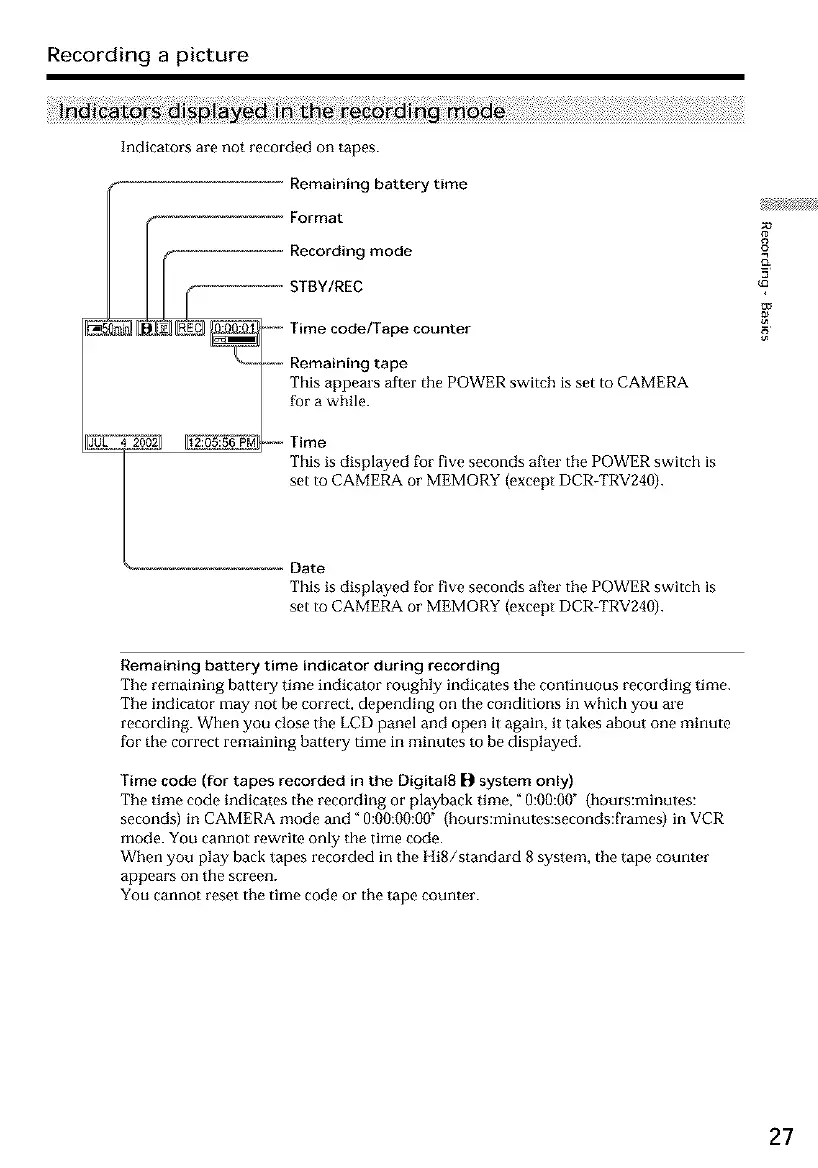
Indicators are not recorded on tapes.
Remaining battery time
E Format
f Recording mode
STOY,REC
_ _ _ _-- Time code/Tape counter
| '_t _, Remaining tape
| _ Thisappears after the POWER switch is set to CAMERA
/
f{ra while_
This is displayed for five seconds a£ter the POWER switch is
set to CAMERA or MEMORY (except DCR-TRV240).
_--------------_ Date
This is displayed for five seconds after the POWER switch is
set to CAMERA or MEMORY (except DCR-TRV240).
o
_a
Remaining battery time indicator during recording
The remaining battery time indicator roughly indicates the continuous recording time.
The indicator may not be correct, depending on the conditions in which you are
recording. When you close the LCD panel and open it again, it takes about one minute
for the correct remaining battery time in minutes to be displayed.
Time code (for tapes recorded in the Digital8 [_ system only)
The time code indicates the recording or playback time," 0:00:00" (hours:minutes:
seconds) in CAMERA mode and" 0:00:00:00" {bouts:minutes:seconds:flames) in VCR
mode. You cannot rewrite only the time code.
When you play back tapes recorded in the HiS/standard 8 system, the tape counter
appears on the screen.
You cannot reset the time code or the tape counter.
27













 To Next Page