Using special effects- Digital effect
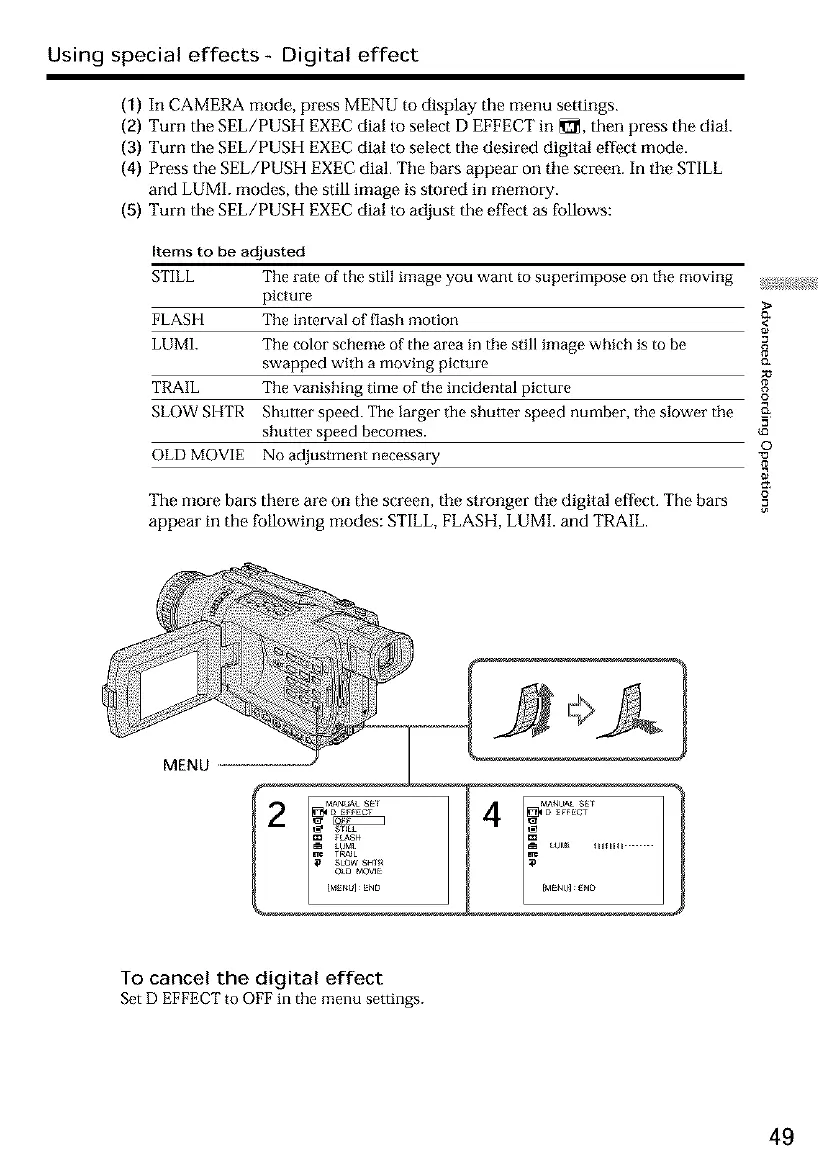
(1) In CAMERA mode, press MENU to display tile menu settings.
(g) Turn the SEL/PUSH EXEC dial to select D EFFECT in _, then press the dial.
(3) Turn the SEL/PUSH EXEC dial to select tile desired digital effect mode.
(4) Press the SEL/PUSH EXEC dial. Tile bars appear on tile screen. In tile STILL
and LUMI. modes, the still image is stored in memory.
(5) Turn the SEL/PUSH EXEC dial to adjust the effect as follows:
Items to be adjusted
STILL The rate of the still image you want to superimpose on the moving _;,_:;_!;
picture >
FLASH The interval of flash motion <_
LUMh The color scheme of the area in the still image which is to be
swapped with a moving picture c_
TRAIL The vanishing time of the incidental picture
SLOW SHTR Shutter speed. The larger the shutter speed number, the slower the __
shutter speed becomes.
o
OLD MOVIE No adjustment necessary
The more bars there are on the screen, tile stronger tile digital effect.The bars
appear in the following modes: STILL,FLASH,LUMI. and TRAIL.
MENU
4
_dENU] gND
To cancel the digital effect
SetD EFFECTto OFFin the menu settings.
49













 To Next Page