4-3
DNW-A75/A75P
ASSEMBLE
VIDEO
VI TC UB INTRP
A IN DF LTC VITC 8F 4F 2F
A OUT TCG TOTAL REMAIN 525 625
EVENT
%
DOLBY
NR
CONFI ON
PB EE
MEMORY
PREVIEW AUTO EDIT
OUT
IN
STANDBY
PLAYER
RECORDER
VAR
FORWARD
JOGSHUTTLE
PREROLL
REC
EJECT REW PLAY F FWD STOP
REVERSE
PB MENU SET
HOLD
CTL/TC/UB
RESET
CH
CONDITION
CAPSTAN
LOCK
1 2 3 4
FEED
CH-1 CH-2 CH-3 CH-4
TOTAL/REMAIN
INSERT
TIME CODE
DELETE
REVIEW
DMC EDIT
IN AUDIO OUT
ENTRY
PREREAD
CONFI
SERVO
ALARM
MARK
LIST
GOOD SHOT
REC/
ERASE
EDIT
INHIBIT
KEYREC
BETACAM SX
SHUTTLE/
VAR
JOG
TRIM
6 542 3
7 8
1
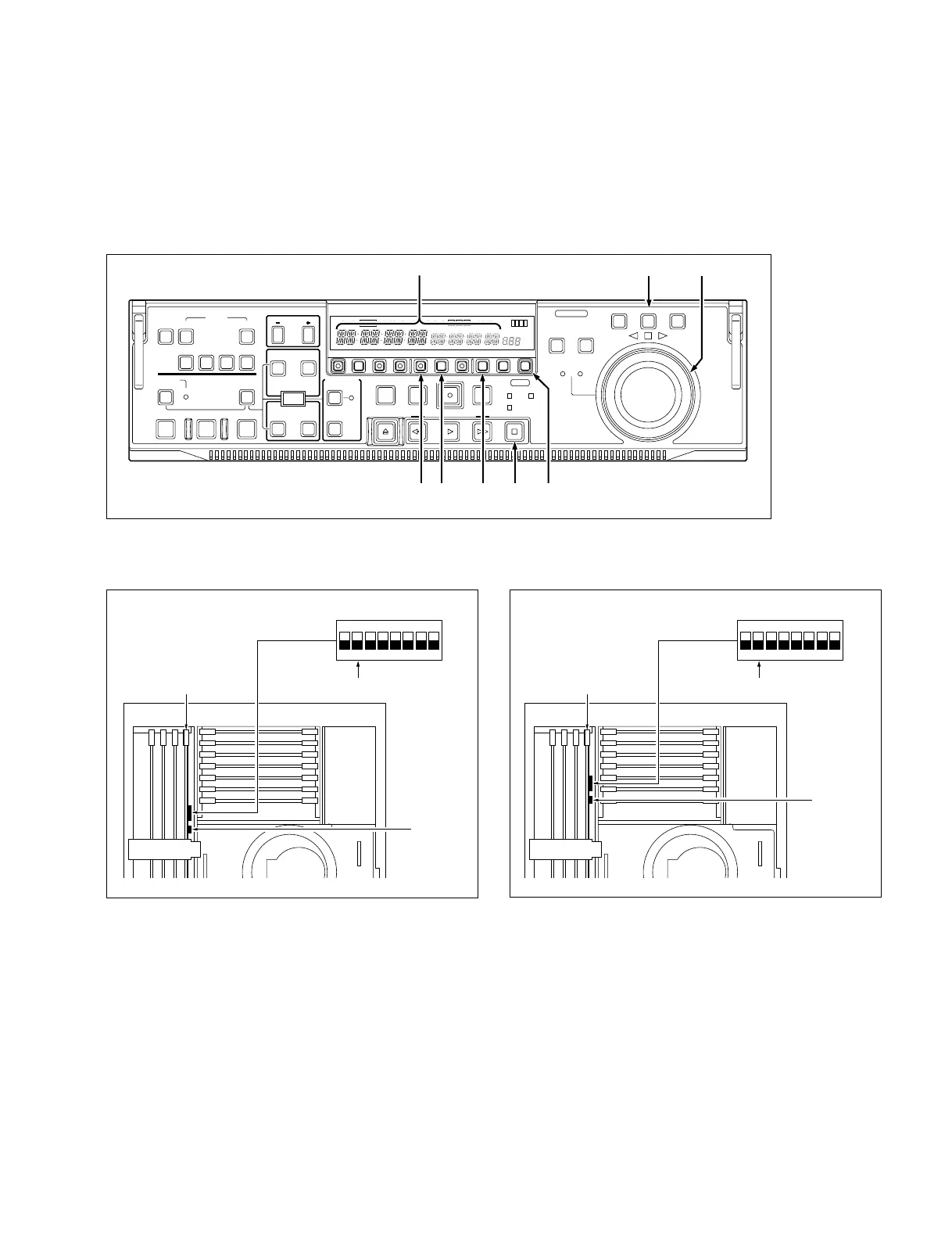
9 S1101/SS-83 board: Maintenance mode start switch (MAINTE MODE START)
Press this switch to activate the maintenance mode.
0 S1100-2/SS-83 board: Maintenance mode access approval switch (MAINTE MODE Access)
Set this switch to ON (upper) in advance when activating the maintenance mode by the button
operation on the control panel.
Lower Control Panel
4-1. Overview of Maintenance Mode
n
Remove the upper lid referring to Section 2-3-1 when operating the switches on the SS-83 board. Change
the setting of DIP switch S1100 with the power switch set to OFF.
Location of Switches on SS-83 Board (Suffix -13 and higher) Location of Switches on SS-83 Board (Suffix -11, -12)
SS-83 board
ON
OFF
S1100
0S1100-2
9S1101
SS-83 board
ON
OFF
S1100
0S1100-2
9S1101



 To Next Page