Buttons Operations Discs
SURROL_D
_* INSTANT
REPLAY/*,_
INSTANT
ADVANCE
PREVi
NEXT
(i;ast reverseii;ast
folavard)
_-_lim_ _,
(slow)
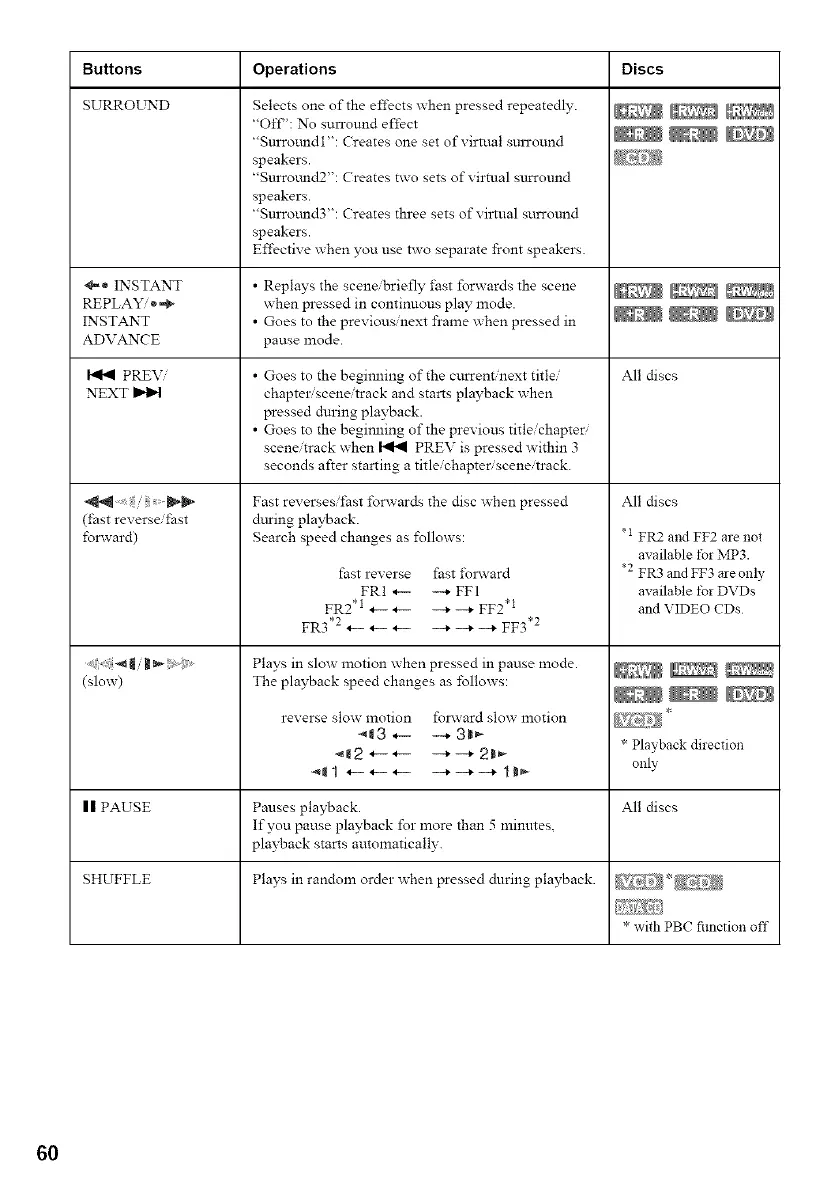
Selects one of the effects when pressed repeatedly.
"Oft"': No surround effect
"Surromldl": Creates one set of virtual smTound
speakers.
"Surromld2": Creates two sets of virtual surround
speakers.
"Surround3": Creates three sets of viltual surround
speakers.
Effective when you use two separate front speakers.
• Replays the scene/briefly fast forwards the scene
when pressed in continuous play mode.
• Goes to the previous/next frame when pressed in
pause mode.
• Goes to the begimling of the current/next title/
chapter scene/track and starts playback when
pressed during playback.
• Goes to the begimling of the previous title/chapter
scene/track when _ PREV is pressed within 3
seconds after starting a title/chapter, scene/track.
Fast reversesii'ast forwards the disc when pressed
during playback.
Search speed changes as ±\_llows:
fast reverse fast ±\_lavard
FRI _ --+ FFI
FR2 .1 ._- ._- __+ __+ FF2 *t
FR3*2 .__ .__ .__ _+_+_+ FF3 .2
Plays in slow motion when pressed in pause mode.
The playback speed changes as follows:
reverse slow motion folavard slow motion
_3 _-- --_ 3B_
All discs
All discs
.i FR2 and FF2 are not
available t)r MP3.
*2 FR3 and FF3 are only
available t)r DVDs
and VIDEO CDs
* Playback direction
only
| | PAUSE Pauses playback. All discs
If you pause playback for more than 5 lninmes,
pla?_ack starts automatically.
SHUFFLE Plays in random order when pressed during playback.
* with PBC fimction off
60



 To Next Page