Chapter 1 Sun Fire X4150 Server Overview 1-7
1.4 Sun Fire X4150 Server Rear Panel
Features
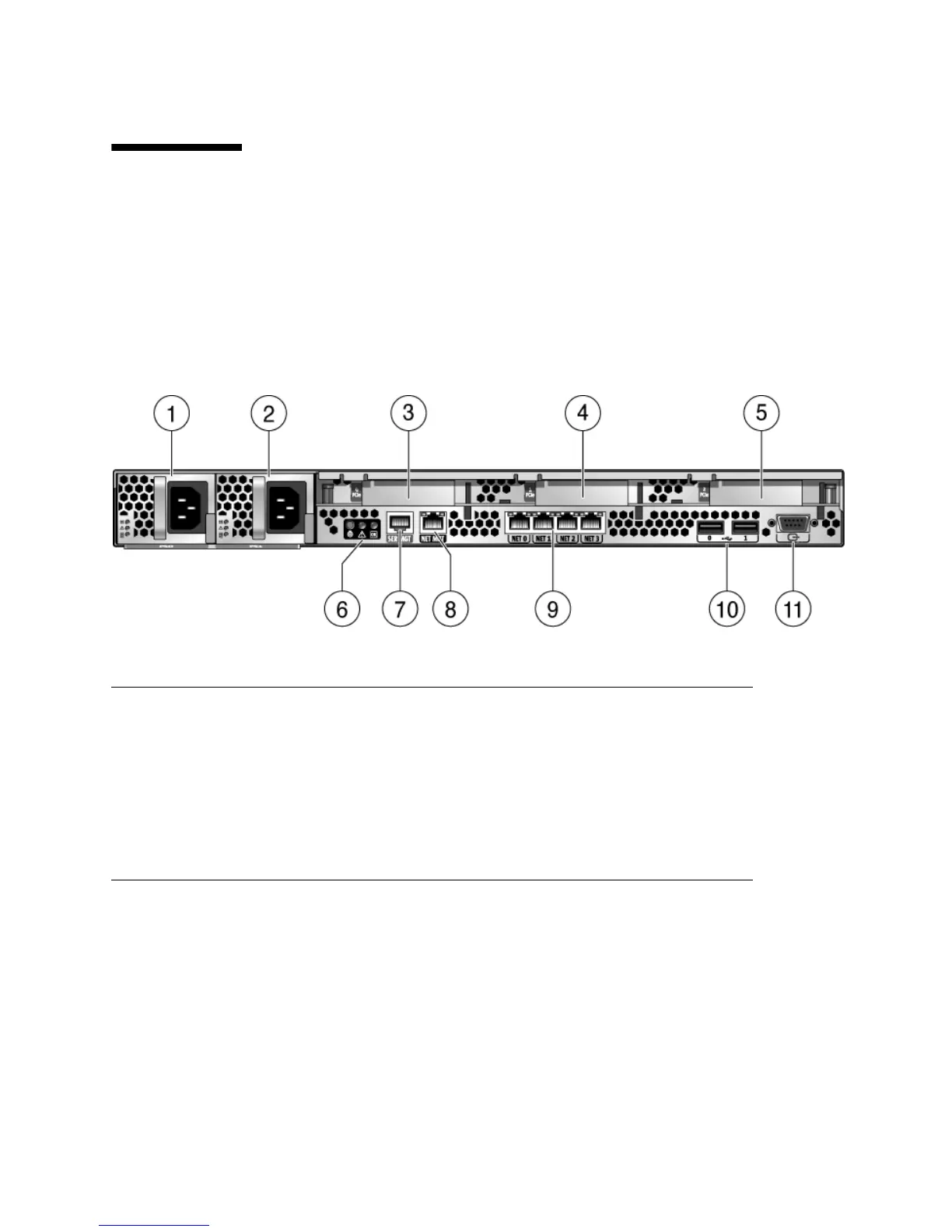
FIGURE 1-2 shows rear panel features on the Sun Fire X4150 Server. For more detailed
information about ports and their uses, see the Sun Fire X4150 Server Installation
Guide.
FIGURE 1-2 Rear Panel Features
For a detailed description of PCIe slots, see Section 4.4.1, “Sun Fire X4150 Server PCIe
Card Guidelines” on page 4-18.
Figure Leg end
1 PSU 0 7 Serial Management Port
2 PSU 1 8 Network Management Port
3 PCIe 0 9 Gbit Ethernet Ports (0, 1, 2, 3)
4 PCIe 1 10 USB Ports (0, 1)
5 PCIe 2 11 HD-15 Video Port
6 Rear Panel System Status LEDs
- Locator LED/Locator button (white)
- Service Action Required LED (amber)
- Power/OK LED (green)














 To Next Page