4-8 Sun Fire X4150 Server Service Manual • November 2009
FIGURE 4-4 Removing FB-DIMMs
6. Place the FB-DIMM on an antistatic mat.
7. Repeat Step 4 through Step 6 to remove any additional FB-DIMMs.
▼ To Install FB-DIMMs
Caution – Ensure that all power is removed from the server before removing or
installing FB-DIMMs, or damage to the FB-DIMMs might occur. You must disconnect
all power cables from the system before performing this procedure.
Tip – See Section 4.1.1, “FB-DIMM Guidelines” on page 4-3 for information about
configuring the FB-DIMMs.
1. Unpackage the replacement FB-DIMMs and place them on an antistatic mat.
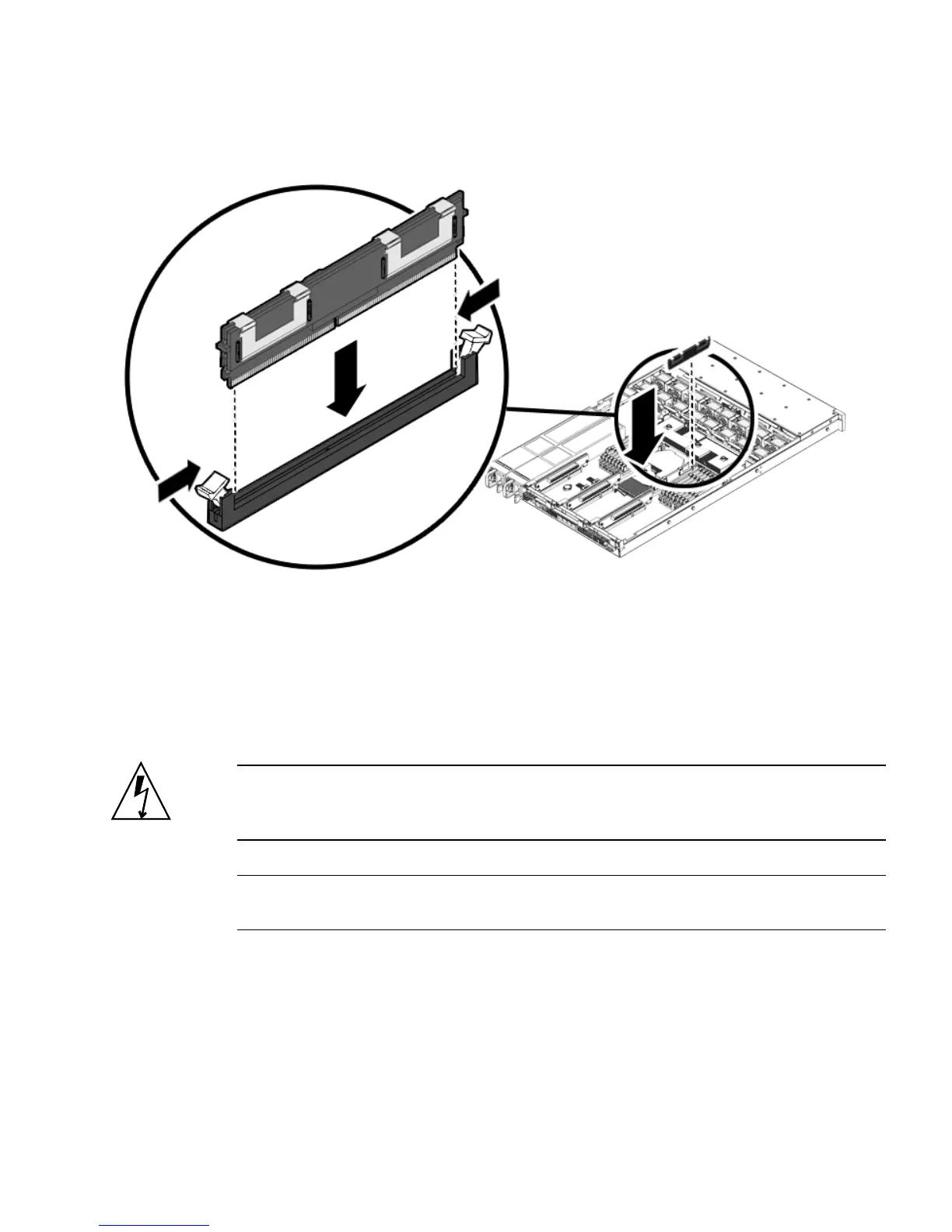
2. Ensure that the ejector tabs are in the open position.
3. Line up the replacement FB-DIMM with the connector (
FIGURE 4-5).
Align the FB-DIMM notch with the key in the connector. This ensures that the
FB-DIMM is oriented correctly.














 To Next Page