4. FUNCTIONS OF THE INSTRUMENT – Function
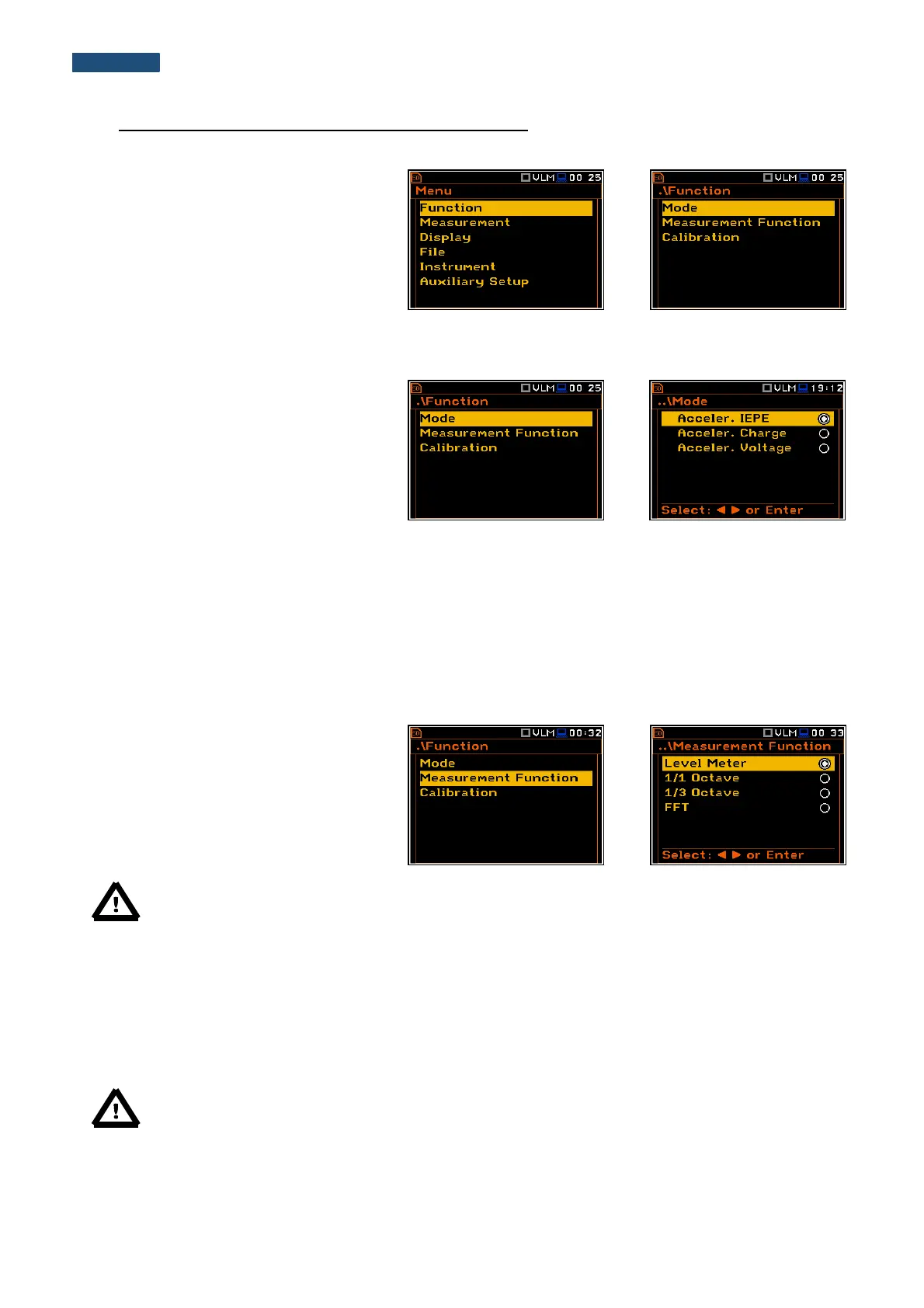
To select the Function list, the user should
press the <Menu> push-button, select the
Function text and press <ENTER>. The
Function list contains three elements:
Mode, Measurement Function and
Calibration.
4.1. Selection of the instrument mode – Mode
The device can work with different types of
accelerometers. The accelerometer type is
selected in the Mode list as: Acceler. IEPE,
Acceler. Charge and Acceler. Voltage.
4.2. Measurement functions of the instrument - Measurement Function
The main function of the instrument is the measurement of Vibration broad band level (Level Meter). The
Vibration Level Meter (VLM) meeting the standard ISO 20816-1:2016. The instrument can also be used for
medium to the long-term vibration monitoring using the huge capacity data logger in which all the measurement
results are stored.
The user may also use 1/1 and 1/3 real time octave band frequency and FFT analysis functions. These functions
extend the main Level Meter functionality of the instrument, because the selected 1/1 and 1/3 octave analysis is
performed together with all calculations of Level Meter.
To select the required function, the user
should enter the Measurement Function
list. After entering the
Measurement Function list, the list of the
available functions appears on the display:
Level Meter, 1/1 Octave, 1/3 Octave and
FFT (in case of Sound modes). The currently
active function is marked.
Note: The type of measurement function and the measurement mode is displayed in the upper line of
the screen.
- VLM Vibration Level Meter,
- V:1/1 Vibration 1/1 Octave,
- V:1/3 Vibration 1/3 Octave,
- V:FFT Vibration FFT.
Optional measurement functions that broaden the application of the instrument can be easily installed. These
options can be initially supplied by the manufacturer or purchased later and added by the user.
Note: It is not possible to change the measurement function during a measurement run. In this case,
the instrument displays for about 3 seconds the message: “Measurement in Progress”. To change
the mode of the instrument the current measurement in progress must be finished!



 To Next Page