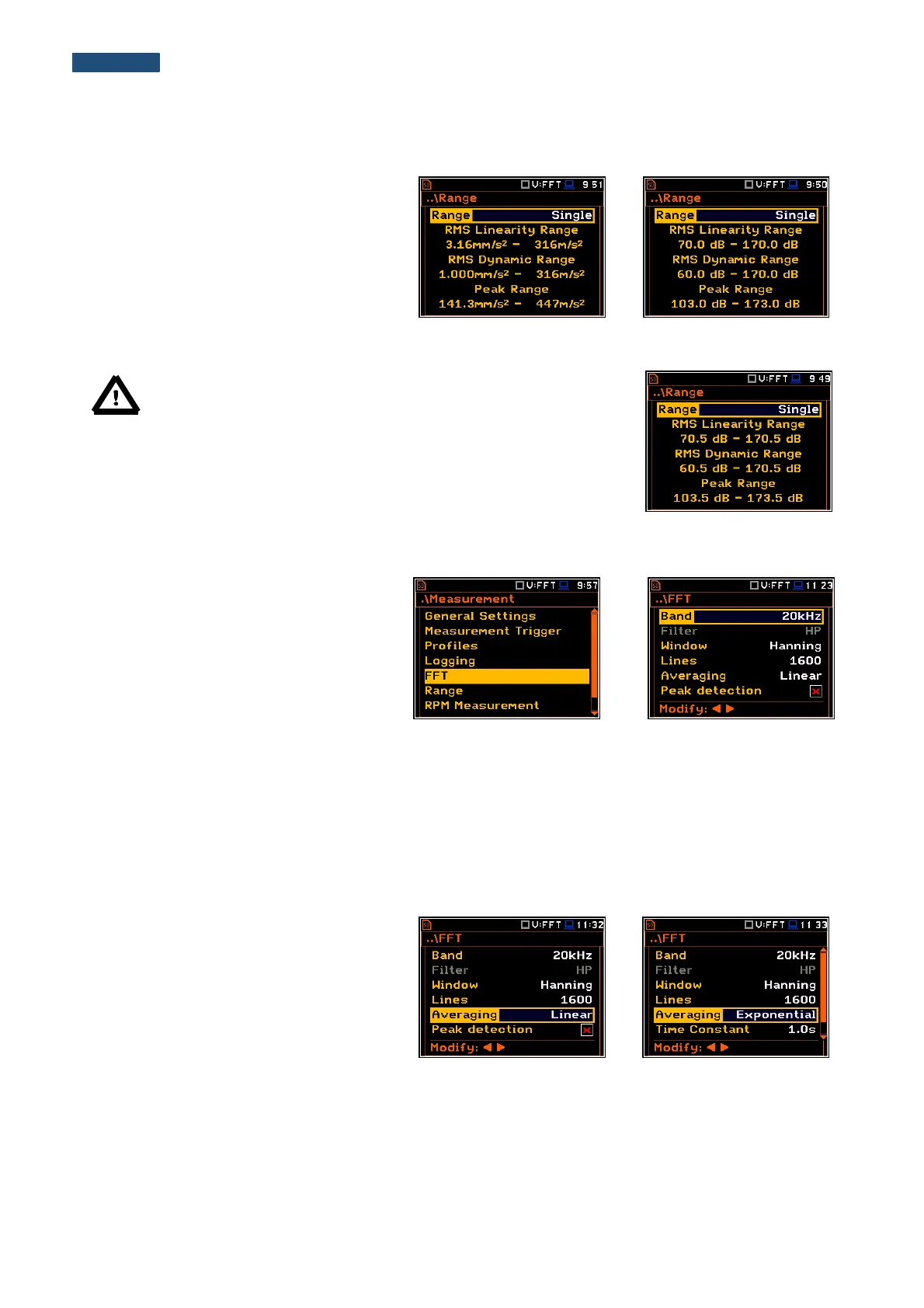
11.2.1. Checking the measurement range of FFT analisys - Range
For the FFT function there is only one
(Single) input range specified in
Appendix C.
The user can check it in the Range window
of the Measurement list.
Depending on the settings of the Scale
parameter (path: <Menu> / Display /
Display Scale) the range will be presented
in absolute or logarithmic units (dB).
Note: The calibration factor is always added to the range limits.
For example, if calibration factor is equal to 0.5 dB, the range will
be changed automatically (lower and upper limits will be increased
by 0.5).
11.2.2. Setting up the parameters of FFT analysis - FFT
The FFT position, which appears in FFT
analysis, opens the window in which the
user can select the parameters of the FFT
analysis: frequency band (Band),
weighting window (Window), number of
lines (Lines) averaging type (Averaging)
and detection od Peak (Peak detection).
In the Band position the user can select the band in which the FFT analysis should be performed. The user can
select: 20 kHz, 10 kHz, 5 kHz, 2.5 kHz, 1.25 kHz, 625 Hz, 312 Hz, 156 Hz and 78 Hz.
Only one HP weighting filter is available for the FFT analysis of vibration. The characteristics of the filters are
given in Appendix C.
In the Window position the user can select the weighting window for the FFT analysis of the signal. The user
can select Hanning, Rectangle, Flat Top and Kaiser-Bessel weighting windows.
In the Lines position the user can select the number of lines for the FFT analysis of the signal. The user can
select 1600, 800 and 400 lines.
There are two averaging options: Linear
and Exponential. In case of Exponential
averaging an additional position appears in
this window: Time Constant. The
Time Constant parameter can be selected
from the values: 100ms, 125ms, 200ms,
500ms, 1.0s, 2.0s, 5.0s and 10.0s.



 To Next Page