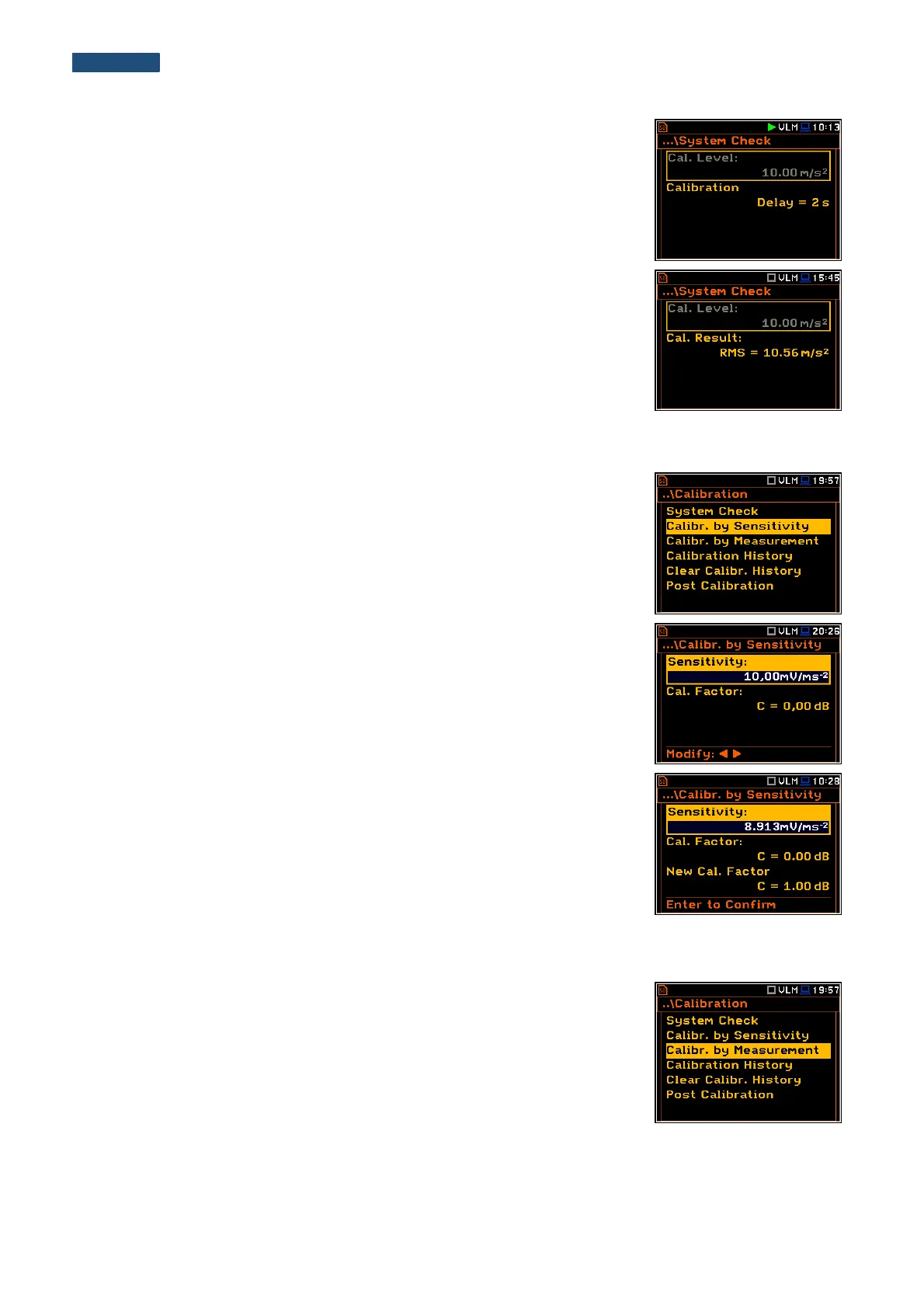
The measurement starts after 3 second delay. The system check measurement
time is also predefined to 5 seconds. During the calibration period, the <ESC>
and <Pause> push-buttons do not operate but it is possible to stop the
measurement using the <Start/Stop> push-button. Waiting for the calibration
measurement to begin, a Delay is counted down.
Measurement results in relationship with calibrator level will be compared
against current calibration factor and the instrument will assess whether the
system check was successful or failed, displaying relevant message together
with current calibration factor and measured calibration.
System check is considered successful in case its result is not more than 2 dB
different than the current calibration factor.
Press <ENTER> to exit System Check.
4.3.2. Calibration by Sensitivity
The calibration by using the accelerometer’s published sensitivity information
can be performed in the following way:
1. Select the Calibr. by Sensitivity position in the Calibration sub-list and
press the <ENTER> push-button.
2. Set the sensitivity of the accelerometer taken from its calibration certificate
using the <Shift> with ◄ or ► push-buttons.
The calibration factor is calculated every time after pressing the◄ or ► push-
buttons, in relation to the nominal value of 10.0 mV / ms
-2
.
To confirm the new calibration factor, press <ENTER>.
For an accelerometer with sensitivity higher than 10.0 mV / ms
-2
the calibration
factor will always be negative.
For an accelerometer with sensitivity lower than 10.0 mV / ms
-2
the calibration
factor will always be positive.
The lowest available value of the sensitivity that can be introduced is equal to
10.0 µV / ms
-2
(it conforms to the calibration factor equal to 60.0 dB) and the
highest value is equal to 10.0 V / ms
-2
(calibration factor is equal to -60.0 dB).
4.3.3. Calibration By Measurement
Calibration by measurement for the vibration measurements can be done in the
following way:
1. Select the calibration by measurement (highlight the
Calibr. by Measurement text) from the Calibration sub-list and press the
<ENTER> push-button.
2. Set the calibration level appropriate to the used calibrator. The default level
for calibration in the vibration mode is 10 m/s
2
at 159.2 Hz. Remember to
change this level if using an alternative vibration calibration signal source.



 To Next Page