7.1 Managing files saved in the memory – File Manager
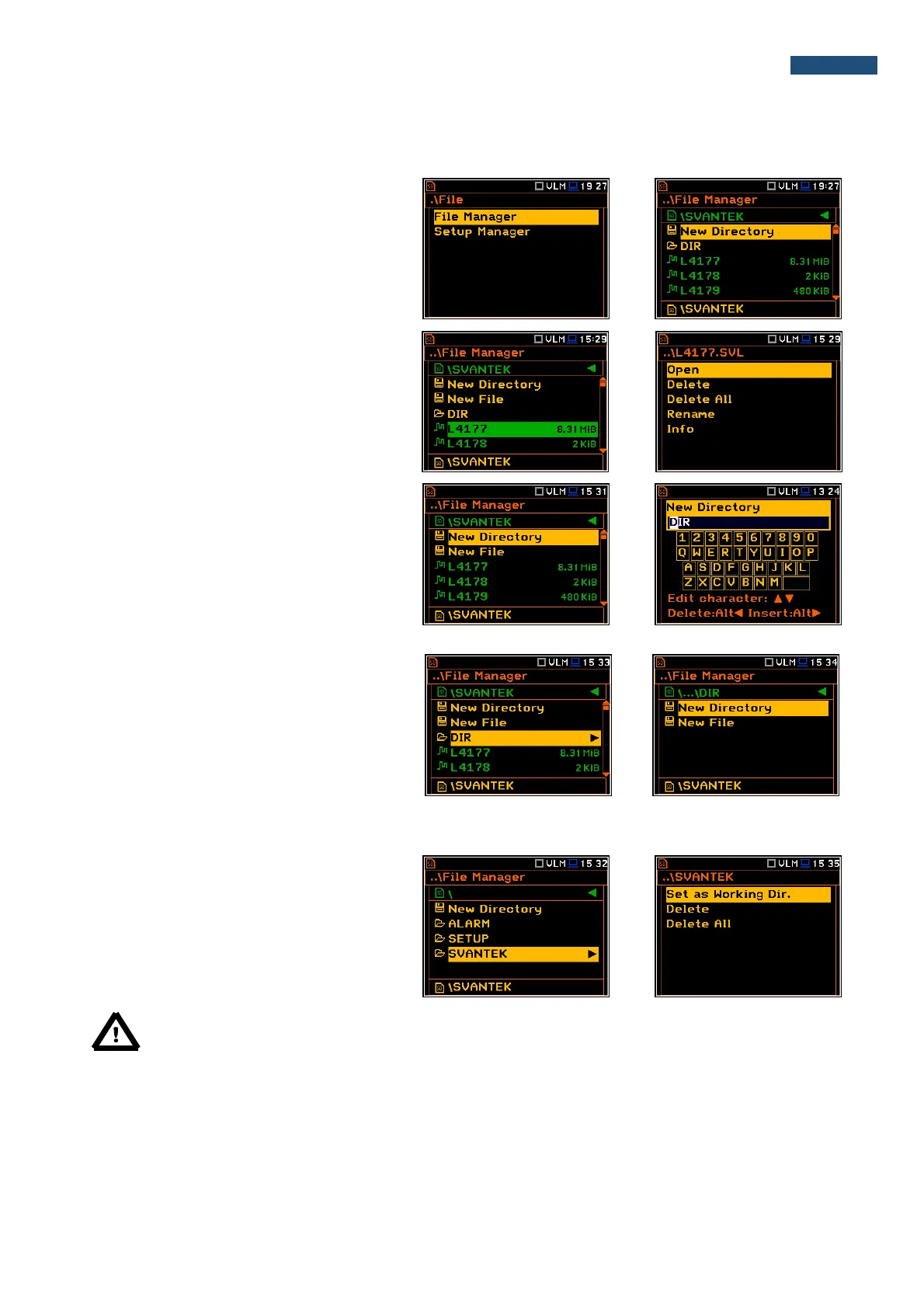
The File Manager is used for checking the
memory content, create new directories and
files, select directory for saving files, delete
files and directories.
The list of files and directories is presented in
the File Manager window. Files are stored in
directories, which are organised
hierarchically. By pressing the <ENTER>
push-button the window with the list of
available commands for the marked
(highlighted) position is opening.
Creating new directory or file
The first position of the File Manager list is
New Directory, which enables the user to
create the new directory.
To do this, the user should enter the directory
in which the new one will be created and press
the <ENTER> push-button at the
New Directory position.
The marked directory can be opened by
means of the ► push-button.
To return to the upper directory the user
should press the ◄ push-button.
7.1.1 Assigning the directory for files saving – Set as Working Dir.
The user can assign the directory for
automatically saved logger files. To do this the
user should choose the required directory and
press the <ENTER> push-button. After
opening the command list, the user should
select Set as Working Dir. and press the
<ENTER> push-button.
Note: The working directory name is displayed on the bottom line of the screen.



 To Next Page