11.4.3. Selection of the spectra to be viewed - Spectrum View
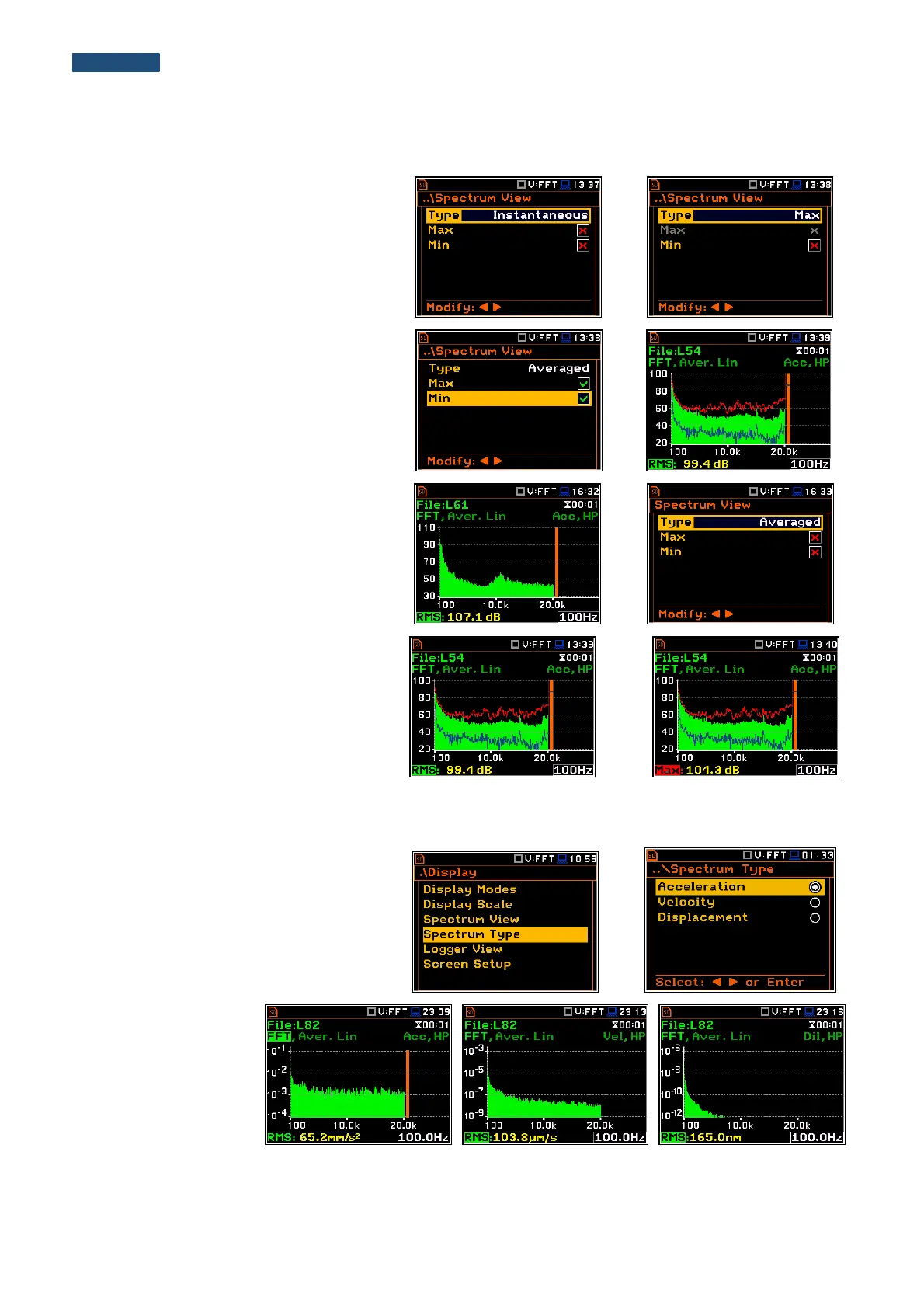
In the Spectrum View window, the user
can select the different spectra to be visible
on the display. In the Spectrum View
window the following spectrum types may
be selected: Averaged, Instantaneous,
Max or Min.
When the Averaged or Instantaneous
spectrum is selected, the user can
additionally switch on or off the
presentation of the Max and/or Min values
for every displayed spectrum band by
switching the Max or Min parameters on.
The user can easily get into the
Spectrum View screen from the spectrum
view. It is necessary to enter the result field
(RMS) with the use of ▲ or ▼ push-buttons
and press <ENTER>.
To enable the cursor to read the Max or
Min values the user should select the field
in the lower left hand corner of the display
by means of the ▲ or ▼ push-buttons.
Then select the appropriate value by
means of the ◄ or ► push-buttons pressed
together with <Alt>.
11.4.4. Selection of the spectrum type - Spectrum Type
In the Spectrum Type window (path:
<Menu> / Display / Spectrum Type), the
user can select the different types of
vibration spectra to be presented on the
display: Acceleration, Velocity or
Displacement.
As an example, three
spectrum types are
presented for the
same measurement –
Acceleration,
Velocity and
Displacement.



 To Next Page