6. SETTING UP THE DATA VIEW – Display
The Display list contains the elements that
enable the user to independently
programme the display parameters.
The content of the Display list is different
for the spectrum analyser functions
(1|1 Octave, 1/3 Octave and FFT) in
regards to the Level Meter function.
The Display list is used for setting the various parameters, which are dedicated to the control of the LCD screen
display, and contains the following items:
Display Modes enables the user to select the mode of the measurement results presentation;
Display Scale enables the user to change the scale in the graphical modes of result’s presentation;
Logger View enables the user to select and present the results stored in the logger’s files;
Spectrum View enables the user to change the type of the spectrum and to activate the Max and Min
spectrum. This position appears only in spectrum analyser functions;
Spectrum Type enables the user to change the spectrum type presented on the display: Acceleration,
Velocity and Displacement. This position appears only in spectrum analyser functions;
Screen Setup enables the user to set up the brightness and the switch on/off the energy saver function.
6.1 Selection of the view modes - Display Modes
The One Result view is always available in
all measurement modes. Other view modes
can be switched on or off in the
Display Modes sub-list.
The mode of the results presentation is
related to the selection of the instrument’s
function (VLM, 1/1 Octave, 1/3 Octave,
etc.).
In case of Level Meter, following optional views are available: 1 Prof. & 3 Prof., 1 Prof. & Logger,
3 Prof. & LoggerB, Logger and File Info.
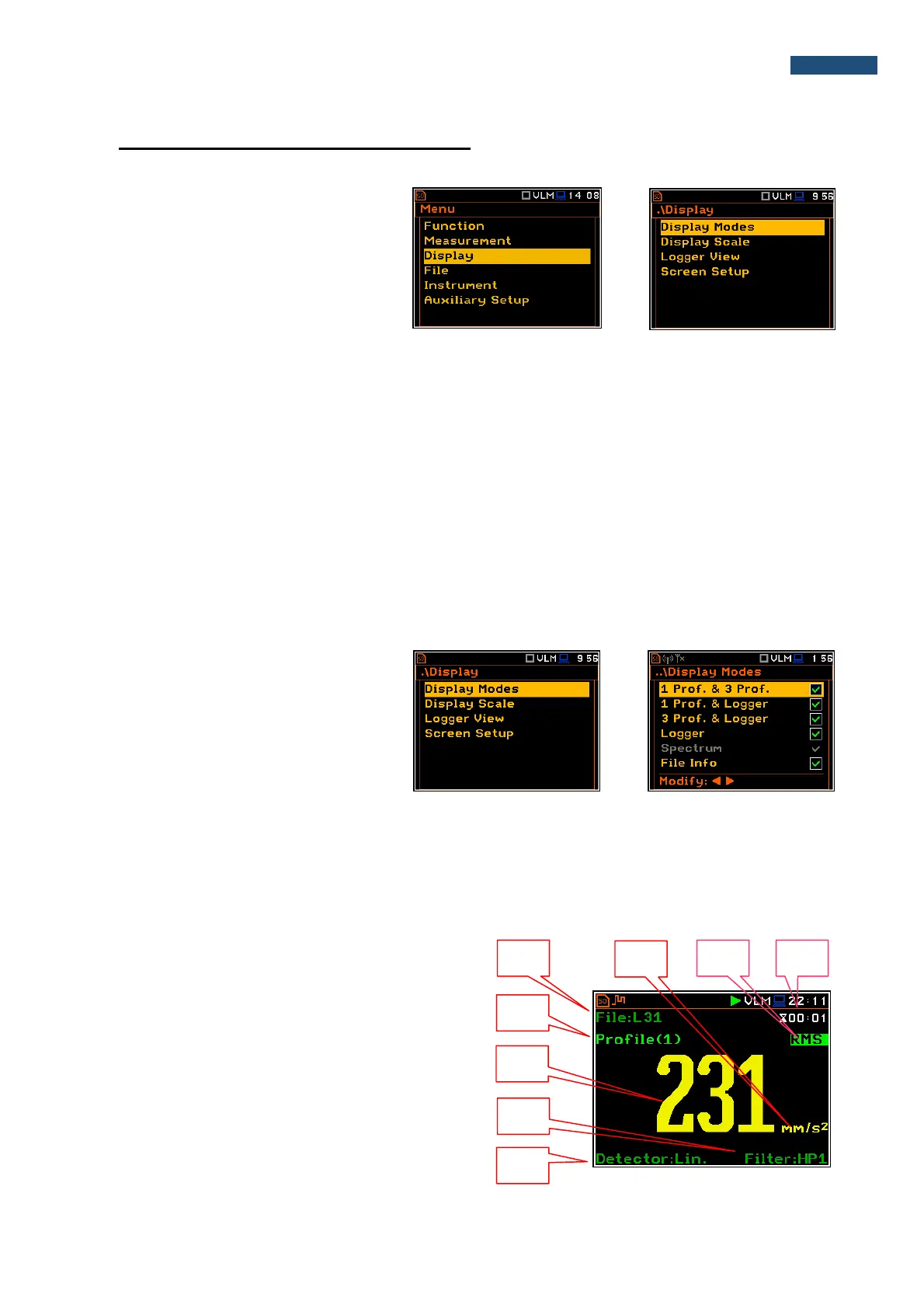
One Result view
The One Result view is always available in all measurement modes. In this view, only one measured value is
displayed in large letters.
Field description of the One Result view
1. File name when Logger is active (path: <Menu> /
Measurement / Logging / Logger Setup /
Logger:)
2. Profile number
3. The value of the measured function
4. The name of the implemented filter: HP, HP1, HP3,
HP10, Vel1, Vel3, Vel10, VelMF, Dil1, Dil3, Dil10,
Wh
5. Detector type: Lin when the RMS Integration is
linear (path: <Menu> / Measurement /
General Settings) or: 100 ms, 125 ms, .. 10.0 s,



 To Next Page