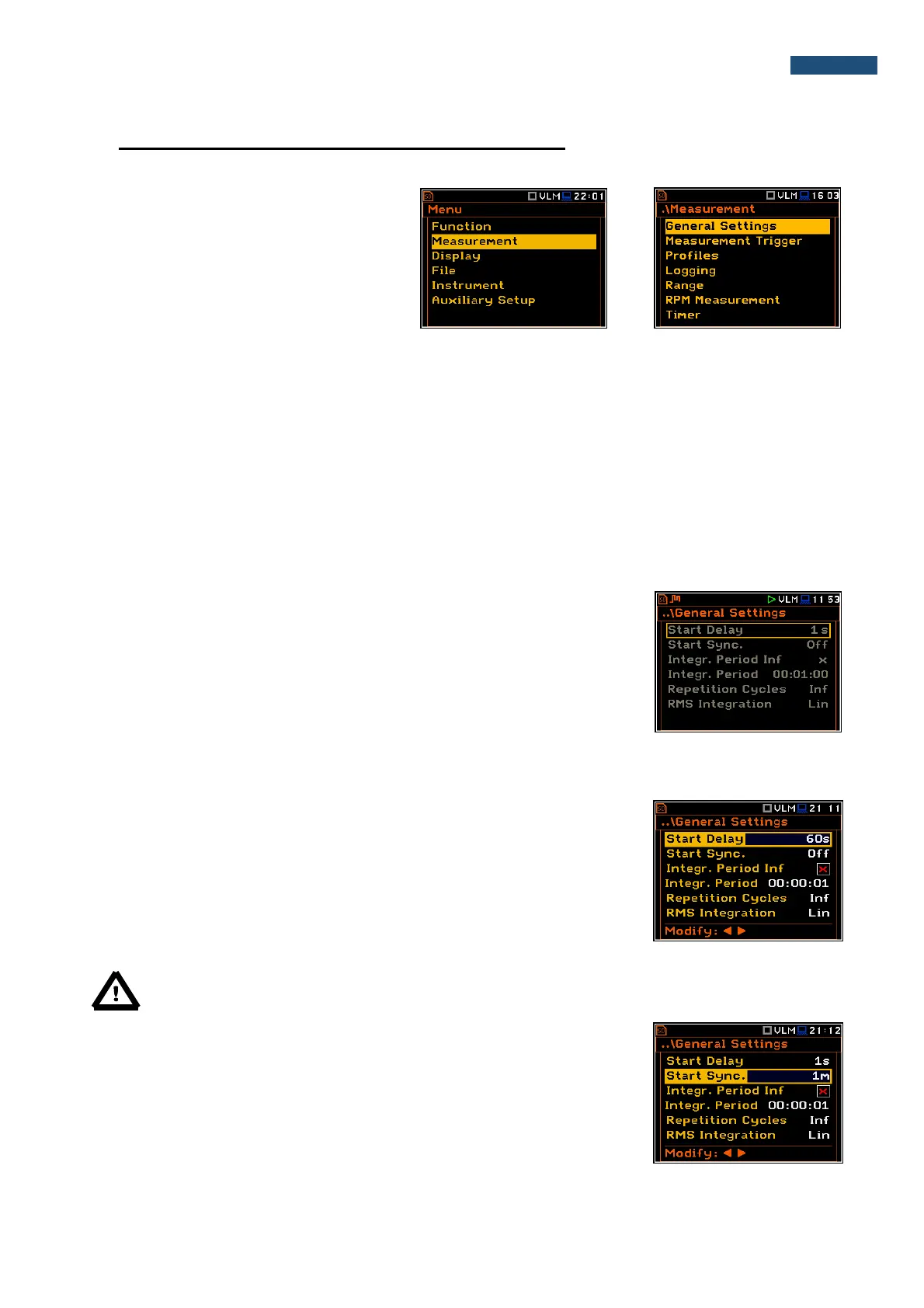
5. SETTING UP THE MEASUREMENT – Measurement
The Measurement list contains the elements
that enable the user to set up the
measurement parameters. To open the
Measurement list, the user has to press the
<Menu> push-button, select the
Measurement text and press <ENTER>.
The Measurement list contains the following items:
General Settings enables the user to set up various general measurement parameters;
Measurement Trigger enables the user to set up the measurement trigger;
Profiles enables the user to program the profile parameters;
Logging enables the user to program the logging function;
Spectrum enables the user to set up spectrum parameters;
Range enables the user to check the applied measurement range;
RPM Measurement enables the user to set up the RPM measurements parameters;
Timer enables the user to program the internal timer.
Any parameter in the Measurement list can be changed only when the
instrument is not currently executing a measurement. The parameters are
displayed with grey colour. The blinking “►” icon on the top row indicates that
the instrument is performing a measurement.
5.1 Setting up the main measurement parameters - General Settings
Delay before the measurement start
The Start Delay position defines the delay period from the moment the
<Start/Stop> push-button is pressed to the start of the actual measurements
(the digital filters of the instrument constantly analyse the input signal even when
the measurement is stopped). This delay period can be set from 0 second to
60 seconds (with 1 second step by means of the ◄ or ► push-buttons and with
10 second step by means of the ◄ or ► push-buttons pressed together with
<Shift>).
Note: The minimum delay period is equal to 0 second. In the Calibration mode, the delay period is
always equal to 3 seconds.
Synchronisation of the measurement start
The Start Sync. position defines maximum delay period from pressing the
<Start/Stop> push-button to the start of the measurements to allow
synchronisation with the instrument’s RTC. The Start Sync. parameter can be
set as: Off, 1m, 15m, 30m and 1h. For example, if 1h was selected, then each
measurement starts from the first second of next real time hour after pressing
<Start/Stop> push-button, and then each hour after Integr. Period, if
Rep. Cycles is greater than one. The default value is set to Off.



 To Next Page