083730300A DCN8101 Getting Started 75
2.5.8 SETUP>ANALOG OUTPUTS
Map the four user-configurable Analog Outputs to any of a wide variety of “Signals”
present in the instrument and customize their respective configurations.
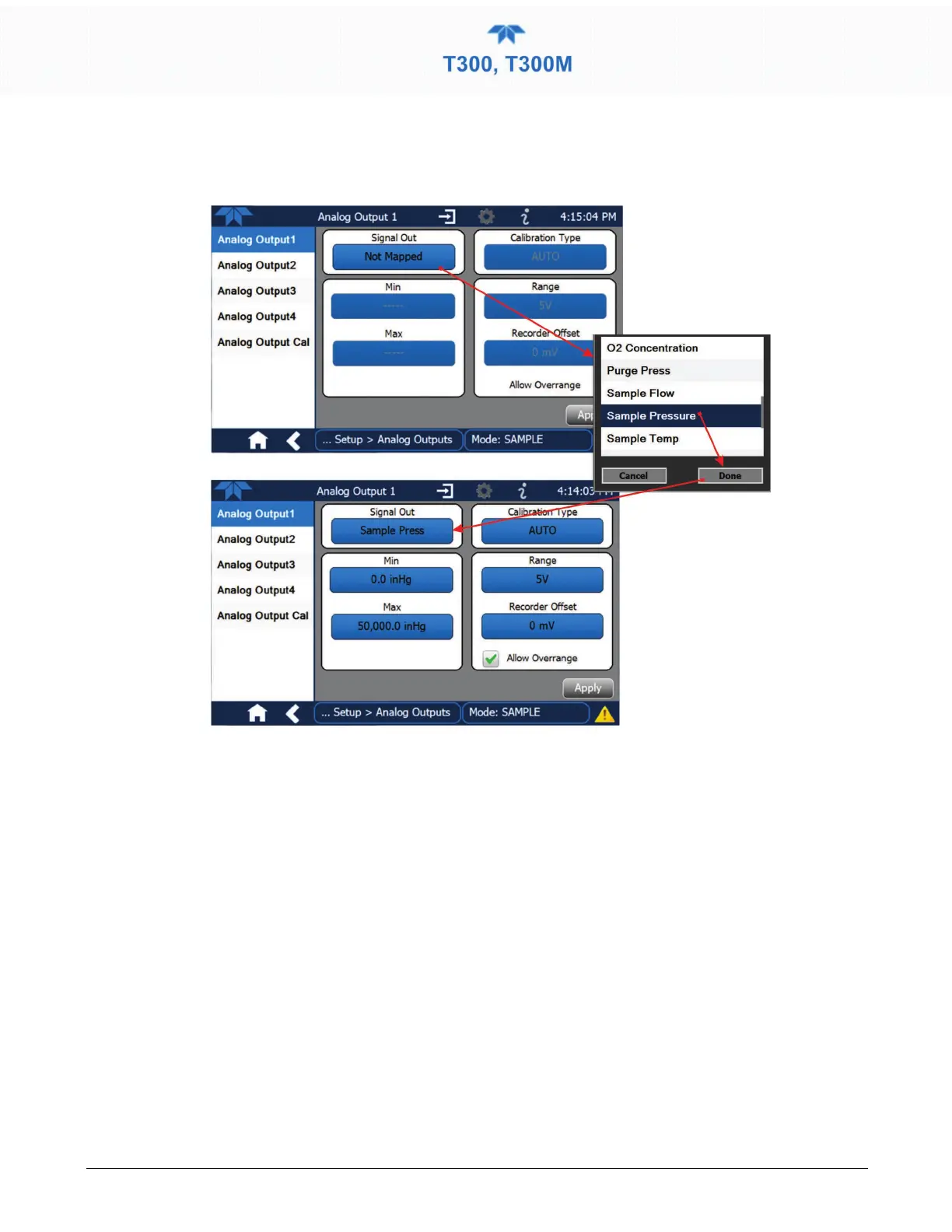
Figure 2-51. Analog Output Configuration Example
Refer to Figure 2-51 for the following:
• Signal Out: select a Signal for the output.
• Min/Max: edit minimum and maximum values associated with the selected Signal.
• Calibration Type:
• AUTO for group calibration (Figure 2-52) of the analog outputs (cannot be
selected when Current is selected for the Range)
• MANUAL for individual calibration (Figure 2-53) of analog outputs where
manual adjustments can be made (the only calibration type allowed when
Current is selected for the Range). See Sections 2.5.8.1 and 2.5.8.2 .
• Range: assign a voltage or select Current (refer to Table 2-14).
• Recorder Offset: add a zero offset for recording slightly negative readings from
noise around the zero point.
• Allow Overrange: check to allow a ± 5% over-range; uncheck to disable over-range
if the recording device is sensitive to excess voltage or current.



 To Next Page