E6582062
2-11 2. Installation and wiring
2
3
9
10
2. 2. 1 With frame size A1, A2, or A3
VFAS3-2004P to 2075P, VFAS3-4004PC to 4185PC
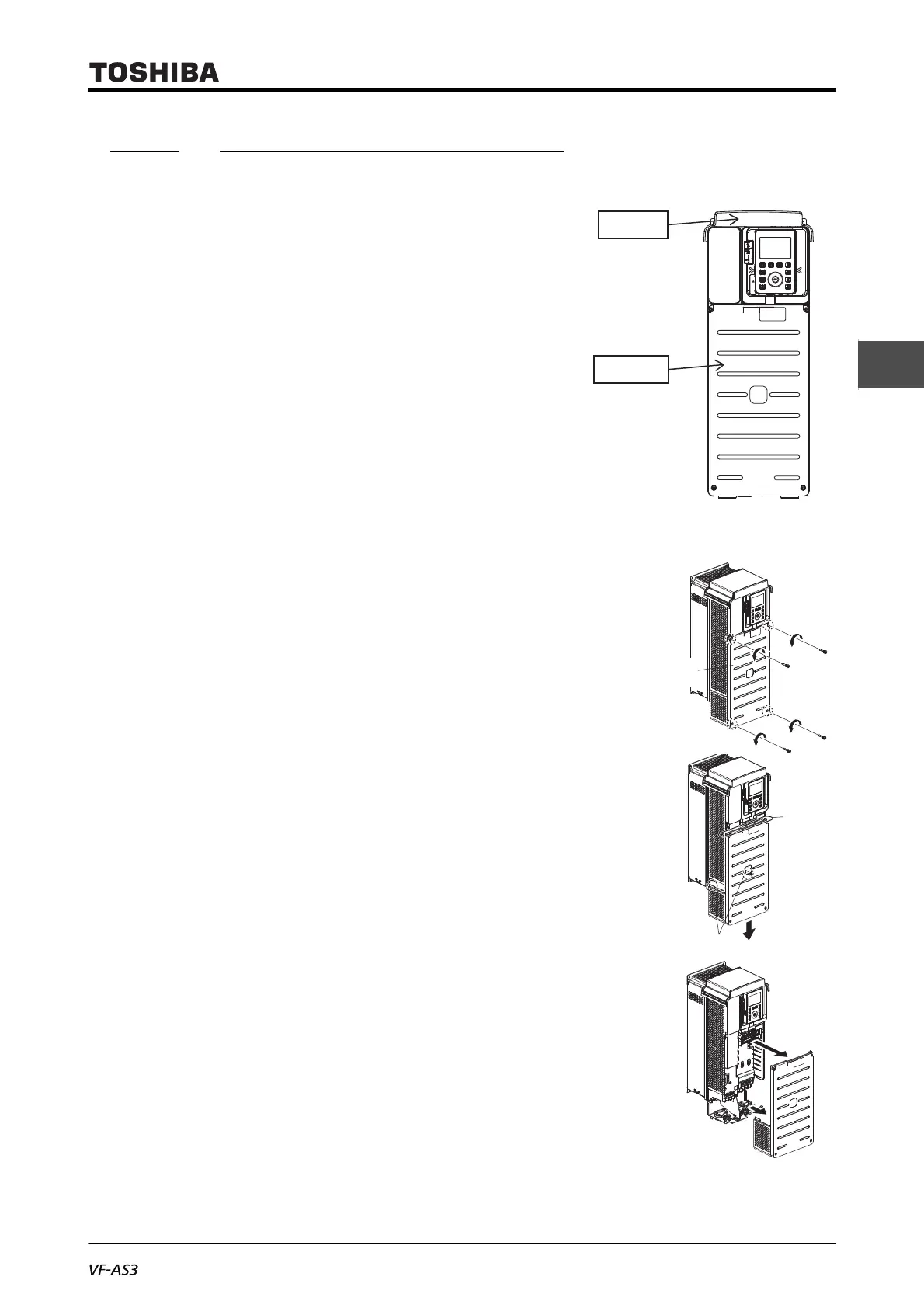
The parts to be removed are as follows.
• Front cover on the lower side of the front surface
(resin)
• Top cover on the top surface (resin)
Each cover can be removed separately.
■ Front cover
1 Loosen four screws of the front cover.
Since the screws are of falling prevention type, they do not
come off the front cover even if loosened.
2 Hold the both side of the front cover and pull it slightly down-
ward.
The inserted part of the upper side of the front cover comes
off.
The tab shown in the figure on the right also come off.
3 Pull the front cover toward you and remove it from the unit.
4 Mount the front cover in the reverse procedure.
Pay attention to engagement of the tab and insertion of the
upper side of the cover.
Front cover



 To Next Page
 Loading...











