TRACKMASTER Ch. 12 Established Component Replacement Times
118 TMX428 TMX428CP & TMX58 Service Manual 317-160-406 Rev 4
May 2021
Belt Speed Calibration Procedure (Controller Interface)
Tools Required
Stop watch or watch with a second hand
Chalk or some other temporary marking device
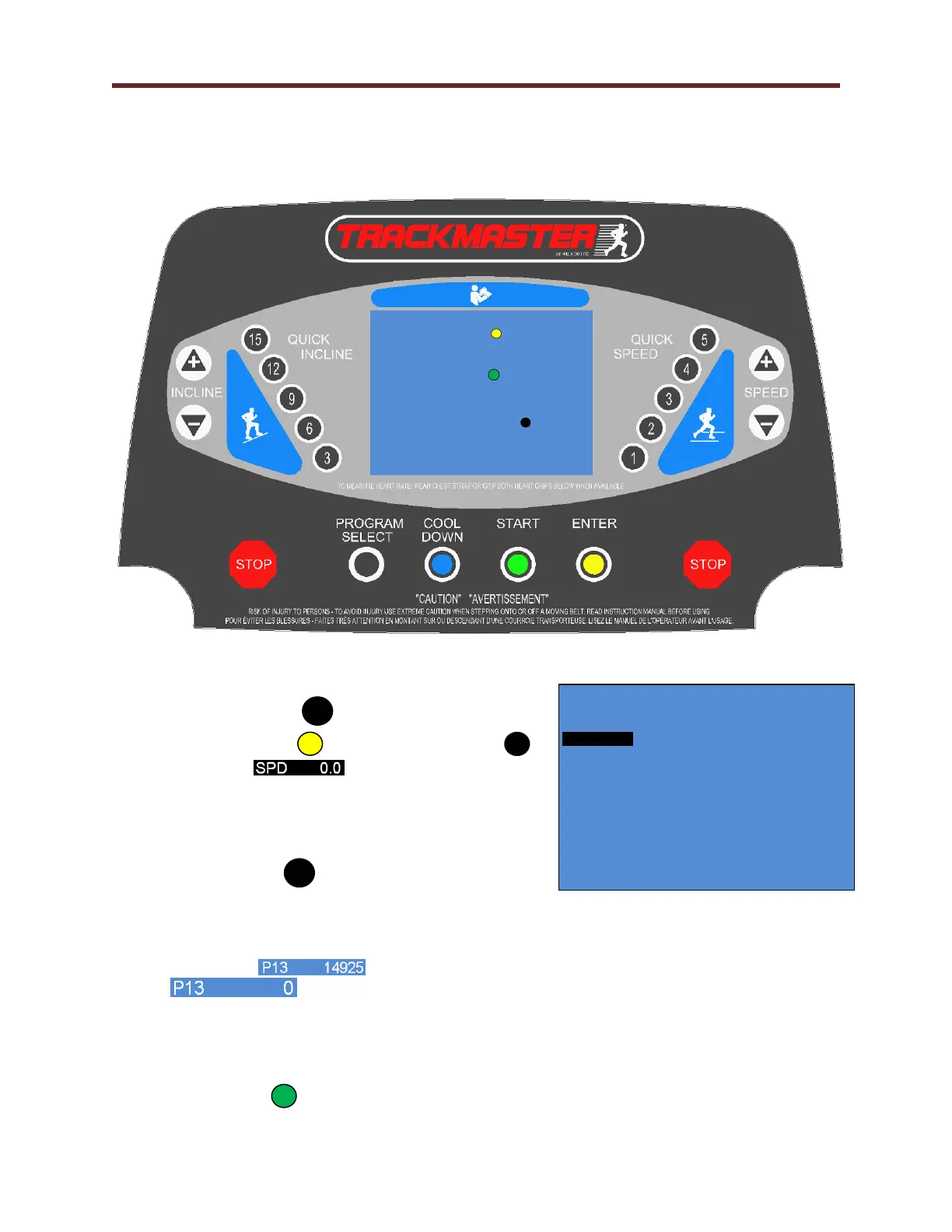
1. To gain access to the parameter screen, hold down
on QUICK SPEED for approximately 4 seconds.
2. Using the ENTER or PROGRAM SELECT
to highlight .
3. Remove all tools from running belt and stand
clear of running surface.
4. To start the calibration procedure hold down on
QUICK SPEED
5. Observe: Running belt will pause for approx. 8 seconds and slowly increase speed establishing
multiple calibration points.
6. When calibration routing is completed and successfully value P13 will automatically update Cal
Speed Fields . When calibration routine fails, value P13 will display
. Consult factory for assistance.
7. At this point, running belt calibration is complete.
8. To set MPH versus KPH, position dip switch 1 when in the “OFF” position, units are set to
English, and in the “ON” position, units are set to Metric.
9. Select START twice to start countdown 3, 2, 1 the running belt will start at .1 MPH.
P R E S S “ E N T E R ” TO I N P U T
U S E R I N F O R M A T I O N
P R E S S “ S T A R T ” T O B E G I N
E X E R C I S E R O U T I N E
P R E S S “ P R O G R A M S E L E C T ” T O B E G I N
P R O G R A M E X E R C I S E R O U T I N E
TMX428 VERSION 0.4
ENTER: NEXT PROG: PREV +- EDIT START: EXIT



 To Next Page