Troubleshooting Ch. 9 TRACKMASTER
78 TMX428 TMX428CP & TMX58 Service Manual 317-160-406 Rev 4
May 2021
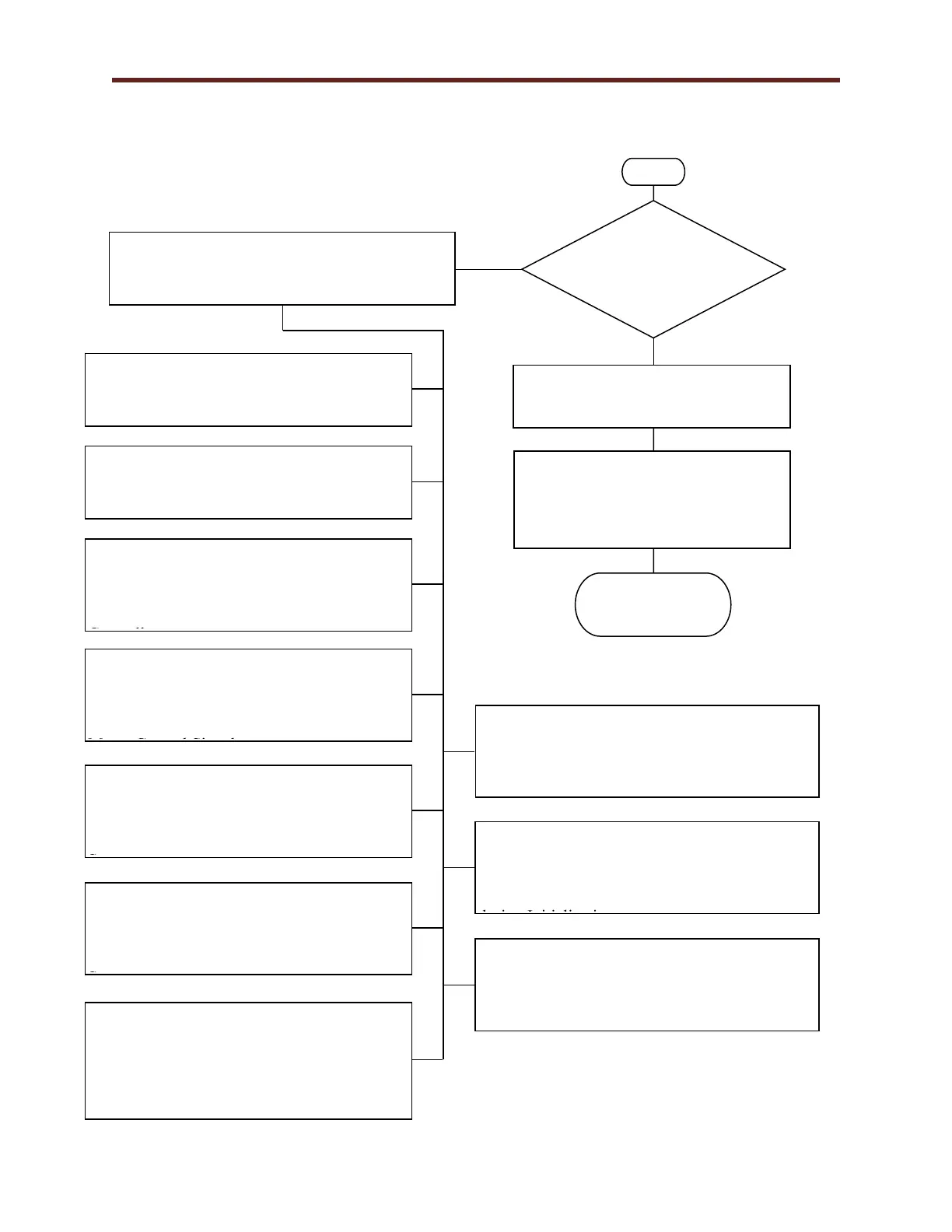
Smart Power Supply Error Code Identification Flow Chart 1I
Is the Red LED D13
flashing on the
Smart Power Supply
FG0495?
Verify the error code by counting the flashes.
The error flashes are very consistent and then a
long pause.
Verify the Emergency Stop Button is
released or Pull Tether missing.
Verify when the Emergency Stop
Button is released the Smart Power
Supply FG0495 initial power-up returns
to the parked position.
Treadmill should
be operational.
Reference Smart Power Supply Error Code 1
Flow Chart 1J “Bad Speed Calibration”.
Reason for error flashes Bad Speed
Calibration.
Reference Smart Power Supply Error Code 2
Flow Chart 1K “Elevation Error”. Reason
for error flashes Elevation Error.
Reference Smart Power Supply Error Code 3
Flow Chart 1L “Missing Speed Signal
From Motor Controller”. Reason for error
flashes Missing Speed Signal from Motor
Controller.
Reference Smart Power Supply Error Code 4
Flow Chart 1M “Over Speed Error Based
on Motor Controller Signal”. Reason for
error flashes Over Speed Error Based on
Motor Control Signal.
Reference Smart Power Supply Error Code 5
Flow Chart 1N “Missing Signal from
External Speed Sensor”. Reason for error
flashes Missing Signal from External Speed
Sensor.
Reference Smart Power Supply Error Code 6
Flow Chart 1O “Over Speed Base On
External Speed Sensor”. Reason for error
flashes Over Speed Bases on External Speed
Sensor.
Reference Smart Power Supply Error Code 7
Flow Chart 1P “Excessive Speed
Mismatch”Reason for error flashes Excessive
Speed Mismatch (Motor Controller Signal VS
External Speed Sensor).
Reference Smart Power Supply Error Code 8
Flow Chart 1Q “Motor Control Reports
Fault”Reason for error flashes Motor Control
Reports Fault.
Reference Smart Power Supply Error Code 9
Flow Chart 1R “Start Belt Command
Received During Initialization”. Reason for
error flashes Start Belt Command Received
during Initialization.
Reference Smart Power Supply Error Code 10.
Consult the factory for trouble shooting.



 To Next Page