TRACKMASTER Ch. 6 Operating Instructions
317-160-406 Rev 4 TMX428 TMX428CP & TMX58 Service Manual 47
May 2021
BUILT-IN PROGRAM OPERATION
There are 10 pre-programmed workouts within the control. Select from (5) Pre-Programmed
protocols and (5) interval training routines. To access these programs, complete the following
steps: The following (5) Pre-Programmed Protocols are explained here.
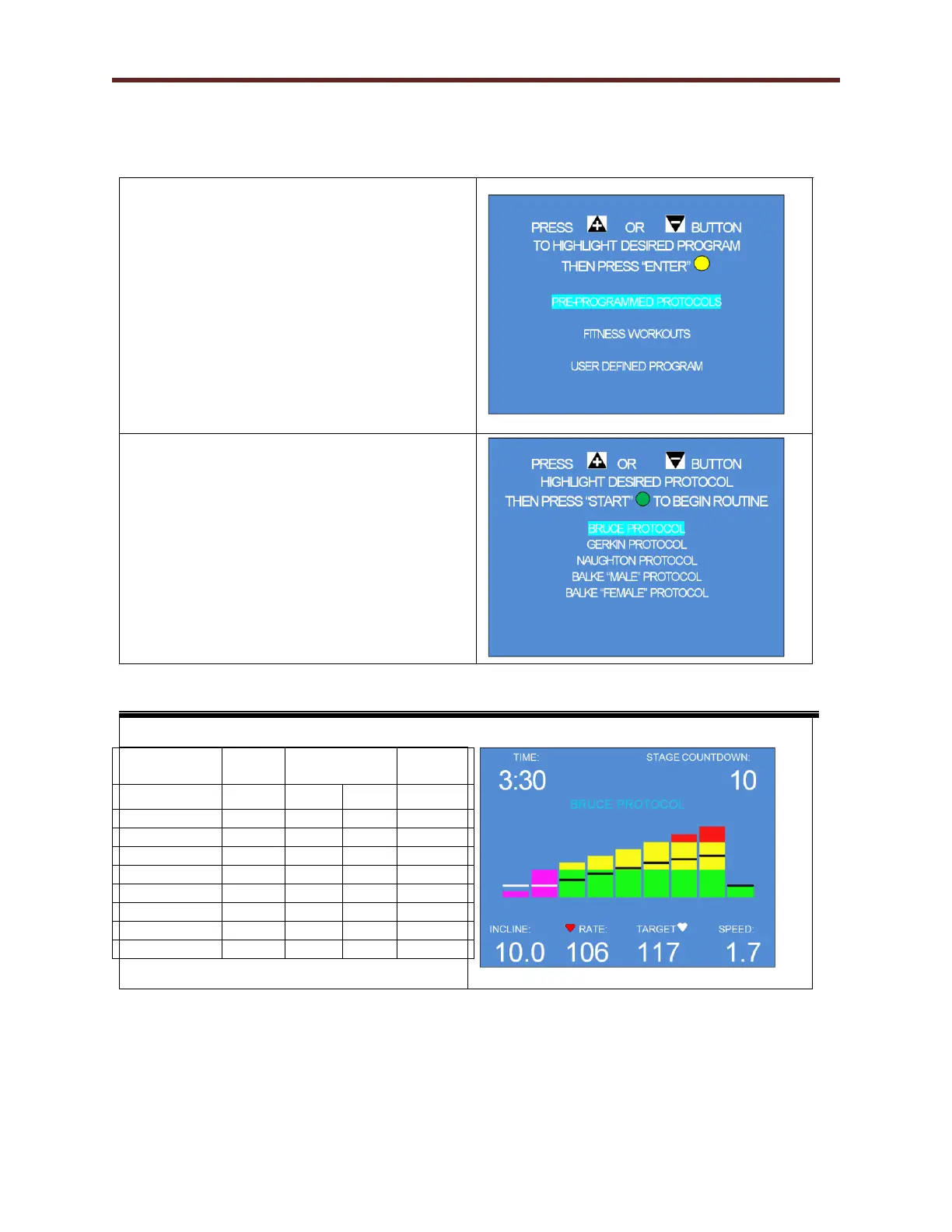
15. In Step 3, the user selected the PROGRAM
SELECT button to access Built-In program
routines. This screen requires the user to
select either Pre-Programmed Protocols,
Fitness Interval workouts, or to define a
custom workout by utilizing the + - buttons.
When the desired program is highlighted,
press the Yellow Enter button to select. If the
user selects Fitness Workouts, go to Step 17.
If the user selects the User Defined Program
go to Step 19.
16. Press the + or – button until the desired
Protocol is selected. When the desired
program is highlighted, press the Green
Start button to start routine. The detailed
description for each Pre-Programmed
Protocolbelow.
Pre-Programmed Protocol Workout Data



 To Next Page