Operating Instructions Ch.6 TRACKMASTER
46 TMX428 TMX428CP & TMX58 Service Manual 317-160-406 Rev 4
May 2021
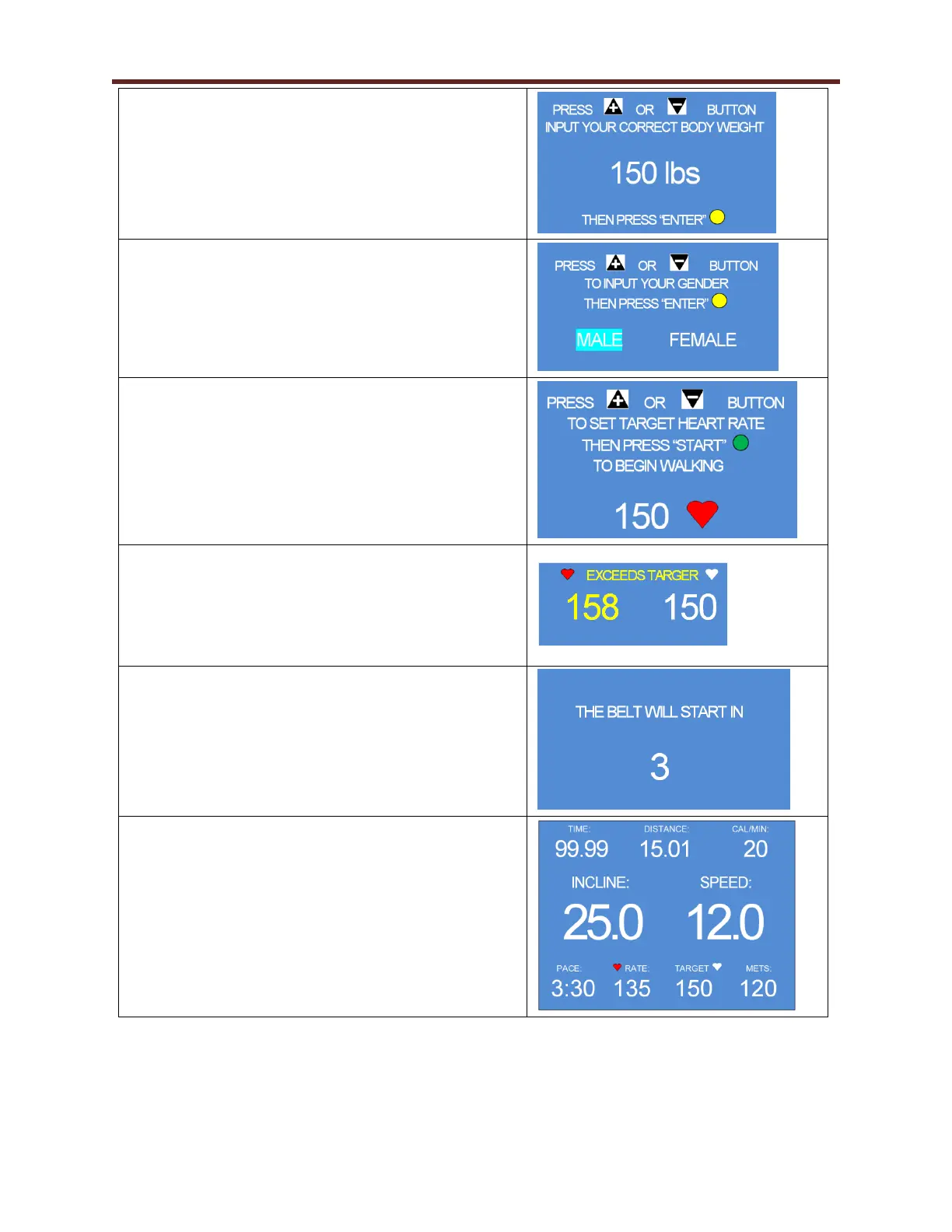
6. Press the + or – button until the desired weight
appears on the screen.
7. Press the ENTER button to continue.
8. Press the + or – button until the correct gender
appears on the screen.
9. Press the ENTER button to continue.
10. Press the + or – button until the desired heart rate
appears on the screen.
11. Press START to begin walking.
NOTE: The target heart rate function is only available
through the use of a wireless chest strap or pulse rate
watch monitoring device.
NOTE: If the user exceeds the stated heart rate target,
the screen will flash a warning that the target heart rate
has been exceeded. The treadmill, however, will not
stop. It is the responsibility of the user to take further
action.
12. Upon pressing the START button in step 11, the
screen will advise that the belt will start in a
countdown of 3 as shown at the right.
13. After the belt begins to move, elevation and speed
control is available through the use of the + / - keys
as well as the quick speed keys on the console.
14. Press the STOP key to immediately stop your
workout or press the COOL DOWN key to slowly
decelerate the belt to a stop.



 To Next Page