TRACKMASTER Ch. 9 Troubleshooting
317-160-406 Rev 4 TMX428 TMX428CP & TMX58 Service Manual 89
May 2021
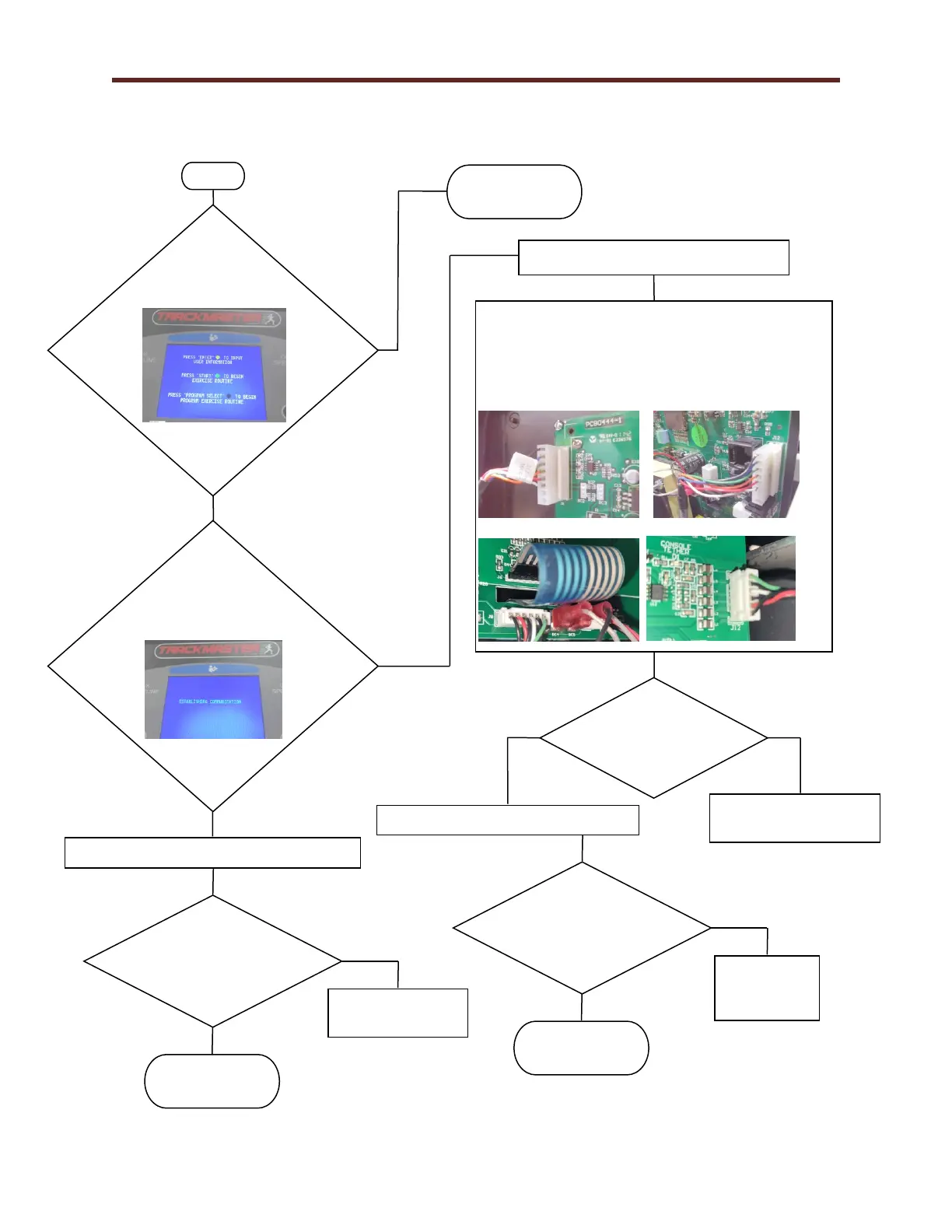
Control Console Communication Flow Chart 1S
Do you see the Welcome
screen?
Treadmill should
be operational.
Verify the harness between LCD Screen J8 connector
and Smart Power Supply FG0495 J12 connector is
properly connected. Inspect cable to see if damaged or
loose connector.
LCD Screen FG0496 (3
rd
Edition)
LCD Screen FG0698 (4
th
Edition)
Did the Welcome
screen appear?
Is the screen displaying
ESTABLISHING
COMMUNICATION?
Verify the Emergency Stop Button is released.
Treadmill should
be operational.
Replace LCD Screen
417-160-017
Turn the treadmill power switch OFF (O).
Turn the treadmill power switch ON (-).
Replace Communication
Cable 317-160-264
Is the RS232 or
USB Interface
cable damaged?
Did the Welcome
screen appear?
Treadmill should
be operational.
Replace Smart
Power Supply
317-160-199



 To Next Page