EasyManua.ls Logo

Valleylab Force FX-C - Correcting Malfunctions

Valleylab Force FX-C
214 pages
Print Icon
To Next Page IconTo Next Page
To Previous Page IconTo Previous Page
Loading...
Correcting
Malfunctions
Correcting
Malfunctions
Situation
Generator
does
not
respond
when
turned
on.
6-4
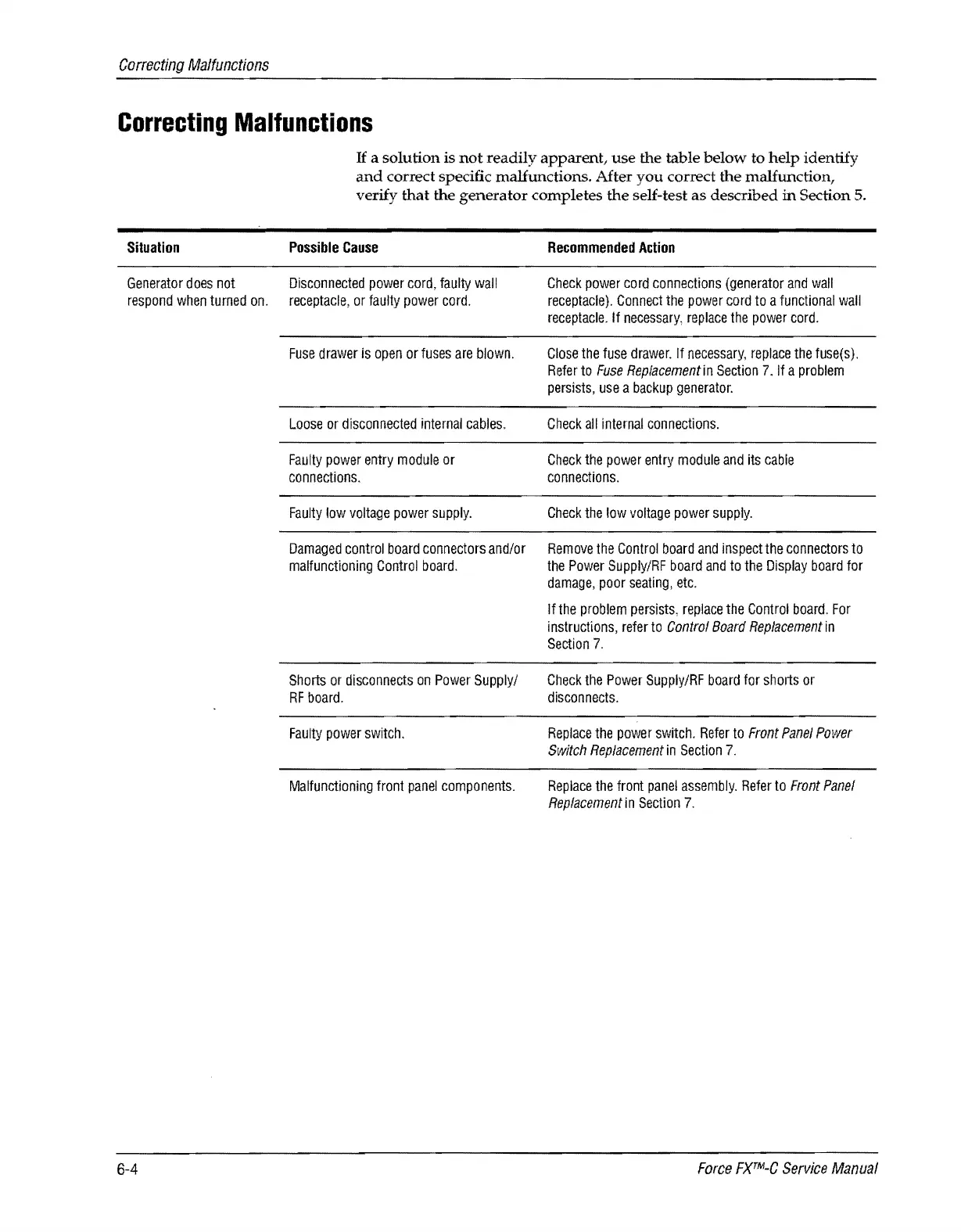
If
a solution is
not
readily
apparent,
use
the table
below
to
help
identify
and
correct specific malfunctions. After
you
correct
the
malfunction,
verify
that
the
generator
completes
the
self-test
as
described
in
Section 5.
Possible
Cause
Disconnected
power
cord,
faulty
wall
receptacle,
or
faulty
power
cord.
Fuse
drawer
is
open
or
fuses
are
blown.
Loose
or
disconnected
internal
cables.
Faulty
power
entry
module
or
connections.
Faulty
low
voltage
power
supply.
Damaged
control
board
connectors
and/or
malfunctioning
Control
board.
Shorts
or
disconnects
on
Power
Supply/
RF
board.
Faulty
power
switch.
Malfunctioning
front
panel
components.
Recommended
Action
Check
power
cord
connections
(generator
and
wall
receptacle).
Connect
the
power
cord
to
a
functional
wall
receptacle.
If
necessary,
replace
the
power
cord.
Close
the
fuse
drawer.
If
necessary,
replace
the
fuse(s).
Refer
to
Fuse
Replacement
in
Section
7.
If
a
problem
persists,
use
a
backup
generator.
Check
all
internal
connections.
Check
the
power
entry
module
and
its
cable
connections.
Check
the
low
voltage
power
supply.
Remove
the
Control
board
and
inspect
the
connectors
to
the
Power
Supply/RF
board
and
to
the
Display
board
for
damage,
poor
seating,
etc.
If
the
problem
perSists,
replace
the
Control
board.
For
instructions,
refer
to
Control
Board
Replacement
in
Section
7.
Check
the
Power
Supply/RF
board
for
shorts
or
disconnects.
Replace
the
power
switch.
Refer
to
Front
Panel
Power
Switch
Replacement
in
Section
7.
Replace
the
front
panel
assembly.
Refer
to
Front
Panel
Replacement
in
Section
7.
Force
FXTM-C
Service
Manual

Table of Contents

Related product manuals