EasyManua.ls Logo

Valleylab Force FX-C - Monopolar Cut Controls 2·5

Valleylab Force FX-C
214 pages
Print Icon
To Next Page IconTo Next Page
To Previous Page IconTo Previous Page
Loading...
Monopolar
Cut
Controls
Monopolar
Cut
Controls
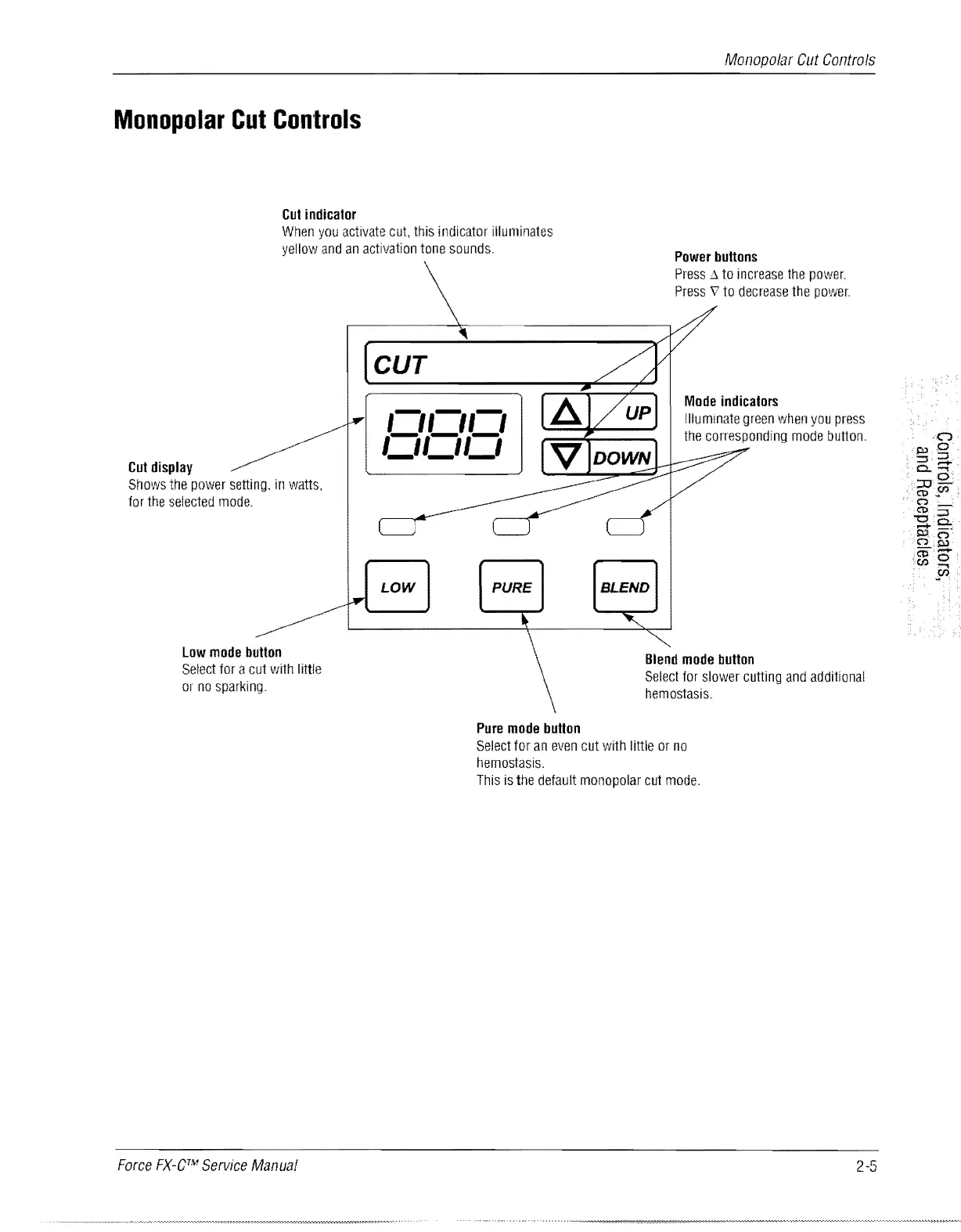
Cut
indicator
When
you
activate
cut,
this
indicator
illuminates
yellow
and
an
activation
tone
sounds.
Power
buttons
Cut
display
Shows
the
power
setting.
in
watts,
for
the
selected
mode.
Low
mode
button
Select
for
a
cut
with
little
or
no
sparking.
Force
FX-CTM
Service
Manual
CUT
Press
.6.
to
increase
the
power.
Press
v
to
decrease
the
power.
Mode
indicators
C/CICI
'_1'_1'_1
Illuminate
green
when
you
press
the
corresponding
mode
button.
LOW
PURE
BLEND
Blend
mode
button
Select
for
slower
cutting
and
additional
hemostasis.
Pure
mode
button
Select
for
an
even
cut
with
little
or
no
hemostasis.
This
is
the
default
monopolar
cut
mode.
2-5

Table of Contents

Related product manuals