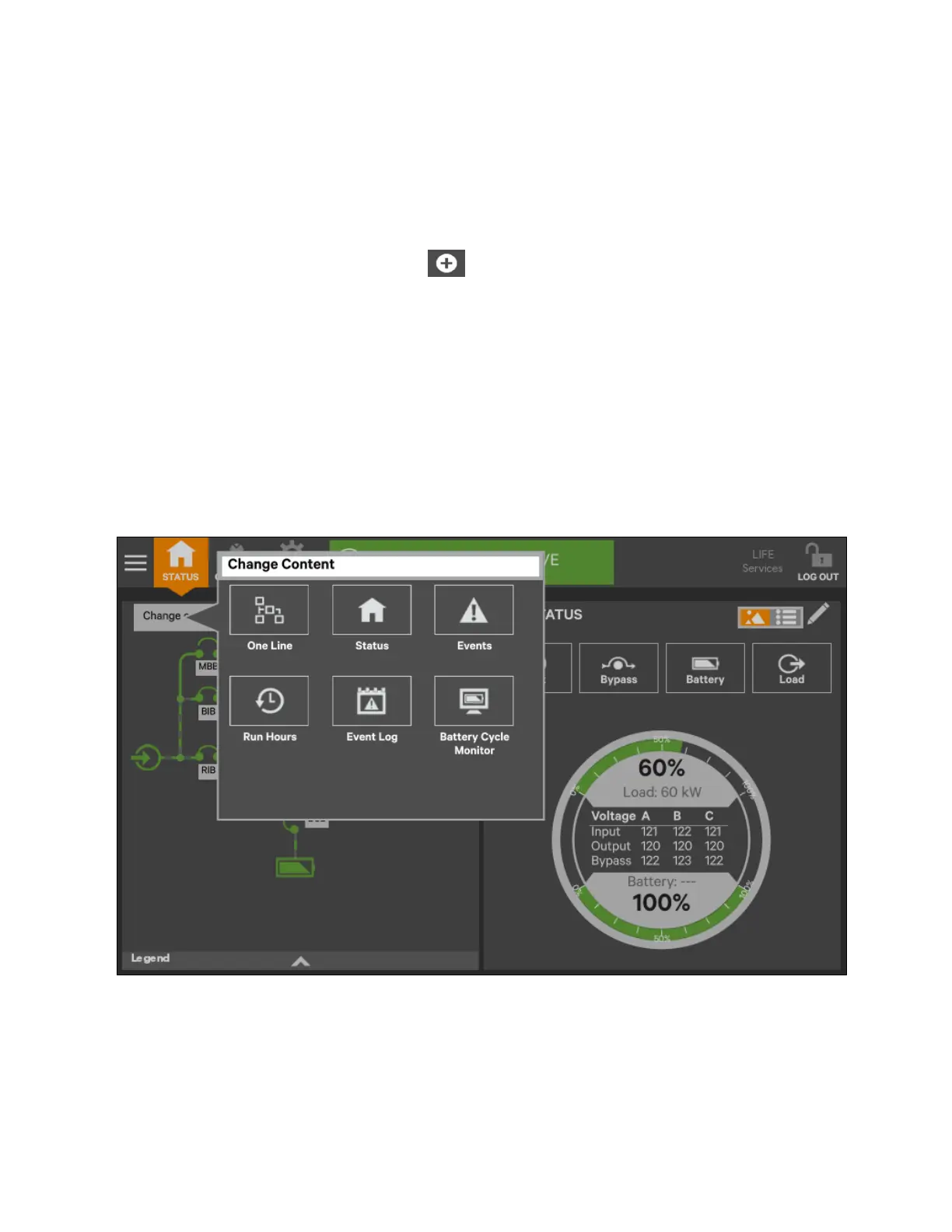
3. To change the UNIT STATUS data displayed in panel:
a. Touch the Edit icon on the UNIT STATUS panel and hold it until the Change Content button and X’s
appear beside the parameters.
b. Touch the X beside the parameter to be removed from the panel. The Add Parameter icon (+) will appear
in the panel if another parameter can be added. The number of parameters possible is based on whether
the Status Gauge is showing.
c. Touching the Add Parameter icon brings up a window to add parameters not already shown on the
UNIT STATUS panel.
d. Touch a parameter’s icon to add it to the UNIT STATUS panel.
4. To resize or remove a panel, touch and hold the Edit icon again while the Change content button is displayed.
5. Release the icon. Resize handles will appear around the panel and a large X will appear at the top right corner.
6. Pull on a handle to resize the panel, or touch the large X to delete the panel.
7. To rearrange the panels, with the resize/remove handles visible, touch the circle in the center of the panel and
drag the panel to its new position.
8. To exit edit mode, it will deactivate after some changes. If all changes have been made and Edit Mode is active,
touch the panel’s header area.
Figure 5.13 Change Panel Content or Resize/Remove a Panel
66 Proprietary and Confidential ©2023 Vertiv Group Corp.
5 Operator Control and Display
Panel
Vertiv™ Liebert® APM2 30 to 120 kVA Modular UPS User Manual















 To Next Page