SHB 803 en – Edition 2.4 * 803s510.fm 5-17
Hydraulic system
5.7 Mechanical control
All hydraulic functions of the 803 are controlled mechanically.
Accessing the elements of the mechanical pilot control requires
removing the plastic trims – see chapter 5.9 Plastic trims on page 5-22.
Control levers (up to serial no. AI00814)
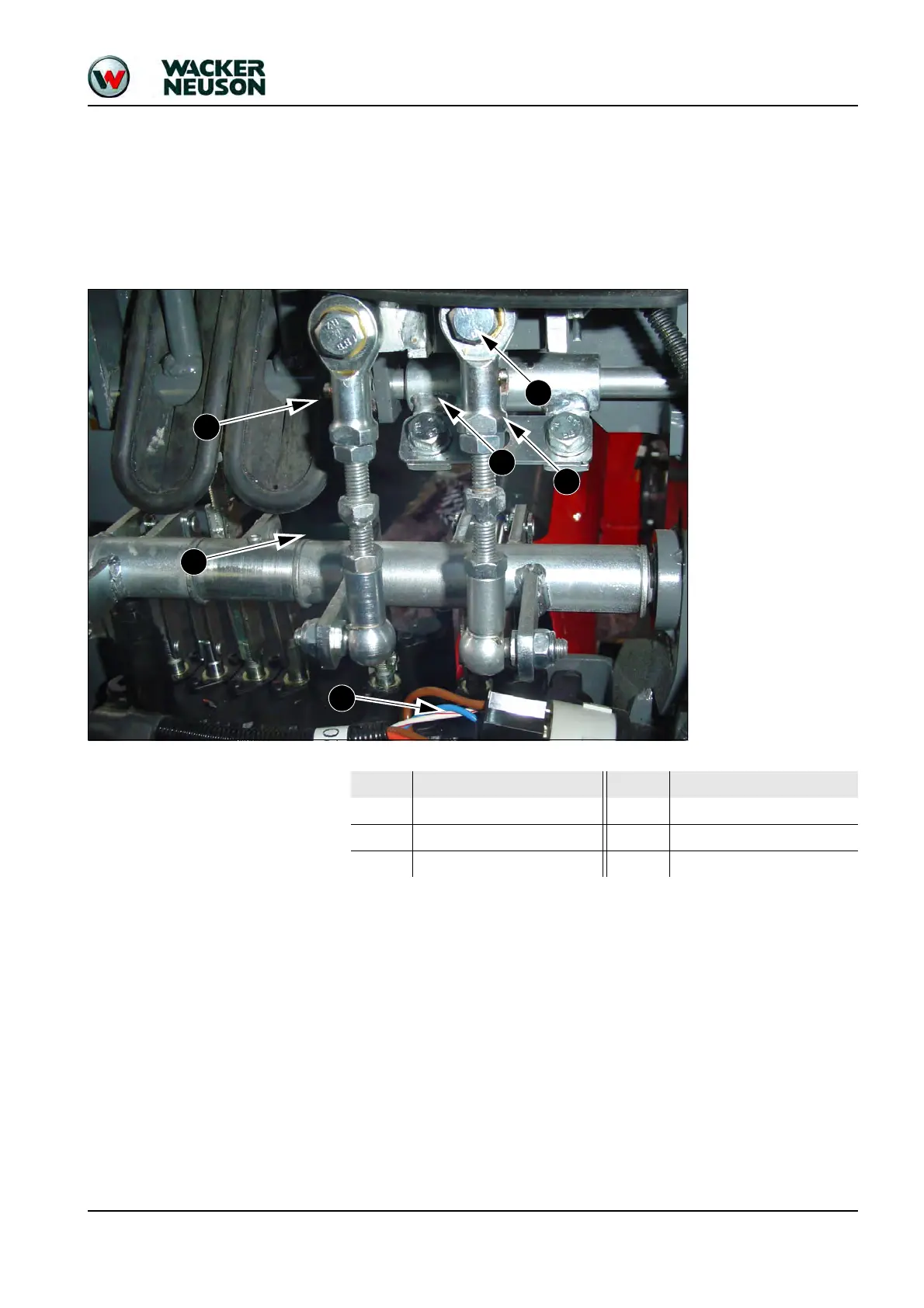
Setting the control levers
☞Replacing damaged elements requires setting the control levers again.
☞Enable and disable the lock and watch the control levers as you do so.
☞Once the lock is disabled, the control levers automatically return to their neutral posi-
tions if they are not set correctly.
☞The position of the control levers can be modified by means of the adjustment linkage,
so that the control levers remain in their positions when disabling the lock.
☞Check for correct setting.
Pos. Connection Pos. Connection
1 Adjustment linkage 4 Boom rocker
2 Bucket segment rocker 5 Lock
3 Control lever 6 Preheating start switch







 To Next Page