EVALUATION MODE OTHER MODES OF OPERATION
134
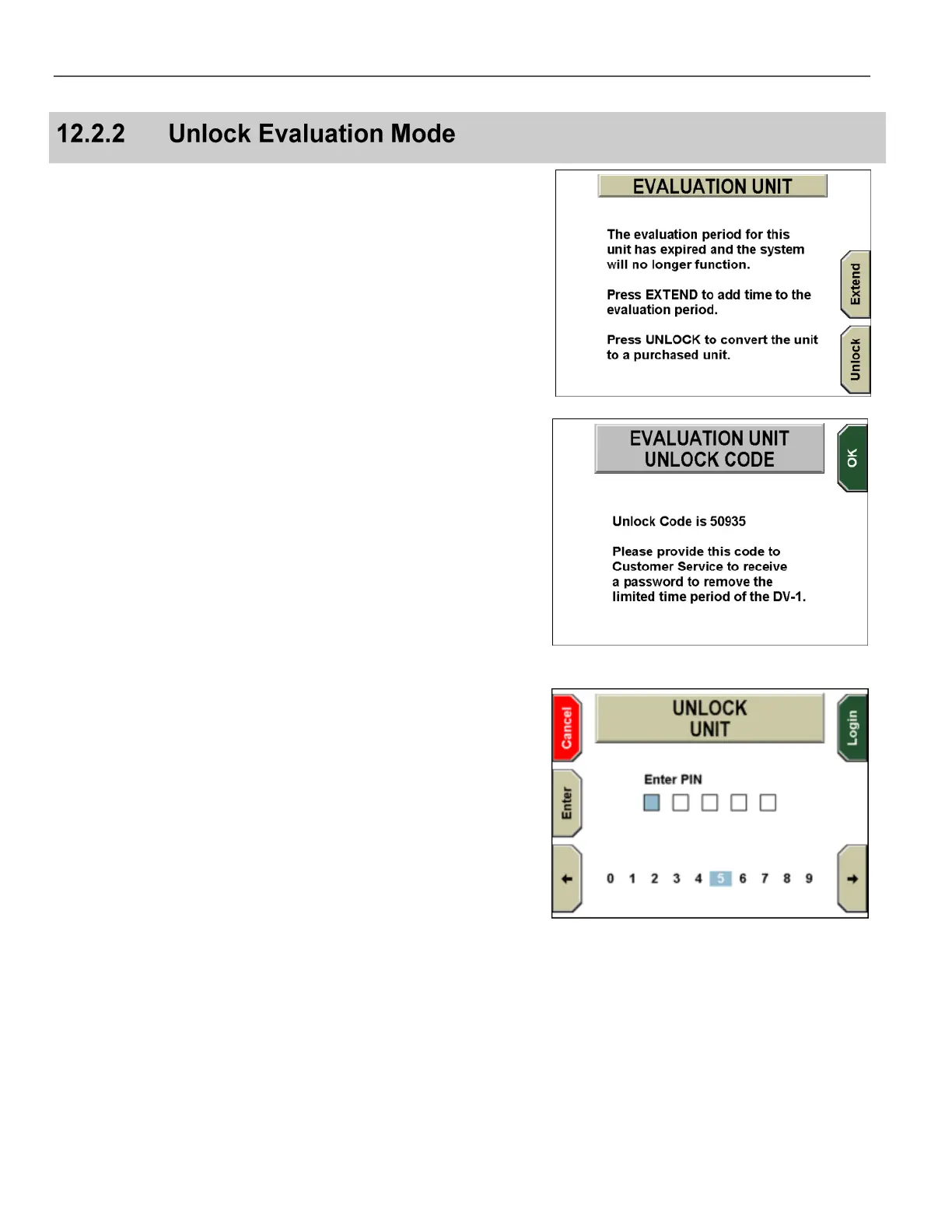
Press Unlock on the EVALUATION UNIT screen to start the
process to convert the Evaluation DV-1 unit to a fully functional unit.
The EVALUATION UNIT UNLOCK CODE screen is displayed.
Note the Unlock Code, then call WatchGuard Video Customer
Service to request that the Evaluation unit be unlocked to convert it
to a fully functional unit.
Give the Unlock Code to the customer service representative. The
representative will give you a four- or five-digit Unlock Unit PIN.
Press the OK key.
The UNLOCK UNIT screen is displayed.
Use the arrow keys to move to a digit in the PIN, then press the
Enter key. Repeat as necessary to enter the entire PIN.
If the PIN has five digits, the Login key is pressed automatically
after you enter the last digit.
If the PIN has four digits, press the Login key after you enter the
fourth digit.
The Evaluation DV-1 unit has been successfully converted to a fully
functional unit. The EVALUATION UNIT challenge screen will no
longer be displayed at the beginning of the boot process.



 To Next Page