DETAILED DV-1 OPERATION FRONT PANEL CONTROLS
59
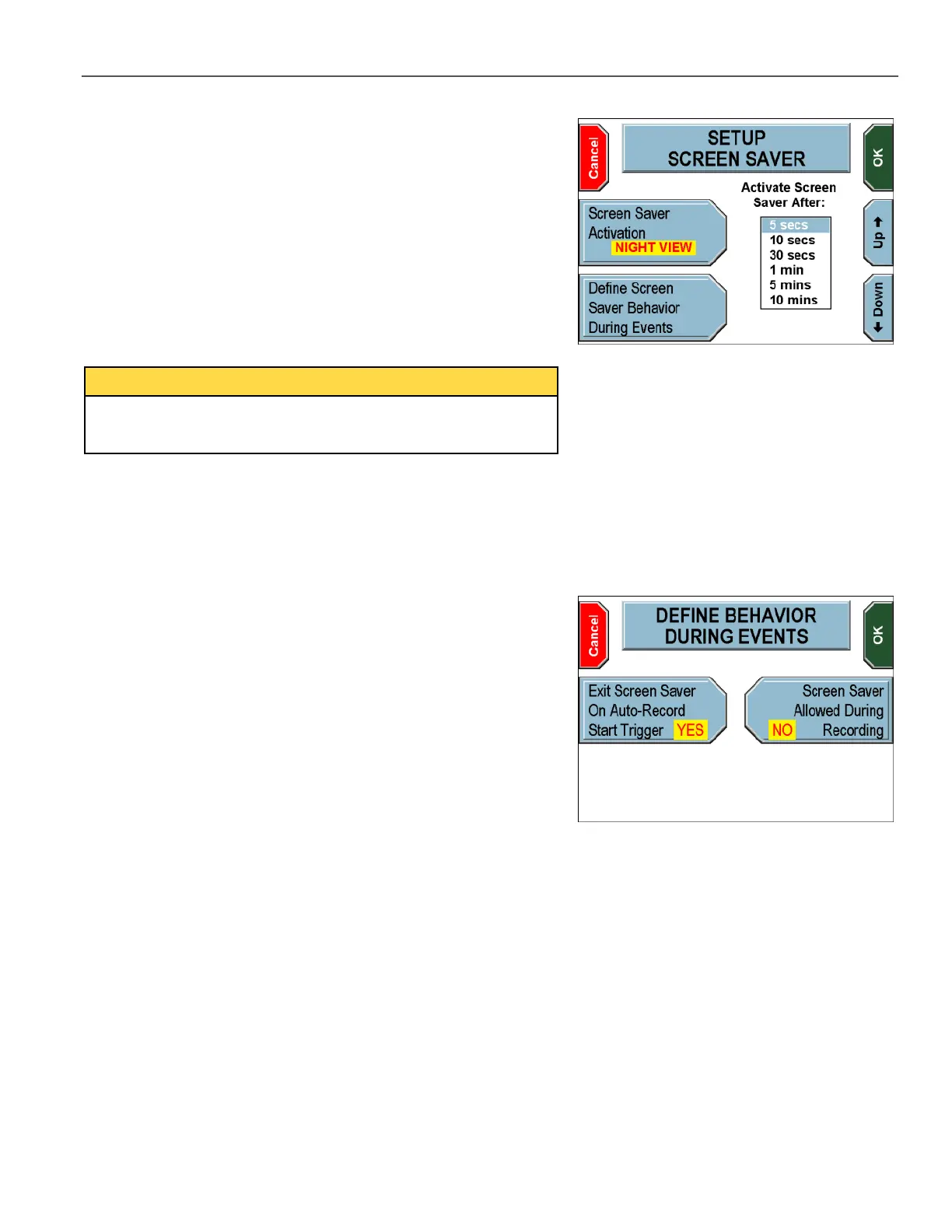
Press the Screen Saver Activation key until NIGHT VIEW is
displayed, to configure the screen saver to activate only during night
view mode (night only), after the specified time interval.
Press the Up and Down keys to set the desired amount of time
until the screen saver activates at night.
Press OK to confirm, or Cancel to exit without making changes.
Users cannot configure different screen-saver behavior for day and
night modes. The only options are never active, active all the time,
or active only at night.
Press the Define Screen Saver Behavior During Events
key to define how the screen saver behaves when a trigger causes a
recording to start.
The DEFINE BEHAVIOR DURING EVENTS screen is displayed.
Press the Exit Screen Saver On Auto-Record Start
Trigger key to indicate whether the unit automatically exits the
screen saver when a recording is triggered. Selecting YES causes
the screen saver to deactivate when a recording is triggered.
Selecting NO keeps the screen saver active even though a recording
has been triggered.
Press the Screen Saver Allowed During Recording key to
indicate whether an active screen saver is allowed while the unit is
recording. Selecting YES allows the screen saver to activate while
the unit is recording. Selecting NO causes the screen saver to NOT
activate while the unit is recording.
Press OK to confirm, or Cancel to exit without making changes.



 To Next Page