2-30 Installing the Detector
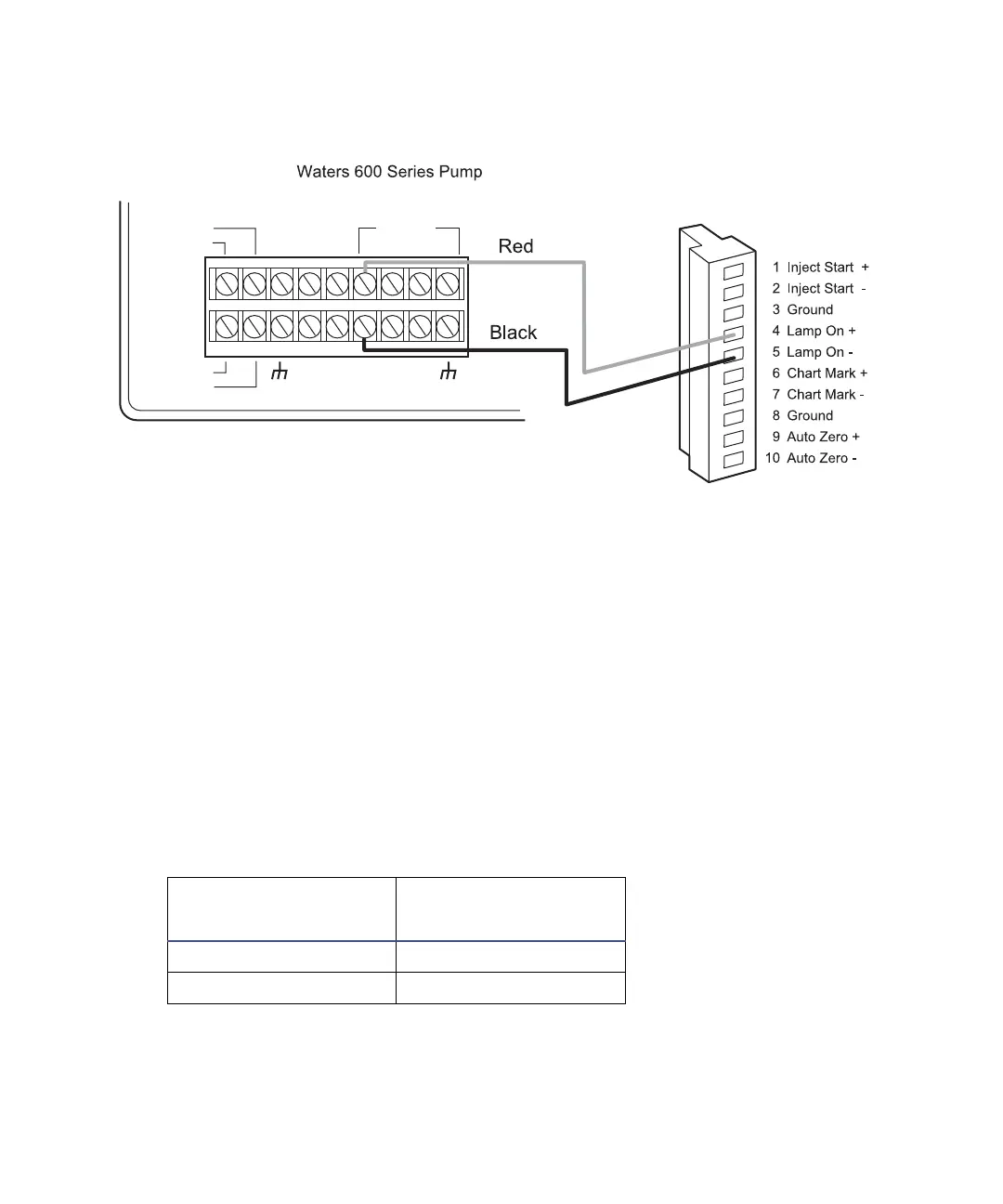
Pump lamp on/off connections
Auto Zero connections
To make Auto Zero connections between the detector and the pump:
1. Using a signal cable, make the connections between the detector and the
pump that are summarized in the table and illustrated in the figure
below.
2. Program the pump to provide a pulse output on the applicable switch
(S1, S2, or S4) at the beginning of each run. Refer to the Waters 600E
Multisolvent Delivery System User’s Guide, Section 5.1.2, for more
details.
Pump and detector Auto Zero connections
Waters 2489 Detector
(II)
Waters 600 Series
Pump Terminal
Pin 9 Auto Zero + S1, S2, or S4
Pin 10 Auto Zero – GND (one of four)
II
Waters 2489
TP01489
INJECT
STOP
FLOW
HOLD
S1
S2
S3
S4
SWITCHES
CHART +
PRESSURE +
CHART
_
PRESSURE
_
GND
GND
GND
GND
AUX.
+12V



 To Next Page