Connecting to other devices 2-23
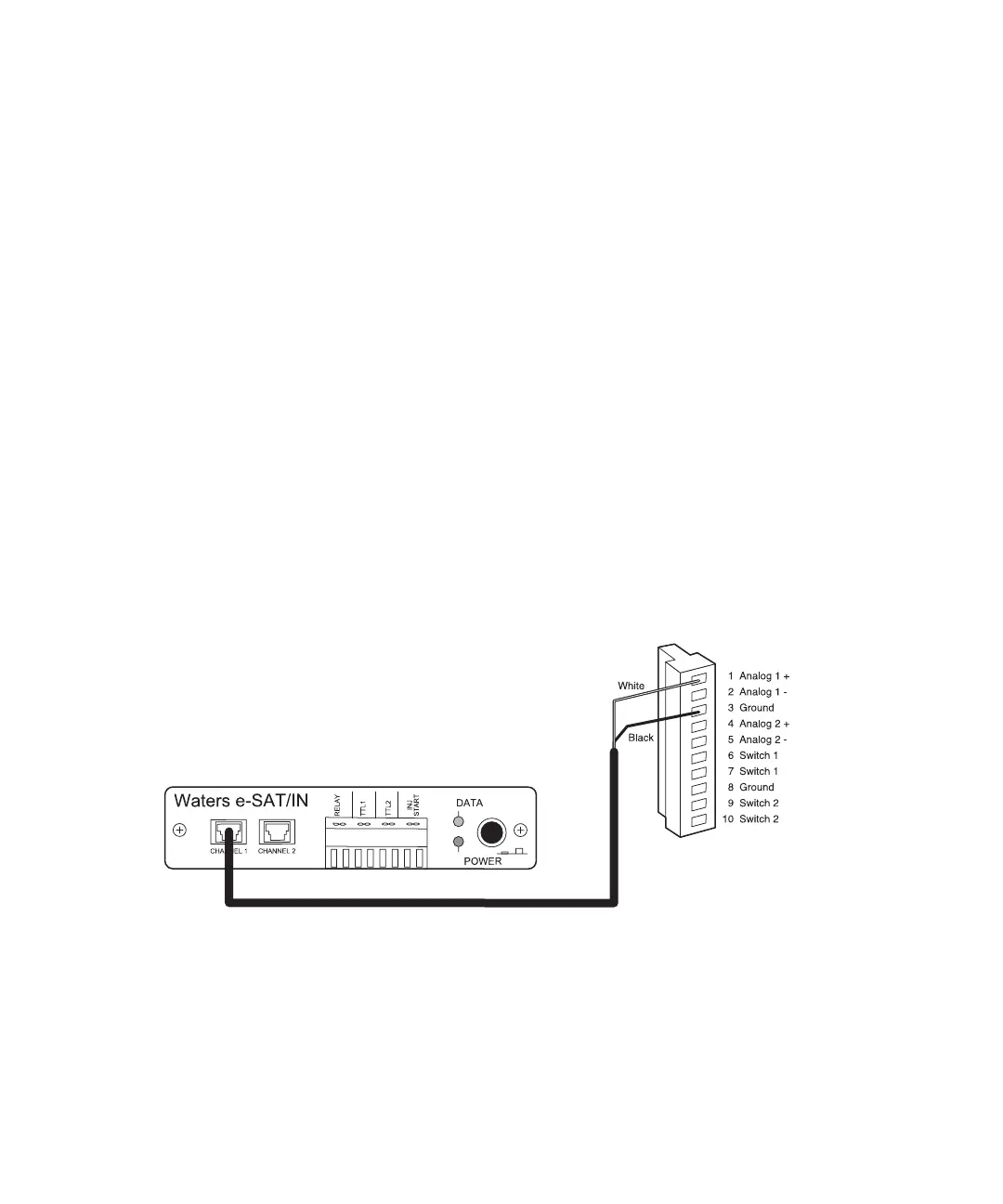
Connecting the detector to the e-SAT/IN module
The e-SAT/IN module connects to the detector through the B (inputs and
outputs) terminal on the rear panel of the detector, as shown in the figure
below.
To connect the detector to the e-SAT/IN module:
1. Using the electrical insulation stripping tool, strip off about 3 mm (1/8
inch) from one end of the e-SAT/IN 9-pin connector, exposing the white
and black wires.
2. Connect the other end of the cable to either the Channel 1 or Channel 2
connectors on the front panel of the e-SAT/IN module.
3. For Channel 1:
a. Connect the white wire to pin 1 on I (Analog 1 +).
b. Connect the black wire to pin 3 on I (Ground).
e-SAT/IN module Channel 1 connection to detector
4. For Channel 2:
a. Connect the white wire to pin 4 on I (Analog 2 +).
b. Connect the black wire to pin 8 on I (Ground).
Waters 2489
(I)



 To Next Page