CHAPTER 6 - DETAILED PARAMETER DESCRIPTION
124
Range
[Factory Setting]
Parameter Unit Description / Notes
NOTES!
1. Use a digital input set to "General Enable" to stop the motor
without braking.
2. Useonedigitalinputsetto"BrakingO",forextrasafety,
for monitoring the real motor standstill and disables the
braking immediately.
3. For high inertia loads it is recommended to use a PTC
motor input.
4. It is not recommended to use Optimal Braking with two and
eight pole motors.
5. See parameters: P266, P267, P268, P500, P501, P502,
P503 and see the recommended set-up at items 3.3 and
3.3.10.
“DC-Braking”
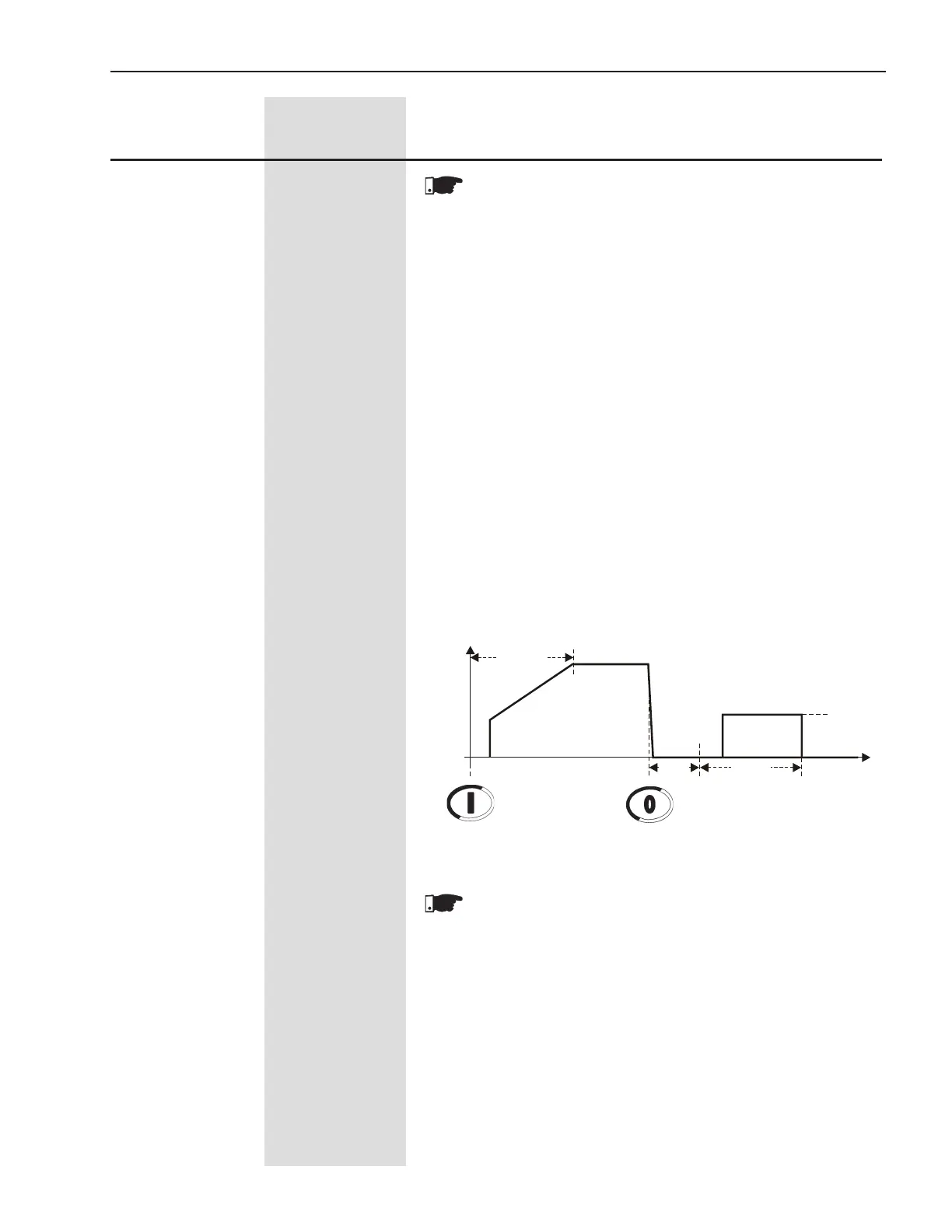
Thisisanoldandecientmethodtostopveryhighinertialoads.
The direct current is applied all the time until the motor stops.
One contactor is needed to short-circuit the output lines U and V.
ThemethoddiersfromSSW-03andSSW-04.
The necessary current to stop the motor is very high and continuously
applied.
It is not compatible with the Soft-Starter SSW-06 inside delta motor
connection.
Figure 6.21 - DC-Braking
NOTES!
1. Use a digital input set to "General Enable" to stop the motor
without braking.
2. Useonedigitalinputsetto"BrakingO",forextrasafety,
for monitoring the real motor standstill and disabling the
braking immediately.
3. It is recommended to use a PTC motor input.
4. See parameters: P266, P267, P268, P277, P278, P279,
P500, P501, P502, P503 and see the recommended set-up
at items 3.3 and 3.3.11.
Start
U(V)
100%Un
Enable Disable
P502
t(s)
P501
DC-BrakeRLX
Closed
1s
0
Rotation direction K1 closed


 To Next Page