Creating / Deleting / Changing a Mailbox
Xerox 6204 Wide Format Solution 91
Scan
4
Creating / Deleting / Changing a Mailbox
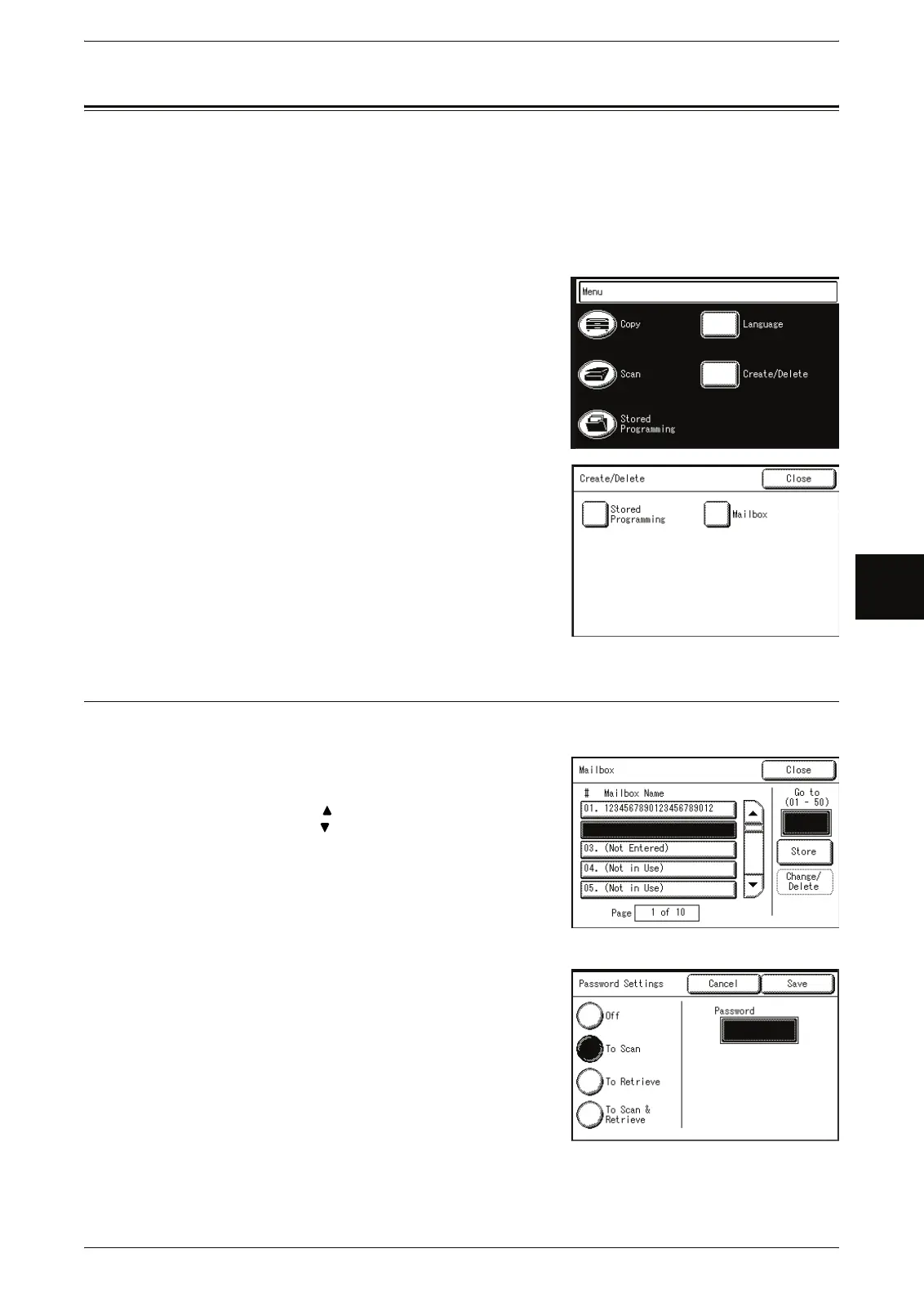
You can set the following items on the [Create/Delete] screen for a mailbox:
Creating a Mailbox..................................................................................................................... 91
Deleting a Mailbox..................................................................................................................... 93
Changing Mailbox Settings........................................................................................................ 94
1 Press the <Menu> button.
2 Select [Create/Delete].
3 Select [Mailbox].
Creating a Mailbox
You can create up to 50 mailboxes.
1 Select a number not in use, and then select
[Store].
Note • Select [ ] to display the previous screen and
select [ ] to display the next screen.
• By entering a two-digit number in [Go To] using
the numeric keypad, you can specify the
mailbox directly.
2 Enter the correct password, the select [Save]..



 To Next Page
 Loading...