8-22
–+
ELEC
E
ELECTRICAL ANALYSIS
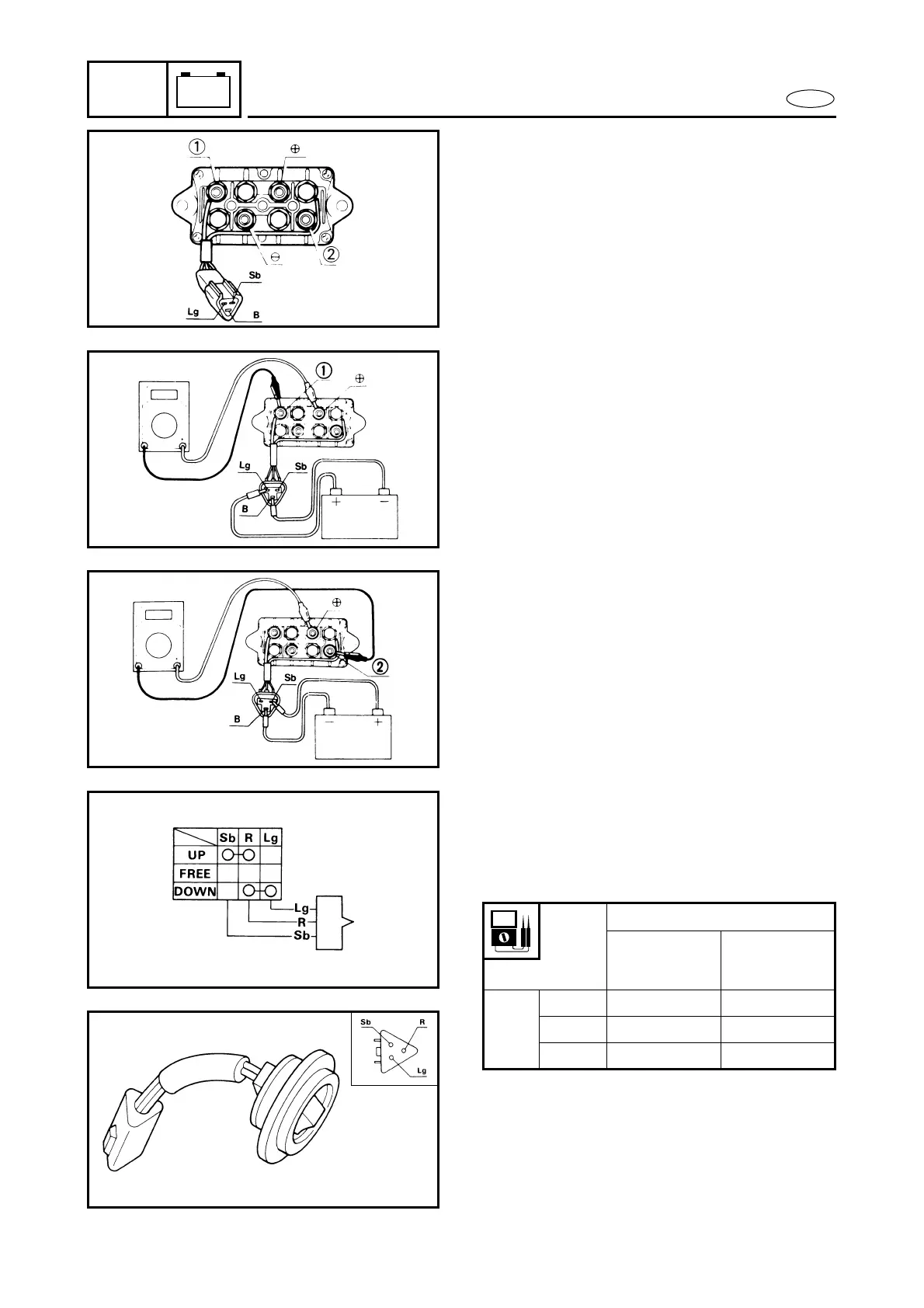
3. Connect the (–) terminal and 1 terminal
and the (–) terminal and 2 terminal to
the tester and check the continuity in
each case.
Sb : Sky blue
Lg : Light green
B : Black
4. Connect the black terminal to the (–) ter-
minal of the battery and the light green
terminal to the (+) terminal of the bat-
tery. Then, connect the (+) terminal and
1 terminal to the tester and check the
continuity.
5. Connect the black terminal to the (–) ter-
minal of the battery and the sky-blue
terminal to the (+) terminal of the bat-
tery. Then, connect the (+) terminal and
2 terminal to the tester and check the
continuity.
M56100-0
TRAILER SWITCH
1. To see that there is continuity, push the
switch.
Unit: Ω
2. Check rubber seal.
Replace the seal if it has any damage.
Checking leads
Sky blue
|
Red
Light green
|
Red
Switch
Position
UP Continuity Discontinuity
FREE Discontinuity Discontinuity
DOWN Discontinuity Continuity



 To Next Page