OPERATION
Carl Zeiss Operating the motorized microscope via the touchscreen of the TFT display Axio Imager
120 430000-7344-001 M70-2-0020 e 06/2009
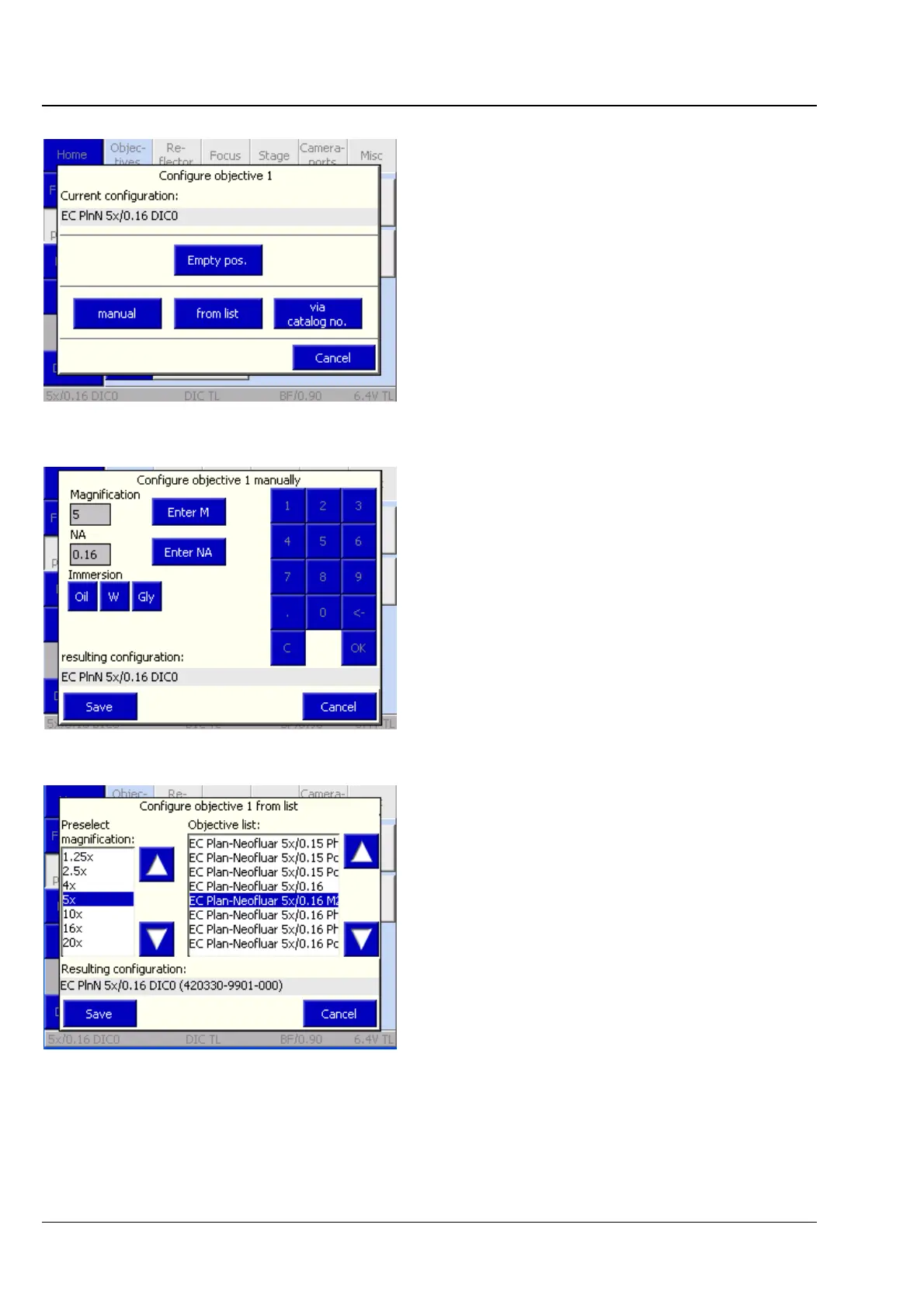
In the Configure Objective # popup window, you
can choose among various options:
− Empty position button
Deletes the existing objective configuration at
the position currently selected. Acknowledge
the safety query with Yes.
− Manual button
The user must enter magnification, numerical
aperture (NA) and immersion on his / her own.
(See
Fig. 4-57.)
To execute the configuration procedure, press
the Save button. To abort the procedure, press
the Cancel button.
− From list button
The user chooses an appropriate objective from
the Preselect Magnification list and the
Objective list
(
Fig. 4-58).
To execute the configuration procedure, press
the Save button. To abort the procedure, press
the Cancel button.
Several DIC prisms / sliders are allocated to
some of the objectives suitable for differential
interference contrast (DIC). Such allocation is
executed when the selection of the objective is
acknowledged.
Fig. 4-56 Microscope -> Settings ->
Components -> Configure objective
Fig. 4-57 Configuring objective manually
Fig. 4-58 Configuring of objective from list








 To Next Page