Camera and Video 99
1.
Fromthehomescreen,touch >Gallery .
2. Touchanalbumcontainingavideoyouwanttowatch,andthentouchthevideothumbnailto
seeitinfullscreen.
3.
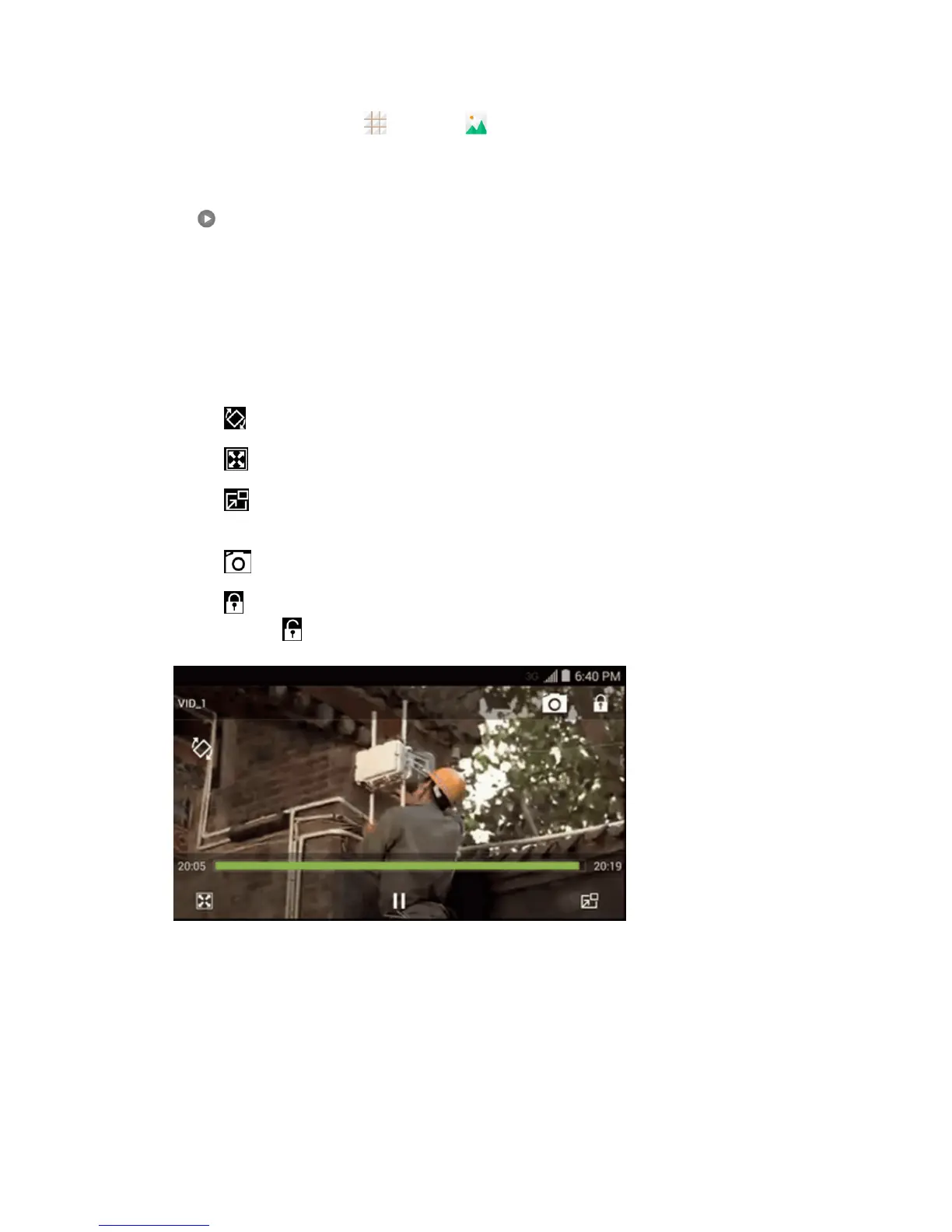
Touch toplaythevideo.WhenplayingitinVideoplayer,youcanusethefollowingcontrols.
l Usetheonscreencontrolstoplay,pause,orjumptoanypartofthevideo.
l Toadjustthevolume,slideupordownontherightsideofthescreenorpresstheVolume
Button.
l Toadjustthescreenbrightness,slideupordownontheleftsideofthescreen.
l Tocontrolplaybackprogress,slideleftorrightonthescreen.
l
Touch torotatethevideo.
l
Touch toadjustthescreenmode.
l
Touch toplaythevideoinapop-upwindowwhileyoucanstillusethephone'sother
functions.
l
Touch tosavethecurrentvideoframeasapicture.
l
Touch tohidetheonscreencontrols,sothattheydonotappeareverytimeyoutouchthe
screen.Touch todisplaythemagain.
Work with Pictures
Whenyou’rebrowsingpicturesintheGalleryapplication,youcantouchthescreentodisplay
optionsandchoosetoeditthepicture,rotateit,andmore.


 To Next Page