5
33
5- Sensors and actuators
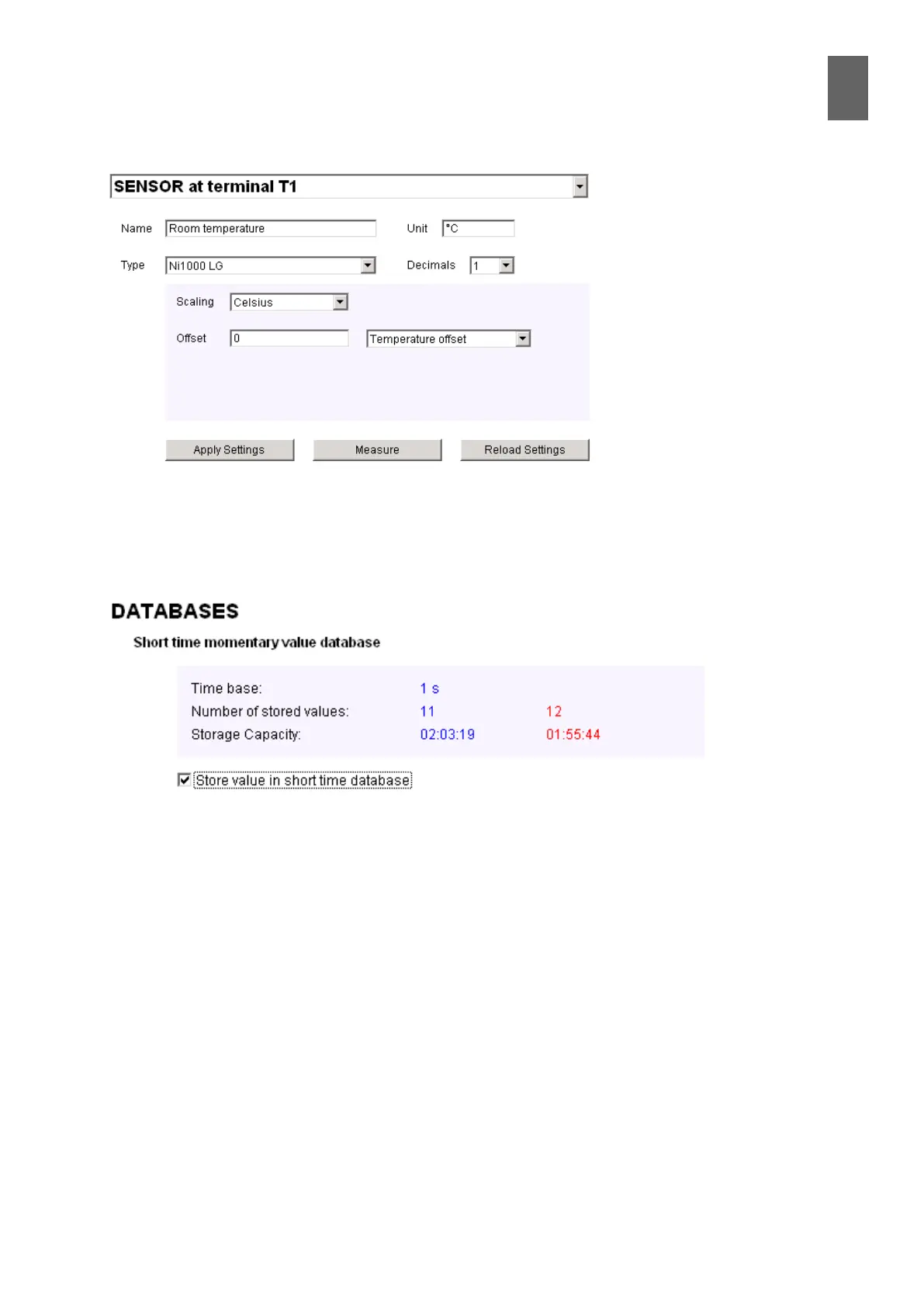
Click Apply Settings to upload the new settings to the device. Click Measure to obtain a new read-
ing to check plausibility. Click Reload Settings to import the settings that were saved last. Important:
Make sure you save the sensor settings before starting database conguration. You can use the
drop-down list box at the top to quickly switch to another sensor or actuator.
Further down the page you can change the database settings. Select the Store value in short time
database option to add the room temperature to the short time database. The blue numbers de-
scribe the situation before the settings are changed, and the red numbers indicate what will hap-
pen when you update. The number of stored values indicates how many values are saved in each
database row. This number increases by 1 when you add the room sensor.
The storage capacity indicates how far back in time the database can store information. The format
is hours:minutes:seconds. This value decreases as more channels are added.
The storage capacity of the other two databases can exceed 24 hours. In this case, the number of
whole days is stated.


 To Next Page