10
Accutome A-Scan Plus Connect User’s Guide
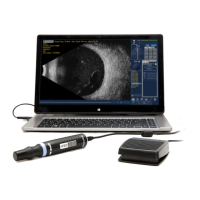
Use only Accutome provided probe, footswitch and USB cable (connection
between Control Unit and laptop PC). Also, be sure the cable and connectors
are in good condition. Inspect the probe before each use to ensure that there are
no breaks, cracks, or other damage.
WARNING! THE A-SCAN PLUS CONNECT IS
ONLY TO BE USED WITH A COMPUTER USING
MEDICAL GRADE POWER SUPPLY COMPLIANT
WITH IEC60601-1
Please refer to the manufacturer’s instructions regarding its use.
The User is responsible for ensuring that the PC to which the
A-Scan Plus Connect system is connected must be of the grounding type in
compliance with applicable electrical codes.
To avoid interruption of a procedure, the user is responsible for ensuring that all
power and USB connections are secure and that the laptop is fully charged.
CAUTION: To avoid possible loss of patient data stored in the PC, ensure that
the data is backed up on some device external to the PC.
CAUTION: The A connector type, Version 1.1 USB ports on the Control Unit
should be used only for low power devices such as the footswitch, a memory
“stick”, or a mouse.
Avoiding Equipment Damage
The Accutome A-Scan Plus Connect provides no explosion protection from
static discharge or arcing components. Do not operate the instrument in the
presence of explosive gases such as ammable mixtures of anesthetic and air, or
nitrous oxide.
CAUTION: This Device is intended for use in a controlled environment only; it
is not intended for outdoor use.
WARNING: OPERATING OR STORING THE
DEVICE BEYOND THE ENVIRONMENTAL
RANGES IN THE SPECIFICATIONS CHAPTER MAY
RESULT IN ERRONEOUS READINGS AND/OR
PREMATURE FAILURE OF THE DEVICE.


 To Next Page