68
Accutome A-Scan Plus Connect User’s Guide
4. Position the mouse cursor over the format desired and left click. This will
place your selection in the Format of export box.
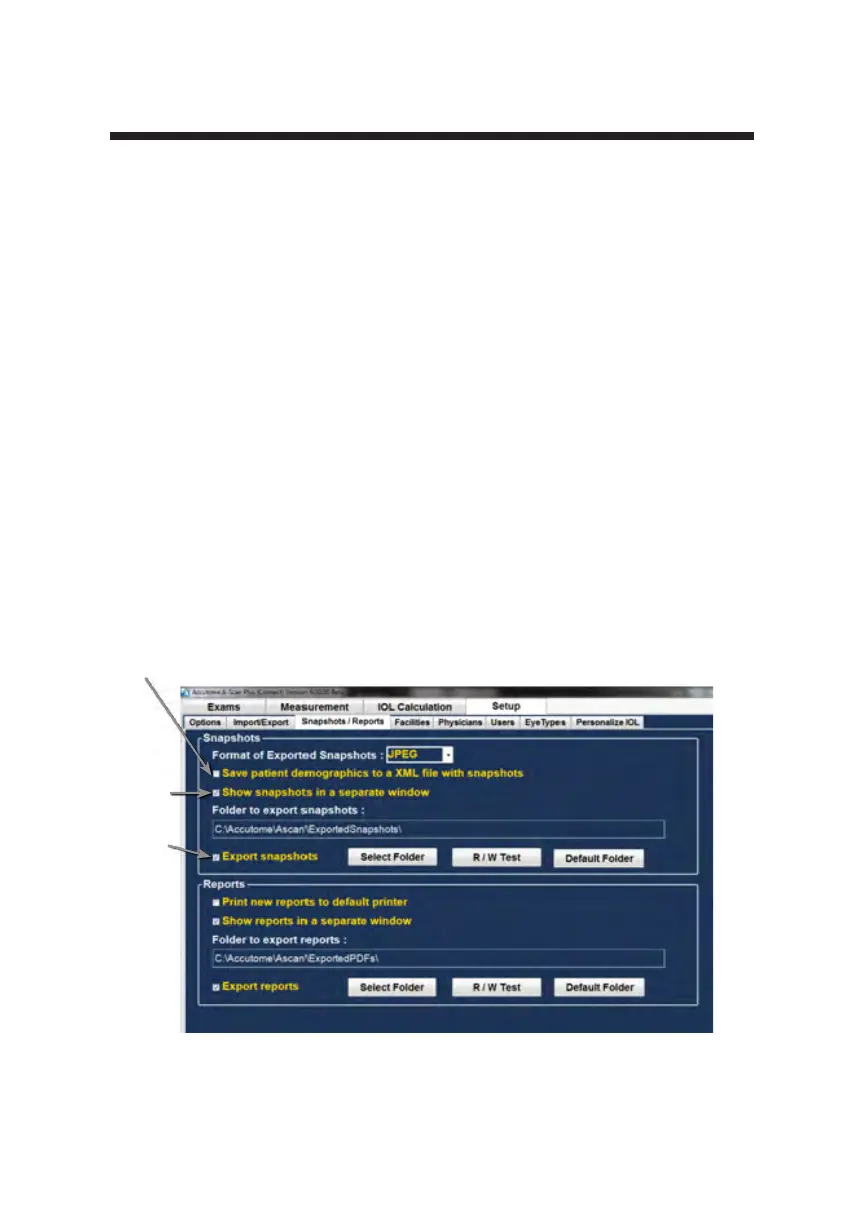
How to Activate Save Patient Demographics to an XML File With Snapshot
Function
The Accutome software also allows the export of an XML le that has all of the
patient demographics whenever a snapshot is requested.
1. Position the mouse cursor over the selection box and left click. When a
check mark is in this box an XML le will be exported along with the
screen snapshot.
How to Activate the Show Snapshot in a Separate Window Function
Some users like to have conrmation when a snapshot has been exported.
Selection of the Show snapshot in separate window feature will display a
picture of the exported snapshot on a separate screen. This ensures the user that
the snapshot has been transferred.
1. Position the mouse cursor over the selection box and left click. When a
check mark is in this box a separate snapshot window will appear on the
screen as an indication that the snapshot has been exported.
Figure 5-24 Snapshot Selection Completed
Save Demographics
Show
Snapshot
Export
Snapshot



 To Next Page