29
Accutome A-Scan Plus Connect User’s Guide
Getting Started
Preparing a Patient for Examination
Preparing a patient for an A-Scan exam consists of the following steps:
1. Anesthetize the patient’s eye with a topical anesthetic such as
Proparacaine. Please refer to the manufacturer’s instructions for proper
use.
2. Clean the probe tip. Refer to Chapter 2, Safety, of the user manual.
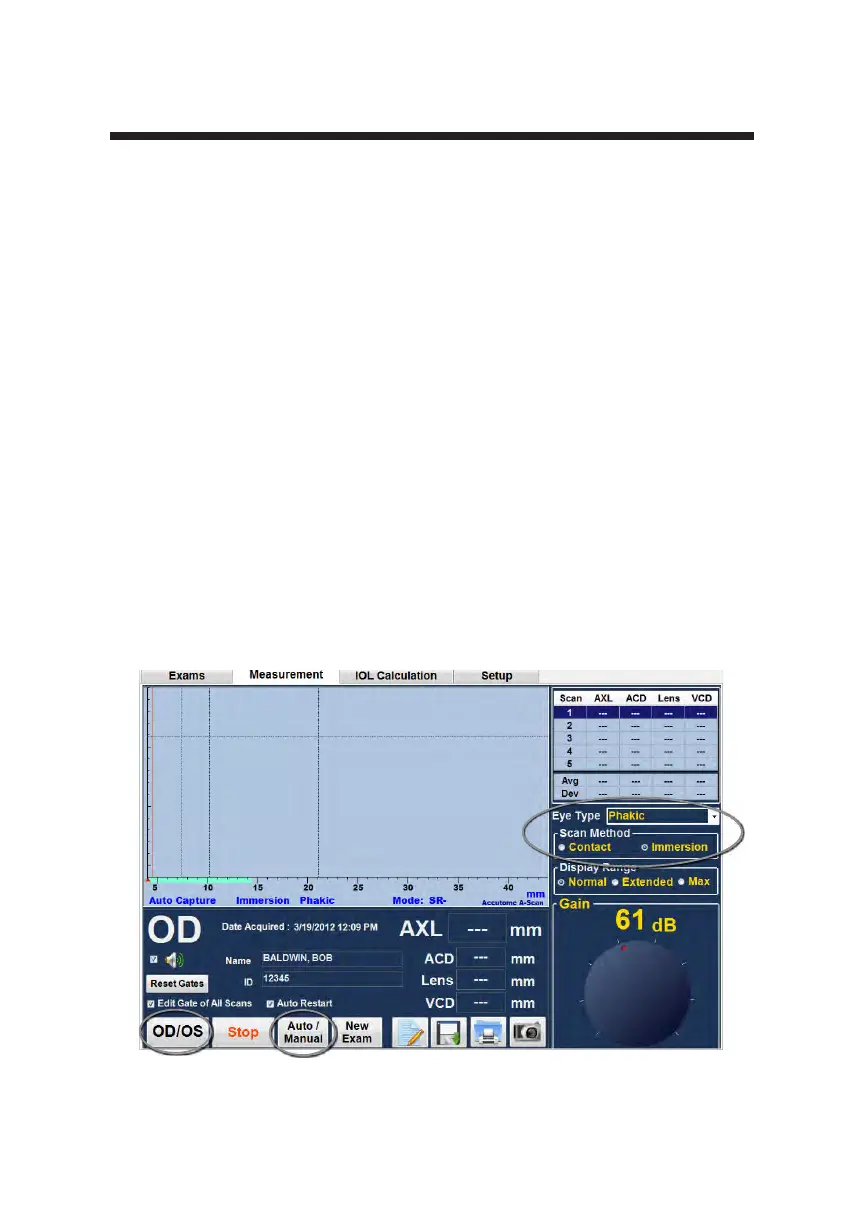
Figure 3-21 Measurement Screen Shown
Measurement Settings
Starting at the Measure Screen, set the measurement selections to your liking.
The selections you can change are:
• Automatic/Manual - which method are you using to take the measurement,
automatic or manual? Automatic allows the Accutome software to
determine when the probe has acquired a measurement, and manual allows
the operator to determine when to capture the waveform.
• Contact/Immersion - which method of applying the probe are you using,
contact or immersion?
• OD/OS which eye are you measuring, OD or OS?
• Eye type - which type of eye are you measuring; i.e. phakic, aphakic,
dense cataract, etc.?



 To Next Page