19
Accutome A-Scan Plus Connect User’s Guide
Getting Started
Accutome Probe with Handle Extension
The Accutome probe is designed to be used with a handle extension to
increase the length of the probe. When using the probe handle extension:
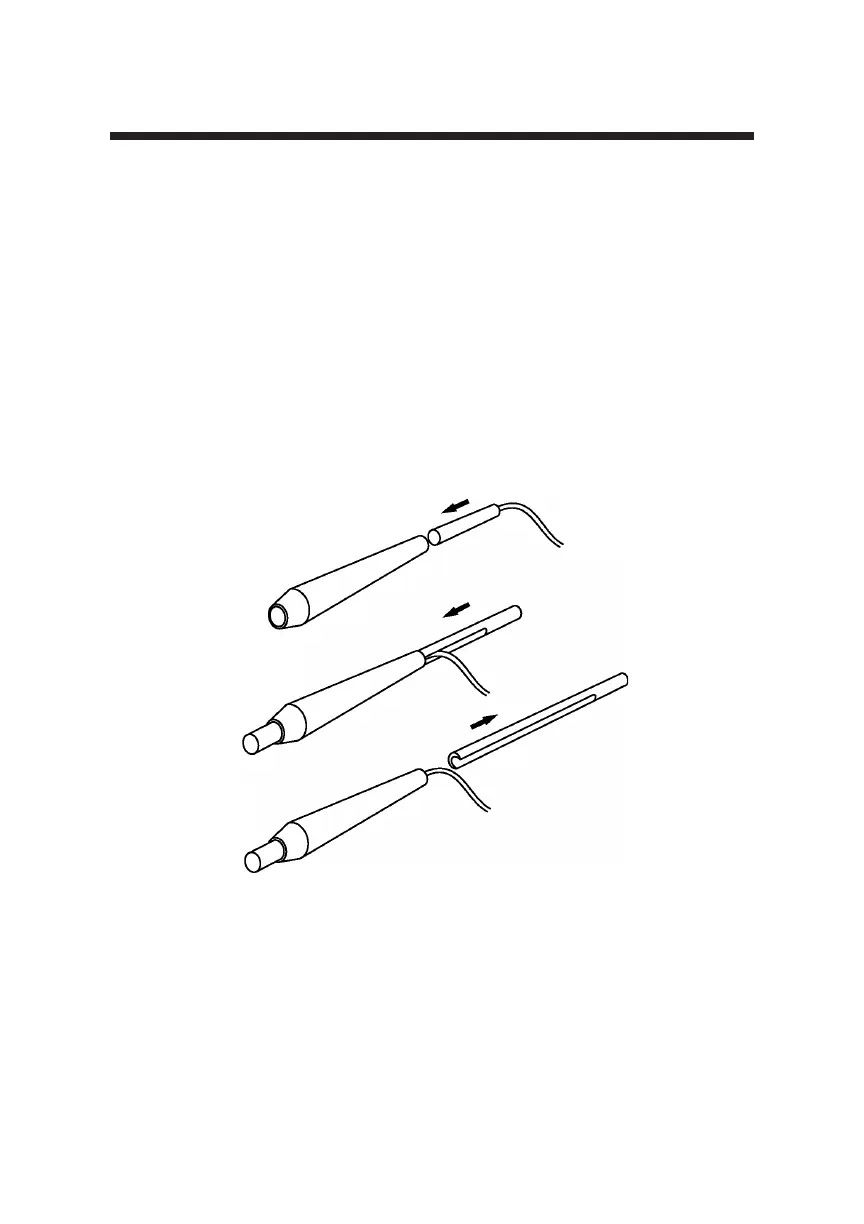
1. Insert the probe into the handle extension as shown in Figure 3-7 below.
2. Slide the insertion tool into the handle extension making sure that the
probe cable runs through the notched channel of the insertion tool.
3. Push the probe through the handle extension until the tip of the probe
emerges from the extension.
4. Remove the insertion tool by sliding it back away from the handle
extension.
Figure 3-7 Inserting the Probe into the Handle Extension
Handle Extension Probe
Insertion Tool
Probe Cable
Removing Insertion Tool
Probe inside Handle Extension



 To Next Page