67
Accutome A-Scan Plus Connect User’s Guide
Snapshots/ Reports
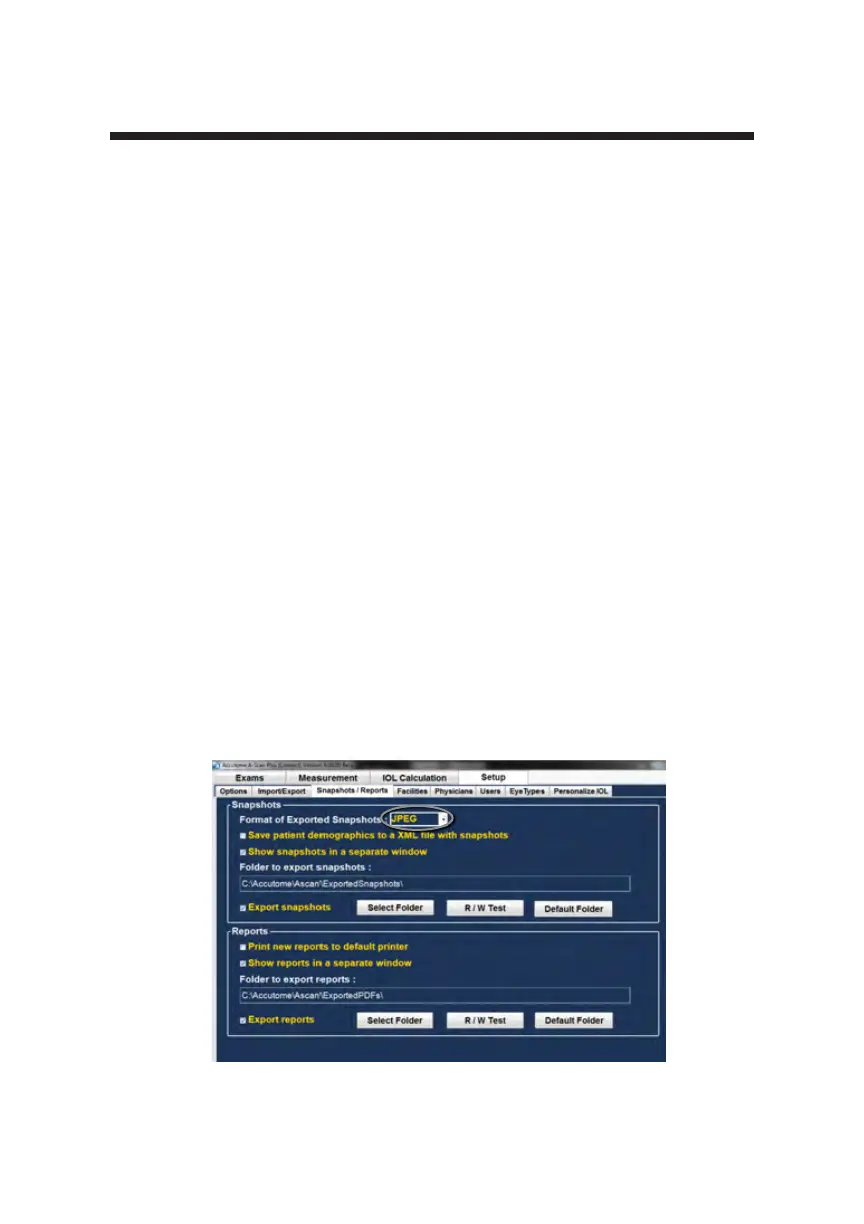
The Accutome A-scan Plus Connect has the advanced feature of being able
to export the print outs from any patient examination to any drive or network
location that is specied in the “Folder to Export Reports”. This feature allows
the patient reports and any screen snapshot to be shared by the electronic
medical record. The reports are exported as a PDF or JPG le.
Whenever a snapshot of any screen is taken, a screen shot is exported to the
location specied in the Folder to export Snapshots.
The snapshot may be exported in the following formats:
• Bitmap
• JPEG
• GIF
• PNG
• TIF
How to Activate the Export Snapshots Function
1. To activate the export snapshot feature position the mouse cursor over the
export snapshot activation box and left click.
2. A check mark indicates the activation of the export feature.
3. Select the output format of the snapshot. Position the mouse cursor over
the “Format of exported Snapshot” drop down window and left click. This
opens the snapshot format drop down window.
Figure 5-23 Selecting the Snapshot Format
Personal Preferences



 To Next Page