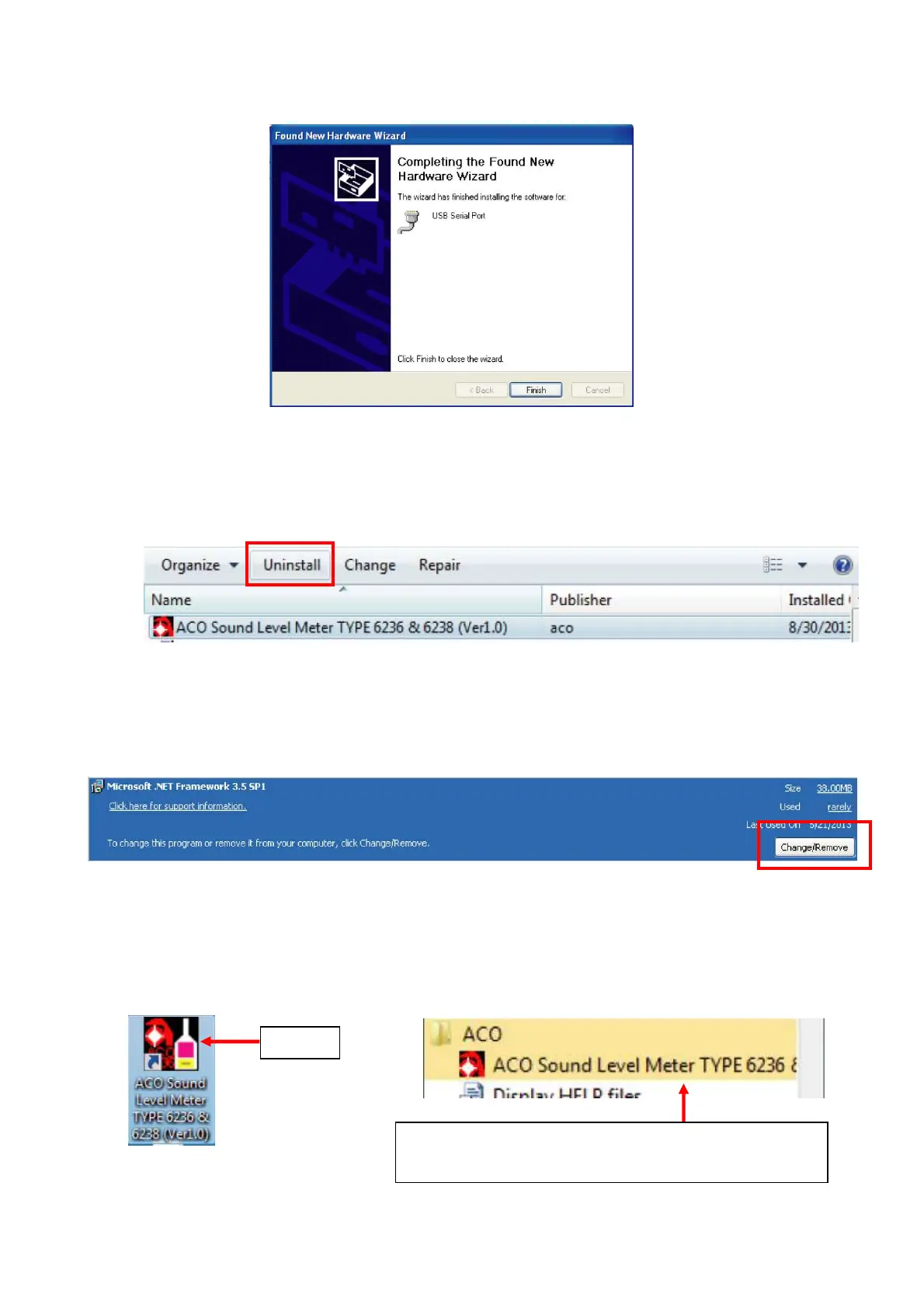
6. After the completion of the installation of the USB driver, click 【Finish】.
1.4 Uninstallation of the Data Management Software
For uninstalling the Data Management Software, go to [Control Panel] → [Programs] →
[Programs and Features] and select [ACO TYPE 6236/6238 Sound Level Meter Ver1.0].
Then click 【Uninstall】.
Even if the Data Management Software is uninstalled, ”.NET Framework 3.5 SP1” will not be
uninstalled. For uninstalling the NET Framework 3.5 SP1, delete it by the same procedure as
above, go to [Control Panel] → [Programs] → [Programs and Features].
Care should be taken for uninstallation of the.NET Framework 3.5 SP1 since it may affect the
operation of other applications.
1.5 Starting the Data Management Software
Click shortcut icon “ACO TYPE 6236/6238 Sound Level Meter Ver1.0”, or start from Start
button and go to [All programs] → [ACO] and select [ACO TYPE 6236/6238 Sound Level Meter
Ver1.0]
【Start from icon】 【Start from Start button】
Click
[Start button]→[All programs]→[ACO] and select
[ACO TYPE 6236/6238 Sound Level Meter Ver1.0]



 To Next Page