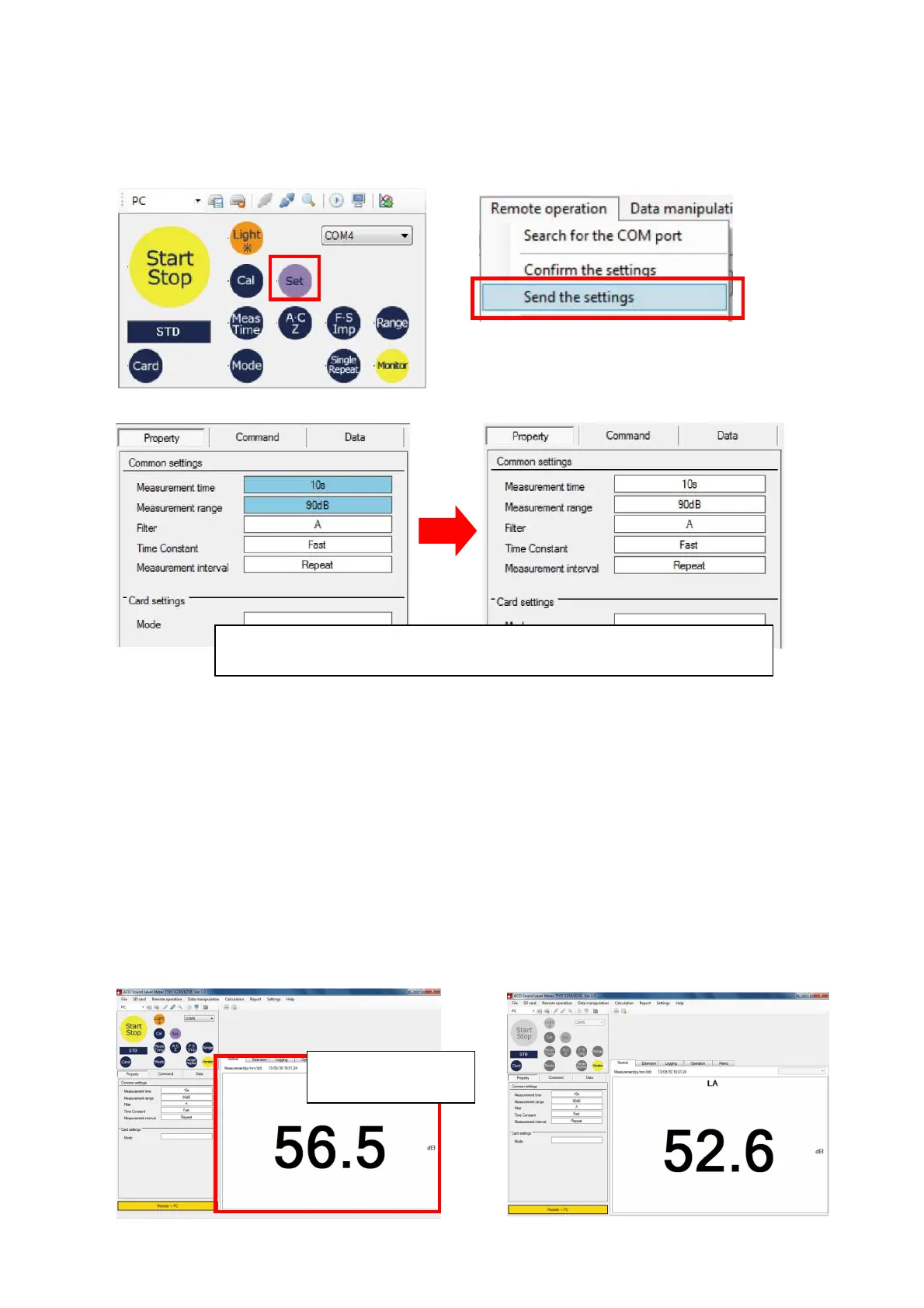
2. Click [Set] button on the remote control panel, or select [Remote operation]→[Send the
settings] on the Menu Bar.
With this operation, setting of the TYPE 6236 is reflected to the PC.
【In the case of remote control panel】 【In the case of Menu bar】
●Before reflection of set values ●After reflection of set values
7.3 Monitoring
Confirmation of condition of sound environment is possible before starting the measurement
by remote control. Perform either of the following operation to start the monitoring.
*Click [Monitor] on the remote control panel.
*Select [Remote operation]→[Start monitoring] on the Menu Bar.
*Click [Start remote control monitoring] on the Tool Bar.
When the monitoring is started, measurement data will be displayed on the Measurement
data display area. To stop the monitoring, click [Monitor] button on the remote control panel.
Monitored data will not be stored as measurement data.
【While monitoring】 【When monitoring stopped】
Set values are reflected by clicking [Set] button on the remote
control panel, or by selecting [Send the settings].
Monitored data
will be displayed.



 To Next Page